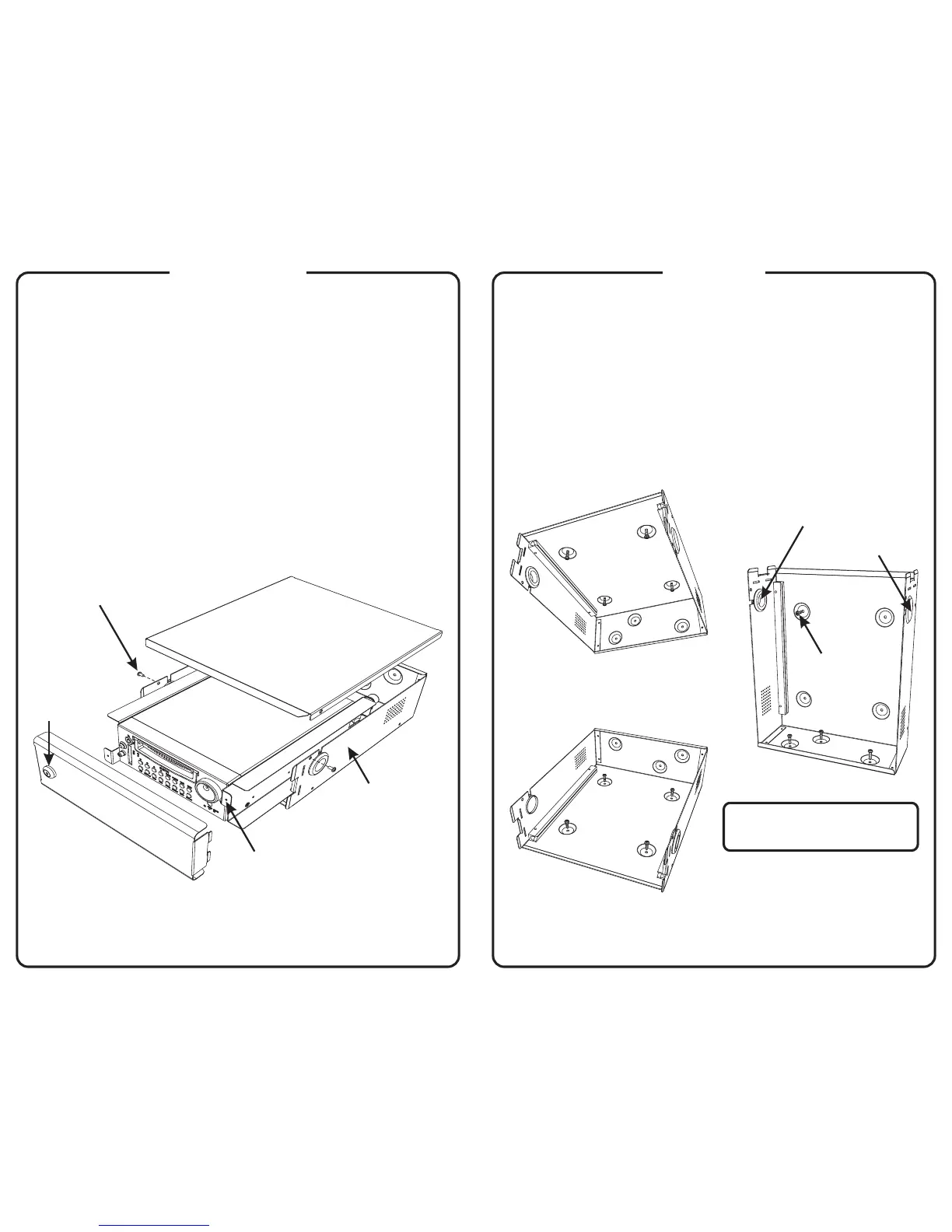
Door
Lid
Tab
Lock
DVR
Enclosure
#8×¼" screws (2)
1
Use the flat key to unlock the door and remove it
from the enclosure. (The cylindrical key fits the
DVR disk drive lock.)
2
Use a Phillips screwdriver to remove the two
screws that secure the lid to the enclosure.
Remove the lid from the enclosure.
#8×¼"
Disassembly
3
Pull on the tabs on each side of the DVR
to slide it out of the enclosure.
Cable grommet
Hole plug
Floor mount
Underseat mount
Vertical mount
#10×¾" screws (4)
#10×¾" screws (4)
(see note below)
#10×¾" screws (4)
Mounting
1
If necessary, swap the cable grommet
and the hole plug to accommodate the
power and camera cables.
2
Use the four screws supplied
with the TR4-20 to mount the enclosure
horizontally or vertically as shown below.
#10×¾"
NOTE: When mounted vertically,
the enclosure must be attached to a
wall to prevent excess vibration.



 To Previous Page