Home
Serafim
Video Game Controller
R1
Page 28
Serafim R1 - Page 28
51 pages
Manual
Save Page as PDF
To Next Page
To Next Page
To Previous Page
To Previous Page
Loading...
27
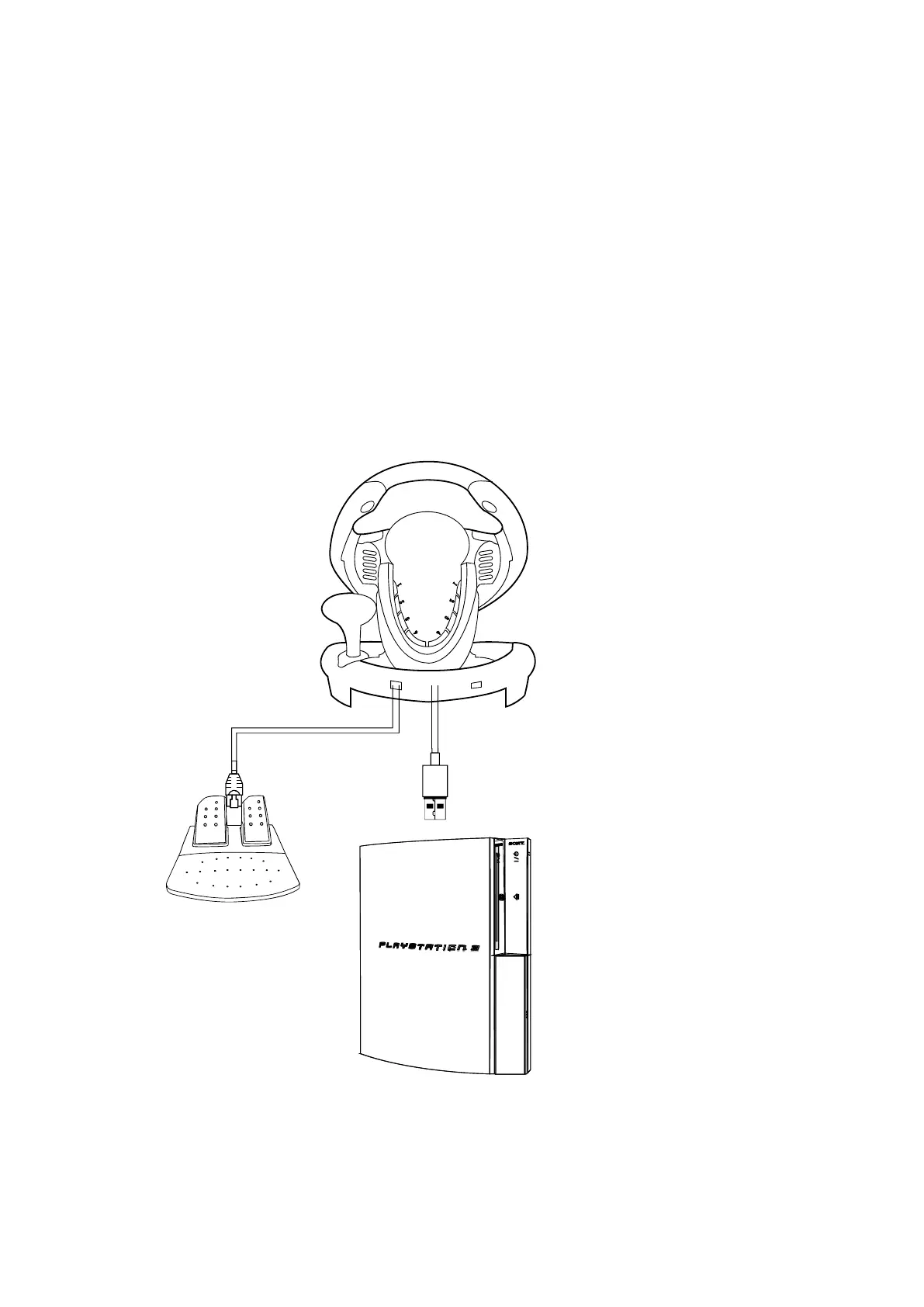
2.
For P
S3
(1)
Connect racing wheel to PS3 con
sole;
plug foot pedals
into the racing
wheel. Turn on the power of PS3.
(2)
The channel light at the back of wheel
would be lit if the wheel is connected.
(3)
Press HOME button. D
one!
27
29
Table of Contents
Main Page
Table of Contents
2
Disclaimer
3
Warranty
4
Package Contents of R1+
5
Component Names of R1+
7
Component Names of R1
8
Instructions for Using the Product
9
How to Use
9
Change Driving Setting in Game Menu
14
Compatible Games
15
Button Customization
17
Clear Customized Button
19
Clear All Customized Buttons
20
Set Pedals to Work as y Axis
21
Adjust Steering Sensitivity
22
For Serafim R1
23
Buttons for Replacement
24
Procedures for Customizing Buttons
25
R1+: How to Play on Consoles
27
For Xbox One
29
X-Input Mode
31
R1/R1+: How to Play on PC
31
D-Input Mode
32
Benchmark and Calibration
33
Technical Specification of Serafim R1+
34
Technical Specification of Serafim R1
34
Product Specification
34
Battery and Environmental Condition
35
Button Bindings for Serafim R1+
36
Key Mapping
36
Button Bindings for Serafim R1
37
Safety Notes
38
Unsupported Android Devices
40
Troubleshooting
41
Other manuals for Serafim R1
Manual
9 pages
Related product manuals
Serafim R1+
19 pages



 To Next Page