EasyManua.ls Logo

Sercomm IP3442M - Back Panel Ports and Reset Functionality

Sercomm IP3442M
9 pages
Print Icon
To Next Page IconTo Next Page
To Previous Page IconTo Previous Page
Loading...
3
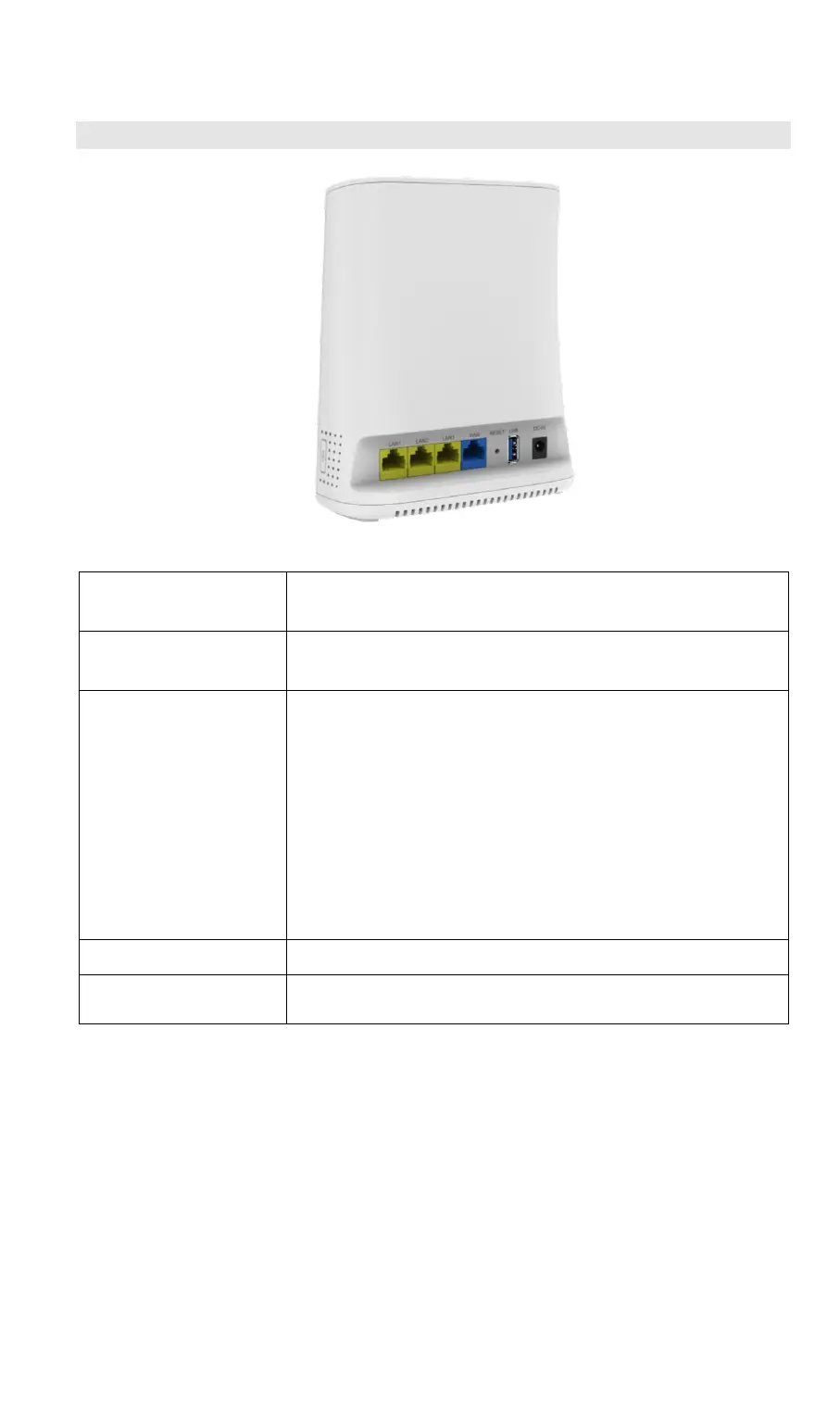
Back Panel
Figure 2: Back Panel
1. LAN port*3
Connect to a PC or other Ethernet device using a
standard Ethernet cable.
2. WAN port
Connect to a cable modem or PON using a standard
Ethernet cable.
3. Reset Button
This button is recessed; a pin or paper clip can be
used to press it. The button can be used while the
unit is powered and the power LED is Green.
Reset to manufacturer default values and reboot.
When pressed and held over 7 seconds, the
settings of the IP3442M will be set to their default
values.
Reboot. When pressed and held over 2 seconds
and less than 5 seconds, the IP3442M will
reboot.

4.USB port
Power charging for smart phone or pad.
5. DC Jack
Connect to power with the accessory power
adapter.

Related product manuals