www.SereneLifeHome.com
4
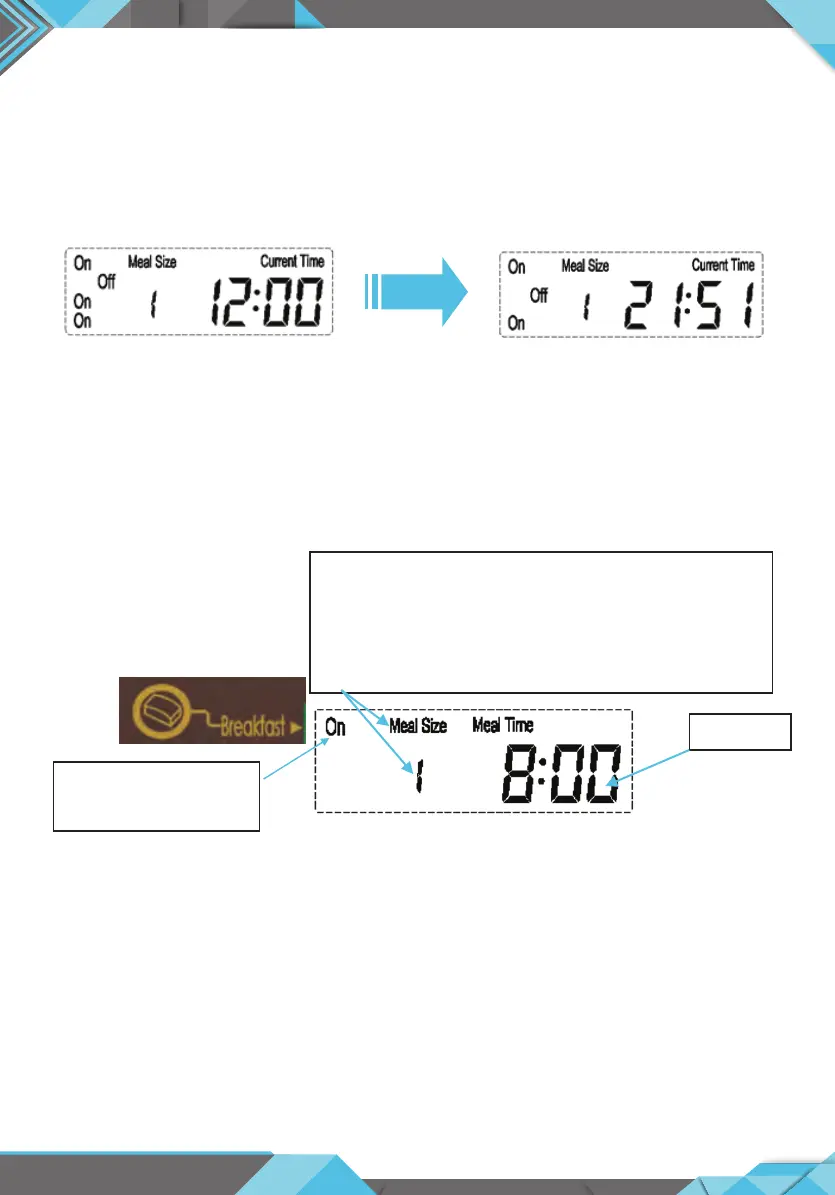
2. To set current time: Press and hold “Time” and “Hour” button simultaneously,
then click “Hour” button setting current hour (Note: when you click,always hold
“Time” button). Press and hold “Time” and “minute” button,then click “minute”
button setting minute.
For example: Current time is 21:51
3. To set breakfast meal:Press and hold “Breakfast” and “ON/OFF” button to set
feeding breakfast or not.Press and hold “Breakfast” and “Meal Size” button
setting meal size.Press and hold “Breakfast” and “Hour” button to set breakfast
hour,Press and hold “Breakfast” button and “Minute” button to set breakfast
minute.
On = Feeding breakfast
O = No Breakfast
Meal time
“ Meal Size”
• Model S: small meal size For Small & Medium pets
Programmable: 1 to 39 portions (5g -195g)
• Model L: Large meal size For Medium & large pets
Programmable: 1 to 39 portions (10g -390g)


 To Next Page
 Loading...