45 46
T: 0333 577 7232 T: 0333 577 7232
MAINTENANCE
3
Remove any foreign materials from the filter with a soft brush.
4
Move the pump by hand to check that it rotates freely.
5
Clean the pump with a soft brush.
Af
ter Cleaning:
1
Re-fit the filter by inserting it and turning clockwise.
2
Close the filter cover.
T
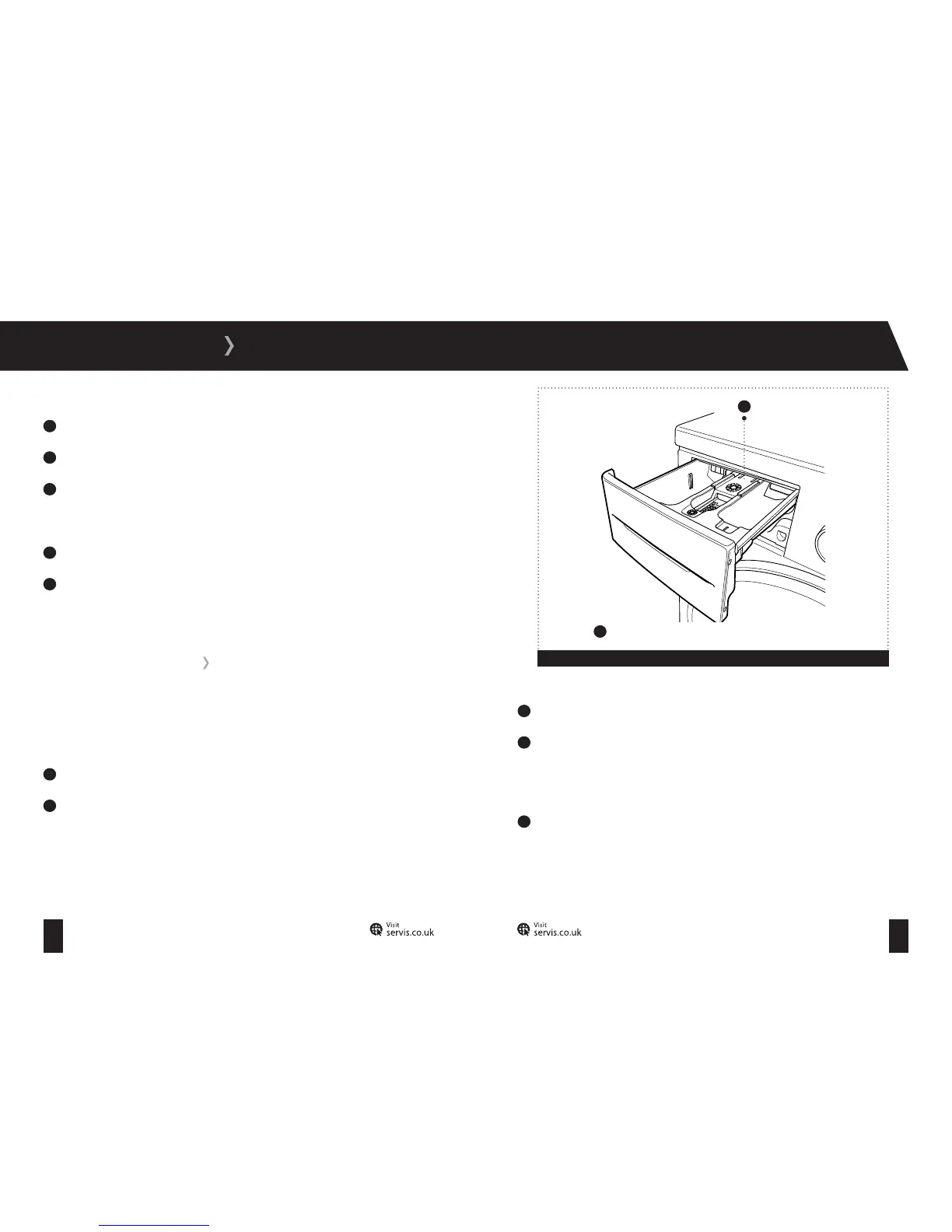
he use of detergent may cause residual build up in the detergent drawer over time. Remove the
drawer at regular intervals to clean the accumulated residue.
To remove the detergent drawer:
1
Pull the drawer forwards until it is fully extended.
2
Press down on the siphon lid (fig 14) and pull the drawer from its housing.
3
Clean the drawer with water and a soft brush.
4
If there is any residue in the drawer housing, remove with a soft brush. Take care to prevent
an
y residue from dropping into the machine.
To replace the drawer:
5
Dry it thoroughly and slide it back into the housing.
DETERGENT DRAWER
Figure 14
1
1
Siphon plug



 To Next Page