18
142 x 208 mm
Cleaning and maintaining the appliance
For a quick guide on cleaning, see Figure II at the beginning of the manual.
Emptying the dust container
The dust container can hold only a limited amount of dirt.
Therefore, it is reasonable to empty the dust container after each use.
1. Make sure that the appliance is switched off and is not on charge.
2. Remove the handset from the handpiece.
3. Hold the appliance with its suction opening facing downwards.
4. Press the release button to detach the dust container from the motor unit.
5. Remove the dust container.
6. Remove the lter and lter holder.
7. Empty the dust container into a dustbin.
Cleaning the dust container
We recommend cleaning the lters after each use or when the unit poorly sucks air when the battery is fully charged.
1. Make sure that the appliance is switched off and is not on charge.
2. Unlatch, remove and empty the dust container (See “Emptying the dust container”)
3. Remove the lter holder, together with the lter, from the dust container.
4. Turn the lter anti-clockwise to release it from the lter holder.
5. Knock out the lter and lter holder over a waste bin and remove any dirt with a soft brush as necessary.
6. Rinse the dust container with clean water.
7. If necessary, wash out the lter in soap solution and then allow it to dry completely.
8. When completely dry, insert the lter into the lter holder and lock it in place by turning it clockwise.
9. Fit the lter holder into the dust container. Never use the appliance without the lter in place.
10. Secure the dust container on the appliance again.
Cleaning the brush roller in the oor tool and the upholstery tool
Soiling may prevent the brush roller from rotating freely. Clean the brush roller regularly.
1. Make sure that the appliance is switched off and is not on charge.
2. Remove the handset from the handpiece if necessary.
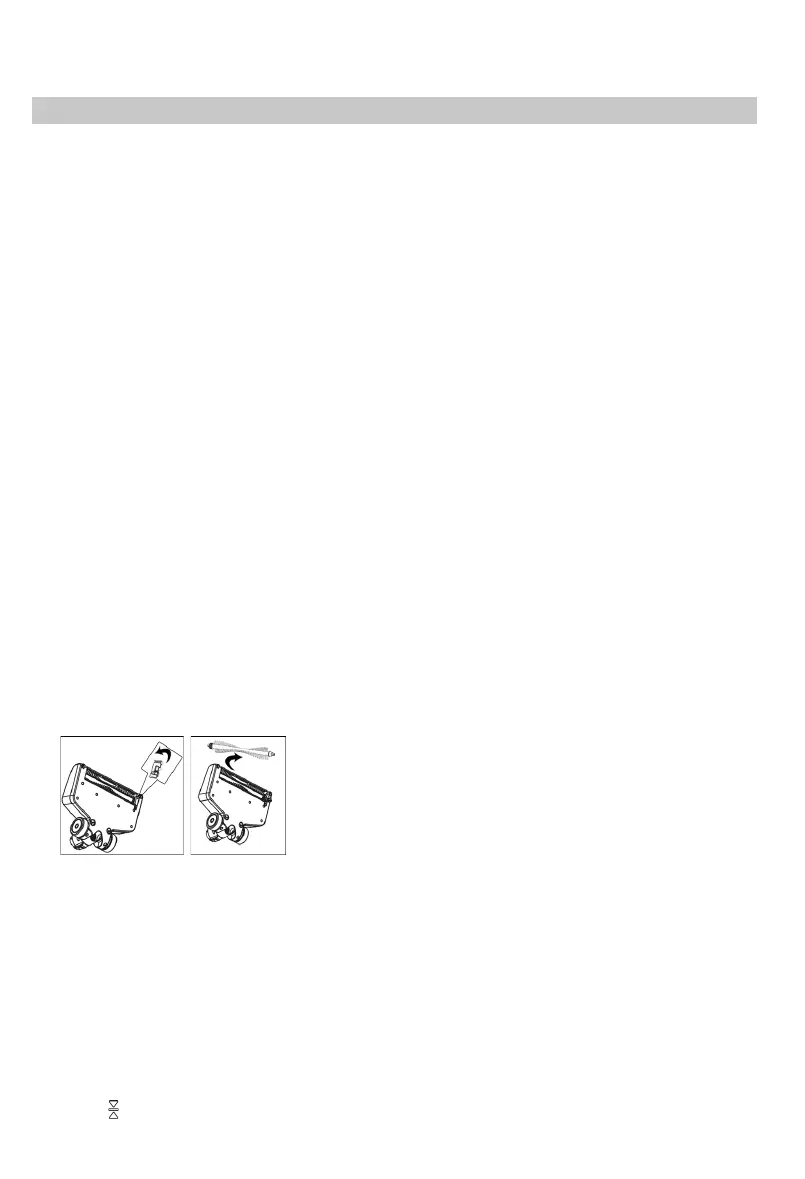
3. Release the brush lock on the underside of the oor nozzle and remove the brush.
4. Remove any hair and dirt from the brush, using a pair of tweezers or scissors carefully, if necessary.
5. Fit the brush rst with the round side on the gear of the oor nozzle. Then attach the square side of the oor nozzle to the
other side.
6. Lock the brush back in place and press it down until it clicks into place.
Cleaning the appliance
1. Make sure that the appliance is switched off and is not on charge.
2. Wipe the housing and handpiece with a slightly damp cloth and then rub them dry.
TIP: Do not use any sharp, abrasive cleaning agents or hard brushes for cleaning.
Storing the appliance
∙ Store the appliance and accessories in a cool, dry place out of the reach of children.
∙ Press the button to fold up the handpiece for convenient storage.


 To Next Page