22
142 x 208 mm
Emptying the dust container
1. Empty the dust container after each vacuuming operation!
2. Make sure that the appliance is switched off.
3. Open the lid of the appliance and reach with your thumb and middle nger into the two openings of the dust container.
The lock is released and the dust container can be removed from the appliance.
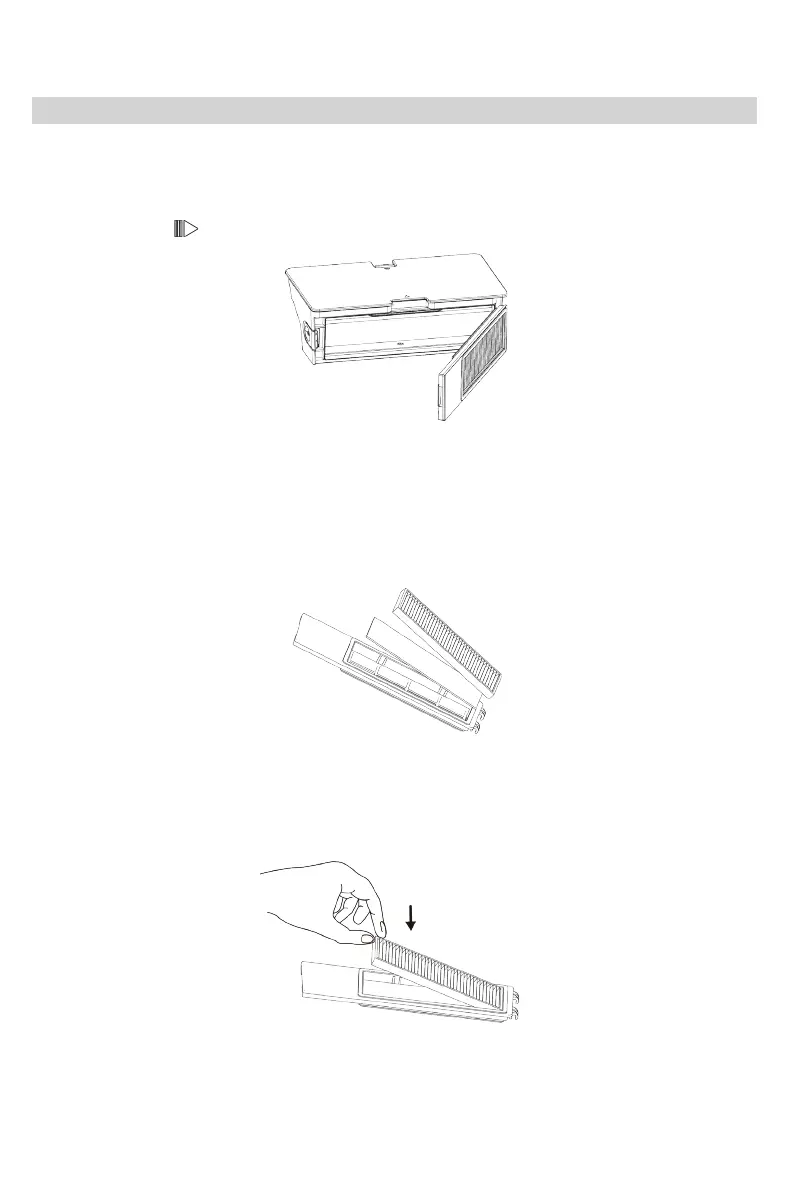
4. Press the side lock and open the dust container door.
5. Empty the dust container and thoroughly tap out the lter in the ap. If necessary, use a vacuum cleaner.
6. Close the lid again and insert the dust container into the appliance. Close the lid.
If necessary, clean dust container and lter wet:
1. Empty the dust container as indicated above.
2. Remove the two lters from the dust container ap.
3. Carefully brush or vacuum the lamellar lter.
4. The foam lter can be cleaned carefully under warm water. Do not use hot water or cleaning agents!
5. Allow lter and dust container to air dry for 24 hours.
6. After the individual parts are completely dry, rst insert the foam lter and then the lamellar lter back into the dust
container ap.
7. Insert the dust container into the appliance. Close the lid.


 To Next Page