
 To Next Page
C
crobinsonSep 9, 2025
What does error E 5 mean on my SEVERIN Vacuum Cleaner?
- AAmber RobertsSep 9, 2025
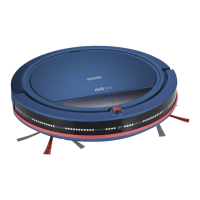
If your SEVERIN Vacuum Cleaner robot displays error E 5, it indicates that the floor is too dark. Set the drop sensors correctly.

What does error E 5 mean on my SEVERIN Vacuum Cleaner?
If your SEVERIN Vacuum Cleaner robot displays error E 5, it indicates that the floor is too dark. Set the drop sensors correctly.
Why does the remote control of my SEVERIN Vacuum Cleaner not function?
If the SEVERIN Vacuum Cleaner remote control isn't working, first charge the remote. If that doesn't work, the robot or remote might be in strong light; try closing the curtains and switching off strong light sources. Also, ensure the robot is at least 2 meters away from the charging station.
Why does my SEVERIN Vacuum Cleaner robot stop on its own?
If your SEVERIN Vacuum Cleaner robot stops on its own, the rechargeable battery likely needs to be charged. Switch off the appliance (position "0") and charge the rechargeable battery.
How to fix SEVERIN Vacuum Cleaner if it cannot be switched on?
If your SEVERIN Vacuum Cleaner robot cannot be switched on, make sure the rechargeable battery is correctly inserted. If it is, the battery may be completely discharged. Switch on the appliance (position "I") and charge the rechargeable battery.
Why my SEVERIN Vacuum Cleaner robot cannot be charged?
If your SEVERIN Vacuum Cleaner robot cannot be charged, check that the mains adapter plug and the mains adapter are firmly connected to their sockets. Also, ensure the robot is switched on for charging (position "I").
What to do if the " " LED lights up on my SEVERIN Vacuum Cleaner?
If the " " LED lights up on your SEVERIN Vacuum Cleaner robot, it means the dust bin is full. Empty the dust bin.
What to do if individual bristles of the round brushes of my SEVERIN Vacuum Cleaner are bent?
If individual bristles of the round brushes of your SEVERIN Vacuum Cleaner are bent, it indicates signs of wear. Soak the brushes in hot water.
Why the operating duration of my SEVERIN Vacuum Cleaner is becoming progressively shorter?
If the operating duration of your SEVERIN Vacuum Cleaner is becoming progressively shorter, dirt may be preventing the wheels from moving freely. Free the wheel of dirt, using scissors or tweezers if necessary.
What does error E 4 mean on my SEVERIN Vacuum Cleaner?
If your SEVERIN Vacuum Cleaner robot displays error E 4, it means the robot has been lifted for longer than 1 second. Place the robot on the floor.
What does error E 2 mean on my SEVERIN Vacuum Cleaner?
If your SEVERIN Vacuum Cleaner robot displays error E 2, it means the cover or dust bin is not installed correctly. Insert the cover and dust bin correctly.
Guidelines for children, elderly, and persons with reduced capacities.
Instructions for safe electrical connection and avoiding electric shock.
Crucial safety information regarding the handling and charging of batteries.
Step-by-step guide to attach the side brushes to the robot.
Instructions on how to adjust drop sensors for different floor types.
Guide on how to install the robot's rechargeable battery.
Instructions for charging the robot using the mains adapter or charging station.
Instructions on how to start the robot for cleaning.
Explains how to use the buttons on the robot's control panel.
 General
| Brand | SEVERIN |
|---|---|
| Model | RB7028 |
| Category | Vacuum Cleaner |
| Language | English |