6
3. OPERATION OF THE CONTROL SYSTEM
The electronic control box is equipped with a key lock. To unlock, please press
and hold
(Selection) for 3 seconds. There will be an indication in the display.
Approximately 1 minute after the last actuation of any key the keyboard gets
relocked.
The automatic key lock after 1 minute can be disabled in the menu to facilitate
setting, for example, with maintenance. The automatic key lock is enabled
with the service mode switched-off only.
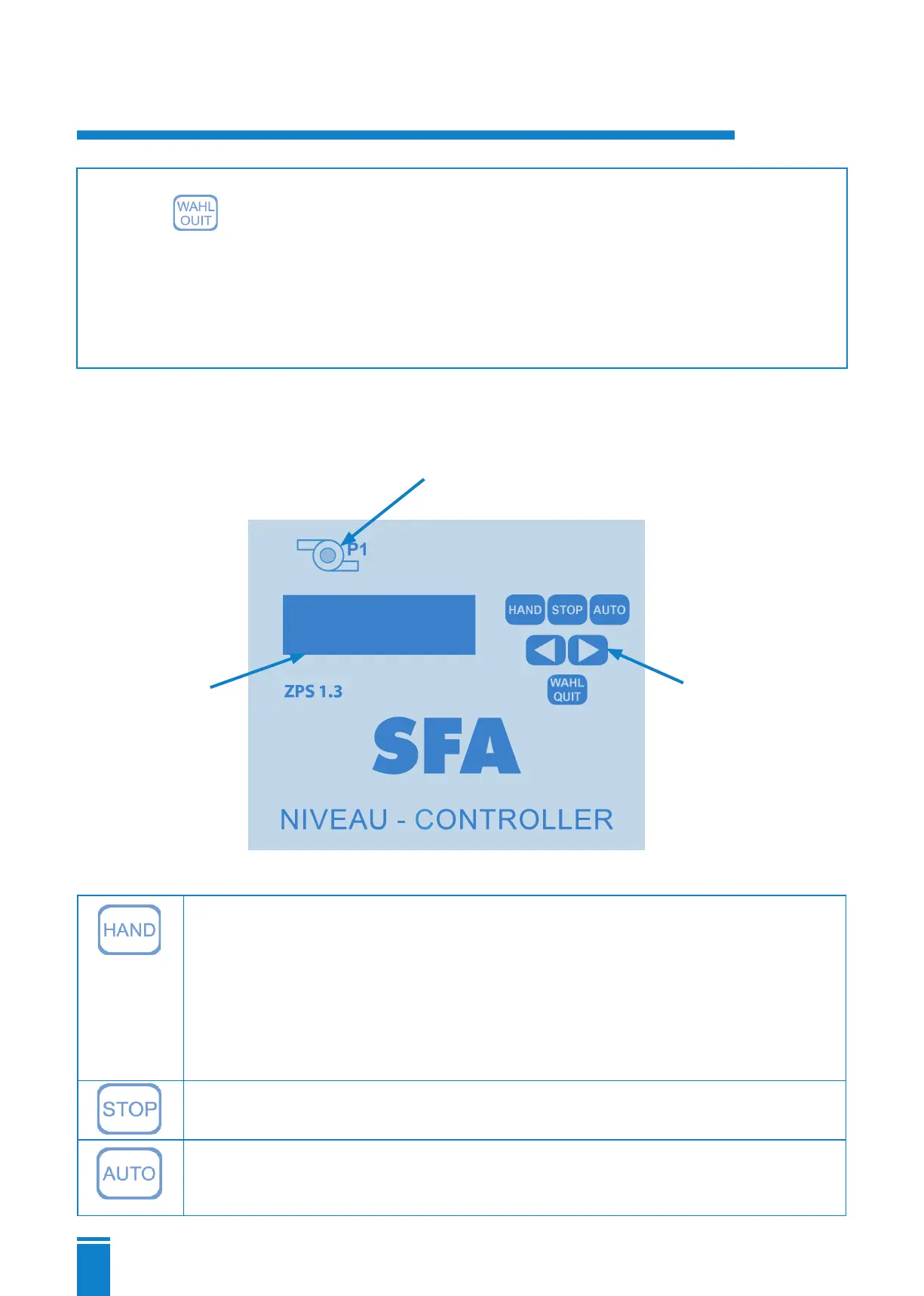
3.1 Operator control panel and operational elements
3.1.1 Key
(MANUAL)
By pressing this key, the preferred pump is switched on without delay. No other
function of the program is enabled.
The green LED
③ of one pump flashes. ATTENTION : If the ATEX mode is enabled,
the pump can only be started if the turn-on level is exceeded !
The green LED is flashing. ATTENTION : The pump will be switched after 2
minutes. A restart of the pump is possible immediately.
Stops the pump motor without follow-up. The green LED goes out.
The pumps are actuated via the level evaluation of the selected sensor (see
point 3.1.4). All monitoring and safety functions are executed according to the
presetting.
③ Signal-LED indicating when the pump is
operating :
- green: pump is on
- red: error
② Short travel
key switches
① LCD display
(2 lines with 16
characters)


 To Next Page