22
SIIADOWX2 OPERATOR INSTRUCTION MANUAL
Setting the Discrimination Level Continued:
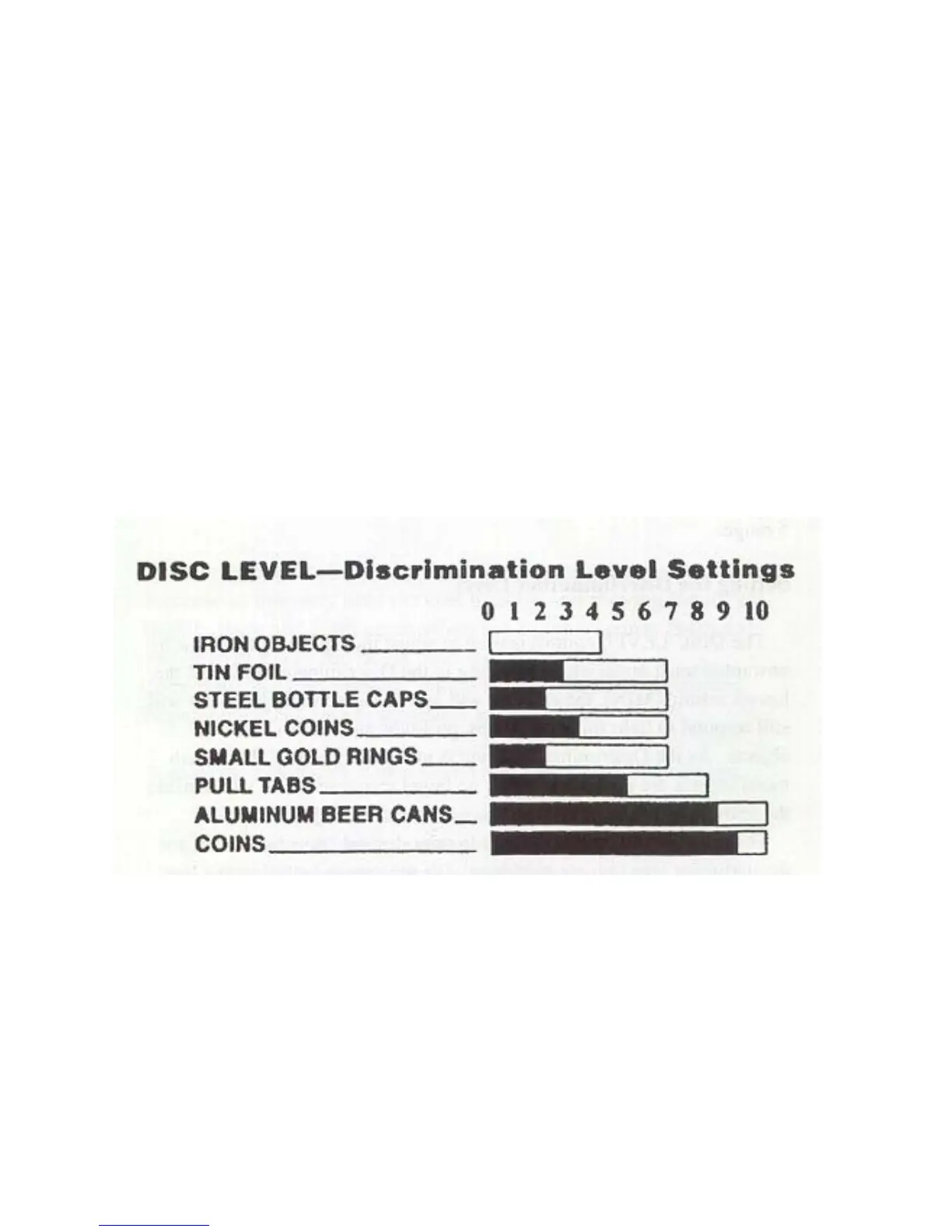
The diagram "Disc Level--Discrimination Level Settings" shows the settings where many
of the common metal objects are ignored by a typical detector. Each detector can vary a
little--due to manufacturing tolerances-- so you should experiment with your detector and
become familiar with its rejection levels for these trash metal objects. Earlier motion
detectors that operated with a continuous "threshold" sound would give the user a definite
indication of trash metal by 'nulling" completely (no sound made temporarily) or by
generating short, choppy sounds. Since the
SHADOWx2's Discriminate Mode is Silent
Search and operates without threshold sound, there is no nulling to indicate that the area
is extremely trashy. When searching in the Discriminate Mode, we recommend that you
periodically switch to Pinpoint Mode and check the area you are searching to get an idea
of how much trash is really there.
Solid black bars indicate likely audio target responses while white bars
indicate possible audio target responses. No bar indicates "rejection area"
with no audio target responses. Levels shown are typical.


 To Next Page