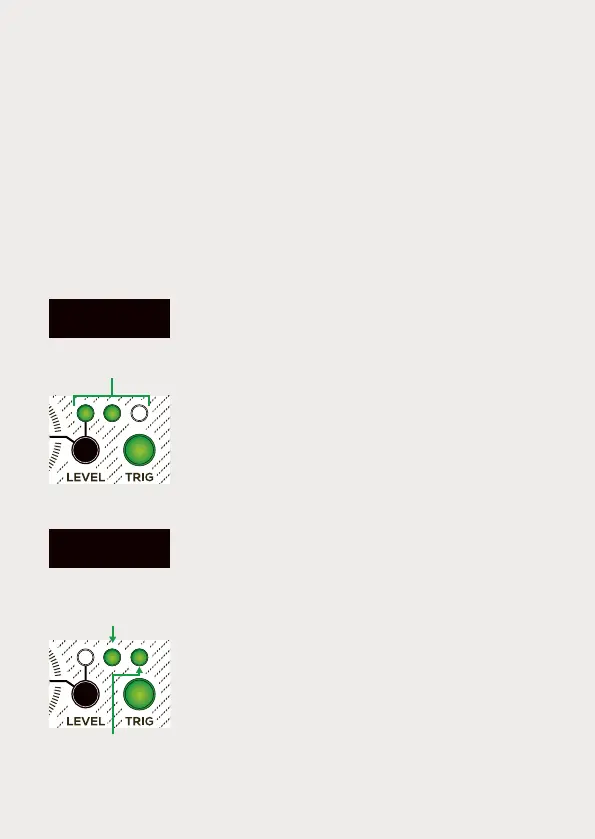
No patch cable
is inserted
Velocity & Level
The Battering Ram features a unipolar Velocity input [5] that can be
used to control the output level. The level of each hit/note is indicated
by the three green level LEDs [B].
When the Velocity input [5] is not connected, the
module will consistently produce sound at the
same loudness level. You can adjust the output
level by simultaneously holding the Level button
[B] and turning the Drive potentiometer [A]. The
three green Level LEDs will indicate the volume
setting. Once you release the Level button, you
will need to turn the Drive potentiometer [A] past
its previous position to reactivate it. The Drive
button [D] will blink until the Drive potentiometer
passes its the previous position.
When the Velocity input [5] is in use, the sound's
loudness will vary based on the CV value sent to it
at the time of the trigger. With a patch cable
inserted into the Velocity input, you can define the
minimum level (i.e., the level played when 0v is
received) by holding the Level button [B] and
turning the Drive potentiometer [A]. The three
green Level LEDs will indicate the volume range.
When setting the minimum level at 0 (potentiome-
ter fully counter-clockwise), the level is null when
the 0v is received into the Velocity CV input.
Note that the Velocity CV input is unipolar and
accepts a range of 0 to 5v.
The second type (indicated by a red Drive button) is closer to clipping
distortion and introduces a higher amount of harmonics. To switch
between these drive types, press the drive type button [D]. The
amount of distortion is controlled by the drive potentiometer [A] and
can also be modulated using the drive CV input [2].
Level
(from left to right)
Patch cable
is inserted
Mini. level
(0v received at
Velocity CV input)
Max. level
(5v received at
Velocity CV input)


 To Next Page
 Loading...