EasyManua.ls Logo

Shanghai Wafer Microelectronics GL09 - User Manual

Shanghai Wafer Microelectronics GL09
6 pages
Print Icon
To Next Page IconTo Next Page
Loading...
- 1 -
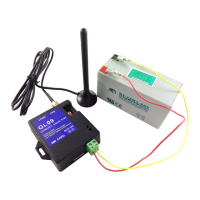
GL09 - GSM Alarm Device
Best designed for battery powered GSM Unit
USER’S GUIDE
Question and Answer IconNeed help?

Do you have a question about the Shanghai Wafer Microelectronics GL09 and is the answer not in the manual?

Overview

The GL09 is a simple and easy-to-use GSM Detector designed for battery-powered operation, sending SMS messages and making calls in the event of an alarm. It is compatible with the GA09 device and operates by detecting changes in NO (Normally Open) or NC (Normally Closed) input ports.

Function Description:

The primary function of the GL09 is to monitor up to eight alarm inputs. When an alarm event occurs (i.e., an input port changes state), the device will send an SMS alert and/or make a phone call to pre-programmed numbers. A key feature is its wide power input voltage range, from DC5V to DC16V, making it suitable for various battery configurations. It requires only a local GSM SIM card for operation. Each of the eight input ports can be independently configured as either NO or NC type for alarm triggering, and each can be armed or disarmed independently. The device also includes a "Power-Save" status, activated by a DIP switch, which puts the GSM module to sleep until an alarm input is triggered, thus conserving battery life. Even in power-save mode, it will send "keep-alive" status reports at a preset timer. A low voltage alert feature allows users to set a voltage limit; if the power input drops below this limit, an alert SMS will be sent, which is particularly useful for battery-operated scenarios. The "RST" line is used for programming or resetting the device.

Important Technical Specifications:

  • Power Input: DC5V to DC16V (wide voltage input for battery operation).
  • Box Size: 61.5mm x 64.5mm x 22mm.
  • Alarm Inputs: 8 independent alarm inputs.
  • GSM Network: Supports GSM (2G) net.
  • SMS Text Length: Maximum 10 characters for alarm SMS text.
  • Low Voltage Alert Limit: User-configurable (e.g., %#LV11.1 for 11.1V).
  • Status Report Timer: User-configurable from 0 to 9999 minutes (0 disables the function).
  • Admin Numbers: Up to three numbers can be programmed to receive alerts via SMS and/or phone calls.
  • Data Log: Stores up to 100 records, readable via SMS (4 records per SMS, requiring 25 SMS for 100 records).

Usage Features:

  • Configuration via SMS: The device is primarily programmed using simple SMS commands.
    • Admin Number Registration: Use @# for SMS alerts and &# for phone call alerts, followed by phone numbers (e.g., @#232425353#45353365#43536363).
    • Alarm SMS Text Preset: Use #1#Alarm input1 SMS text to #8#Alarm input8 SMS text to define custom messages for each input. A #0#All back to normal text can be set for when all inputs are released.
    • Status Report Timer: Set with %#Txx where xx is minutes (e.g., %#T120 for 120 minutes).
    • Alarm Working Mode: Select %#M1 for SMS only, %#M2 for phone calls only, or %#M3 for both.
    • Low Voltage Alert: Set with %#LVxx.x (e.g., %#LV11.1).
    • Input Port Type: Define as NO or NC using *NC246 (e.g., for inputs 2, 4, 6 as NC). *NC0 sets all to NO.
    • Arm/Disarm Inputs: Use @#ARM00100100 (from right to left, Input1 to Input8, 0 for disarmed, 1 for armed). @#ARM11111111 arms all, @#ARM00000000 disarms all.
    • Read Data Log: Use @#LOG10 to read the last 10 data logs.
    • Read Status/Parameters: Use @#STATUS?.
  • Temporary Disarming: Calling the device number from an Admin phone and hanging up after one or two rings will disarm the alarm for 10 minutes. Keeping the ring until the device rejects the call will disarm it for 60 minutes.
  • App Control: The device can be managed using a dedicated app (same as GA09) available on Apple App Store or Google Play Store by searching for "GA09".

Maintenance Features:

  • Resetting the Device: Short the RST line to GND and send the SMS command "RESET". This clears all stored SMS and phone call alarm numbers and sets the device to "Only SMS alarm report Mode" (M1 mode).
  • RST Line Usage: The RST line is crucial for programming. It must be shorted to GND during SMS programming and then disconnected for normal operation to protect the device.
  • Troubleshooting GSM LED: If the GSM LED flashes quickly, check if the SIM card supports 2G, reinsert the SIM, or try a different SIM card from another provider.
  • Troubleshooting MCU LED: If the MCU LED remains ON for more than 70 seconds, it indicates a SIM card recognition issue or no SIM card. Reinsert the SIM or try a different one.
  • Battery Power Management: The device supports a "Power Save" mode by switching both Red DIP Switches to "ON", which puts the GSM module to sleep to conserve battery.
  • Low Battery Alert: The configurable low voltage alert feature helps users monitor battery health and replace it promptly.

Shanghai Wafer Microelectronics GL09 Specifications

General IconGeneral
BrandShanghai Wafer Microelectronics
ModelGL09
CategoryAlarms
LanguageEnglish