9
EM5
Streaming Music Centre
Power ON / OFF / Screen Locking
2. Power off: . The display shows the "Power
Off" and "Restart" selection window. Click on "Power Off" to shut down the device.
press and hold down the volume wheel for 2 seconds
3. Screen lock: while the device is powered on, short press the volume wheel to lock screen and turn
off display. Press the volume wheel again to unlock device.
Back to the main screen: slide up from the bottom of the screen.
Gesture / Floating Ball Operation
1. Gesture mode (Settings - System Display - Virtual Key Mode)Settings -
Return to the previous: slide to the right from the left edge of the screen or slide to the left from the
right edge of the screen.
2. Floating ball mode (Setting - Display - Virtual Key Mode) - System Settings
Return to the previous: click the floating ball on the screen.
Back to the desktop: press and hold the floating ball on the screen.
Volume Control
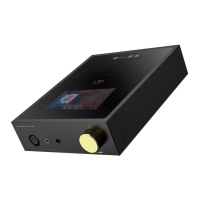
Turn the wheel clockwise to increase the volume, turn the wheel counterclockwise to decrease the
volume.
Operating instructions
1. Power on: Put the power switch to ON position. Then press the wheel for 2 seconds to turn on the
device.
" "
Note: If the device is not in use for longer period of time, please disconnect it from power outlet.


 To Next Page