SHANLING Q1 – ADVANCED USER MANUAL
Page 4
SUBMENU NAVIGATION
All submenus utilize same system of navigation.
• Swipe up and down to scroll through the submenu.
• To go one step back, swipe right or tap on “Back” icon.
• Right icon in upper right corner of screen serves as quick jump to Now playing screen.
• Left icon in upper right corner will enable multi-select, which can be used to delete files
or add files to Playlist or Favorites.
• Items with “Switch” icon, click once to enable/disable. Enabled = Switch in right position
and red color. Disabled = Switch in left position and white color.
If text of item is too long and can’t be fully displayed, swipe left on item to make text scroll.
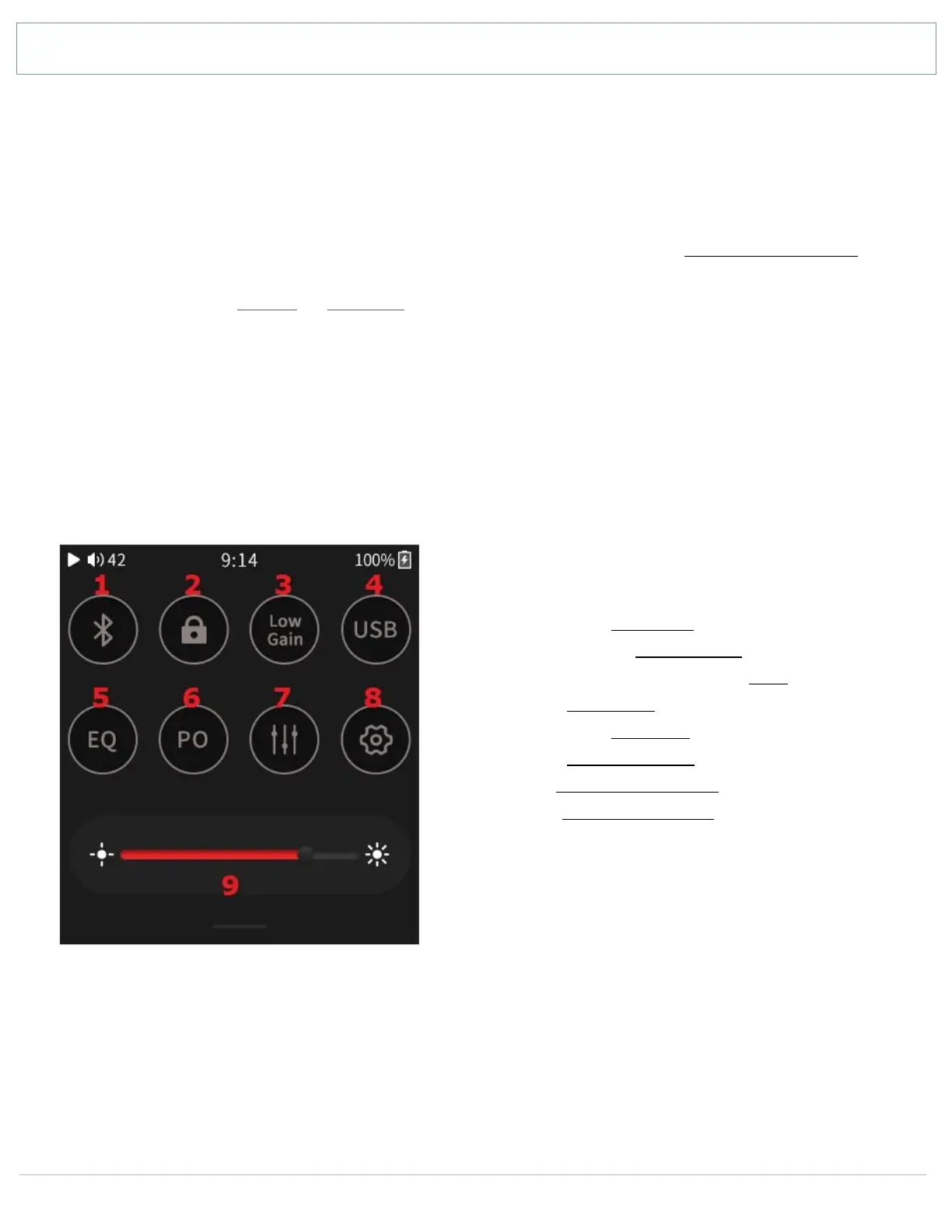
QUICK ACCESS MENU
Swipe down from the top edge of the screen to display the Quick Access menu.
Swipe up to close the Quick Access menu.
1. Turn On/Off Bluetooth
2. Enable/disable Buttons lock
3. Switch between Low & High Gain
4. Switch USB Mode
5. Turn On/Off Equalizer
6. Switch Output options
7. Enter Playback Submenu
8. Enter System Submenu
9. Drag slider to adjust screen brightness


 To Next Page