9
sharkclean.co.uk
8
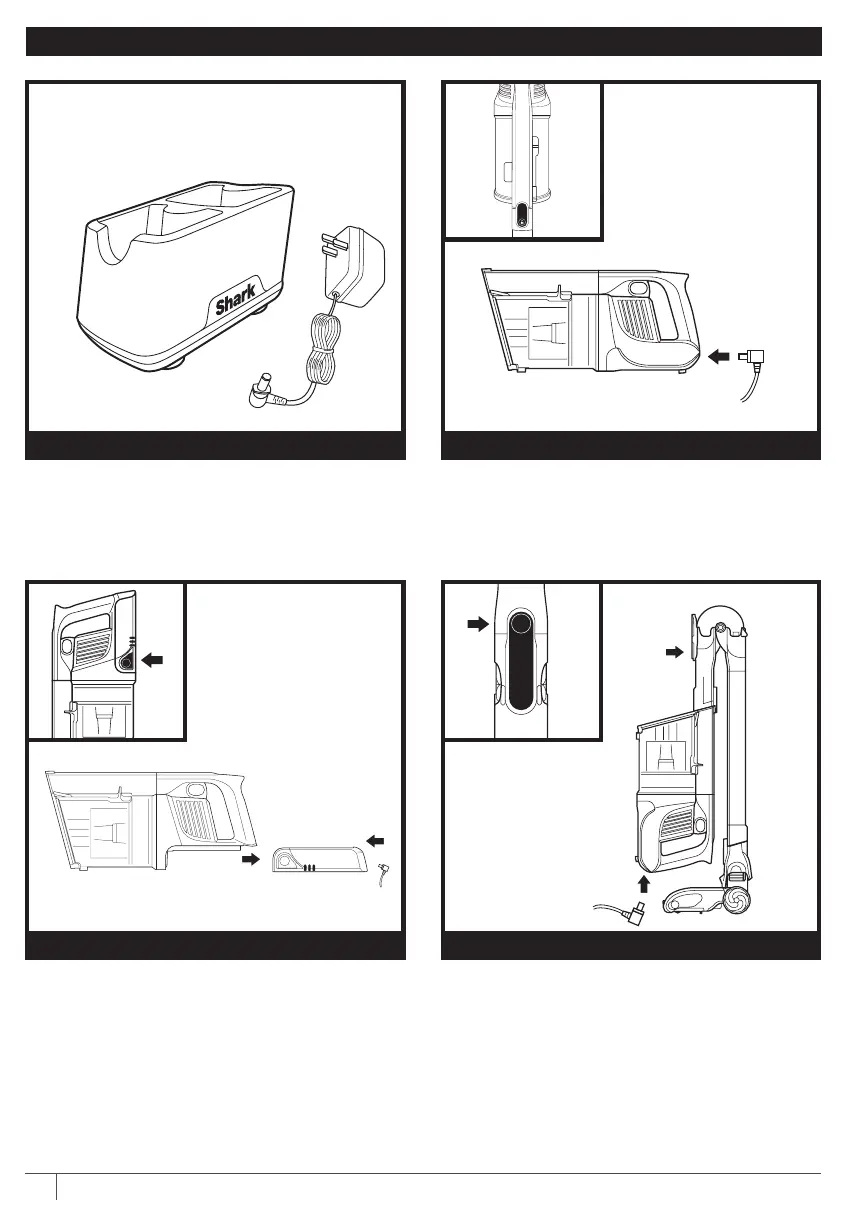
CHARGING YOUR LITHIUM ION POWER PACK BATTERY
Remove the handheld vacuum from the wand
by pressing the Wand Release button and pulling
up. Plug the charger into the charging port on the
handheld vacuum.
Plug the Lithium Ion Power Pack Charger into
a wall socket.
To put the vacuum in storage mode, press
the Unlock latch while folding the handheld
vacuum forward until the wand clicks and locks.
Plug the charger into the charging port on the
handheld vacuum.
To remove the battery, squeeze the Battery
Release Button and slide backwards. Plug the
charger into the charging port on the battery.
IN HANDHELD VACUUM
LITHIUM ION POWER PACK CHARGER
FLEXOLOGY® STORAGE MODEOUT OF THE VACUUM
USING SMART RESPONSE TECHNOLOGY
Slide switch to the top to turn o power.
To begin vacuuming, slide switch to the
desired setting.
Hard Floor/Small Area Rugs
Use this setting to clean floors and small arearugs.
Carpet
Use this setting to pick up debris below the surface
ofyour carpets.
For an added boost in power, pull the Trigger
on the handheld vacuum. Release it to return
to Ion Power Mode.
Boost mode is available in both Carpet and Hard
Floor setting
OFF
HARD FLOOR SETTING
CARPET SETTING BOOST MODE



 To Next Page