6
7. The editor
7.1 Starting the editor
StarttheapplicationviaitsWindowsstartmenuentryorthesymbolinthetaskbar.
7.2 “Main Control” window
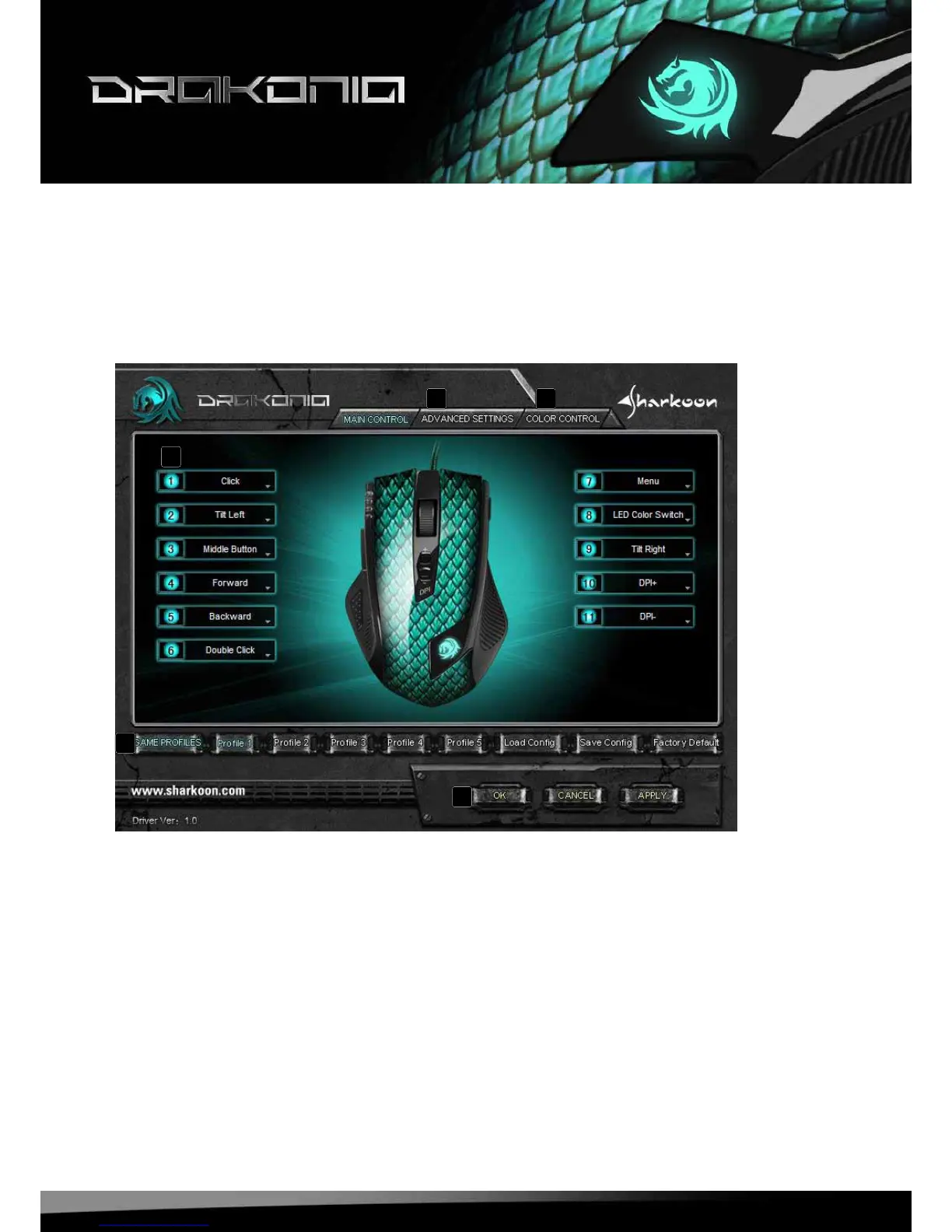
A – AdvancedSettings:seebelow7.4
B – ColorControl:seebelow7.5
C – Buttonassignment:Everymousebuttonandthescrollwheelcanbeassigneddifferentfunctions,
whichyoucanselectfromtherespectivepulldownmenu(seebelow7.3).
D – GameProles:TheDrakoniacanbeassigneduptovedifferentuserproles.With“LoadCong”an
alreadydenedproleisloaded,while“SaveCong”storesthecurrentsettingsasnewprole.
“FactoryDefault”resetstheselectedprole.
E – “OK“transfersthesettingstothemouseandclosesthewindow;“Apply“transfersthesettingstothe
mouse,andleavesthewindowopen;“Cancel“discardsthesettings.
A B
C
D
E





 To Next Page