Getting started
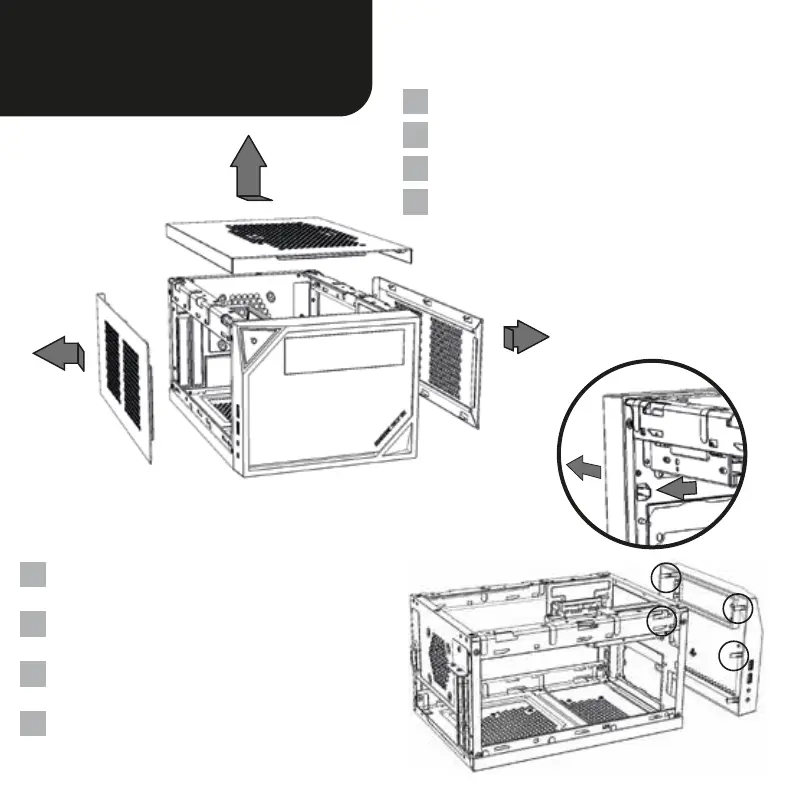
Entfernen Sie beide Seitenteile und die Gehäuseoberseite.
Remove both side panels and the case top.
移除機殼兩邊側板及機殼上板
両側のサイドパネルとケースのトップパネルを取り外
します.
Entfernen Sie die Frontblende, indem Sie die Kunststoff-
haken von innen zur Seite drücken.
Remove the front panel by pressing outward on the
plastic tabs located inside the case.
按壓固定於機殼前方面板內側塑膠卡榫組,即可移除
機殼前方面板
プラスチック製の固定爪を外側に押してフロントパネ
ルを取り外します.
DE
EN
CN
JP
DE
EN
CN
JP


 To Next Page