IO shield
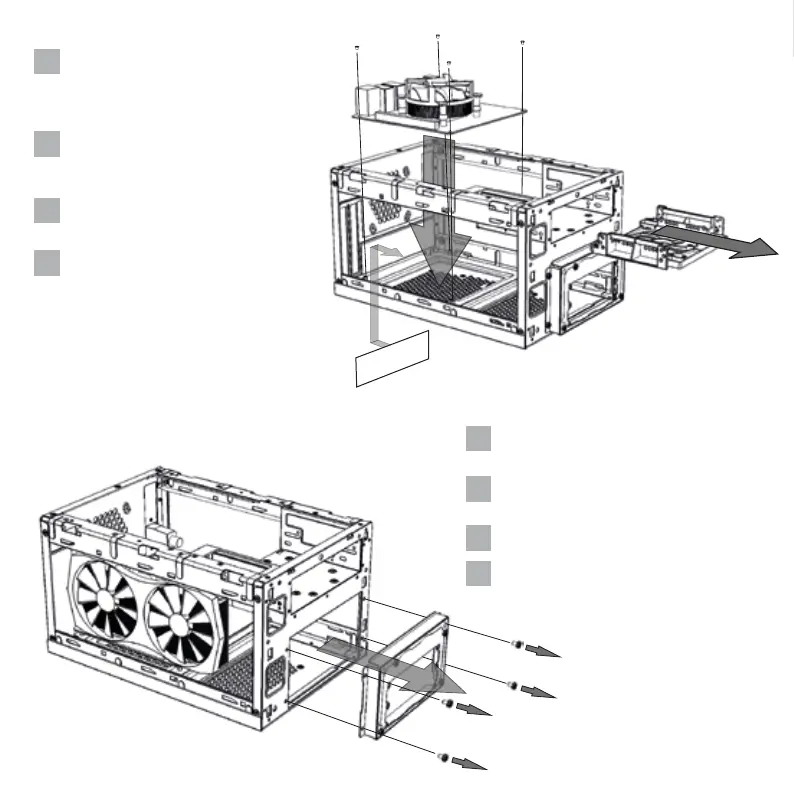
Entfernen Sie den Festplatten-Einbaurah-
men. Anschließend können Sie das
Mainboard und gegebenenfalls eine
Grafikkarte einbauen.
Remove the hard drive mounting frame. You
can now install the mainboard and, if
applicable, a graphics card.
先取下5.25吋硬碟轉接架並開始安裝主機
板及顯示卡
ハ ードドライブトレイを 取り外します。そ
れから、メインボードを取り付けます。場
合によってグラフィックスカードを設置す
ることができます.
DE
EN
CN
JP
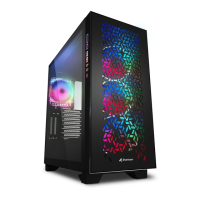
Entfernen Sie die Netzteil-Halterung, indem
Sie die äußeren Schrauben lösen.
Remove the power supply bracket by
loosening the outer screws.
鬆開螺絲後即可卸下電源供應器固定框
外側のネジを外し、電源ユニットブラケッ
トを取り外します.
DE
EN
CN
JP


 To Next Page