EasyManua.ls Logo

Sharp 19SV111 - Page 5

Sharp 19SV111
39 pages
Print Icon
To Next Page IconTo Next Page
To Previous Page IconTo Previous Page
Loading...
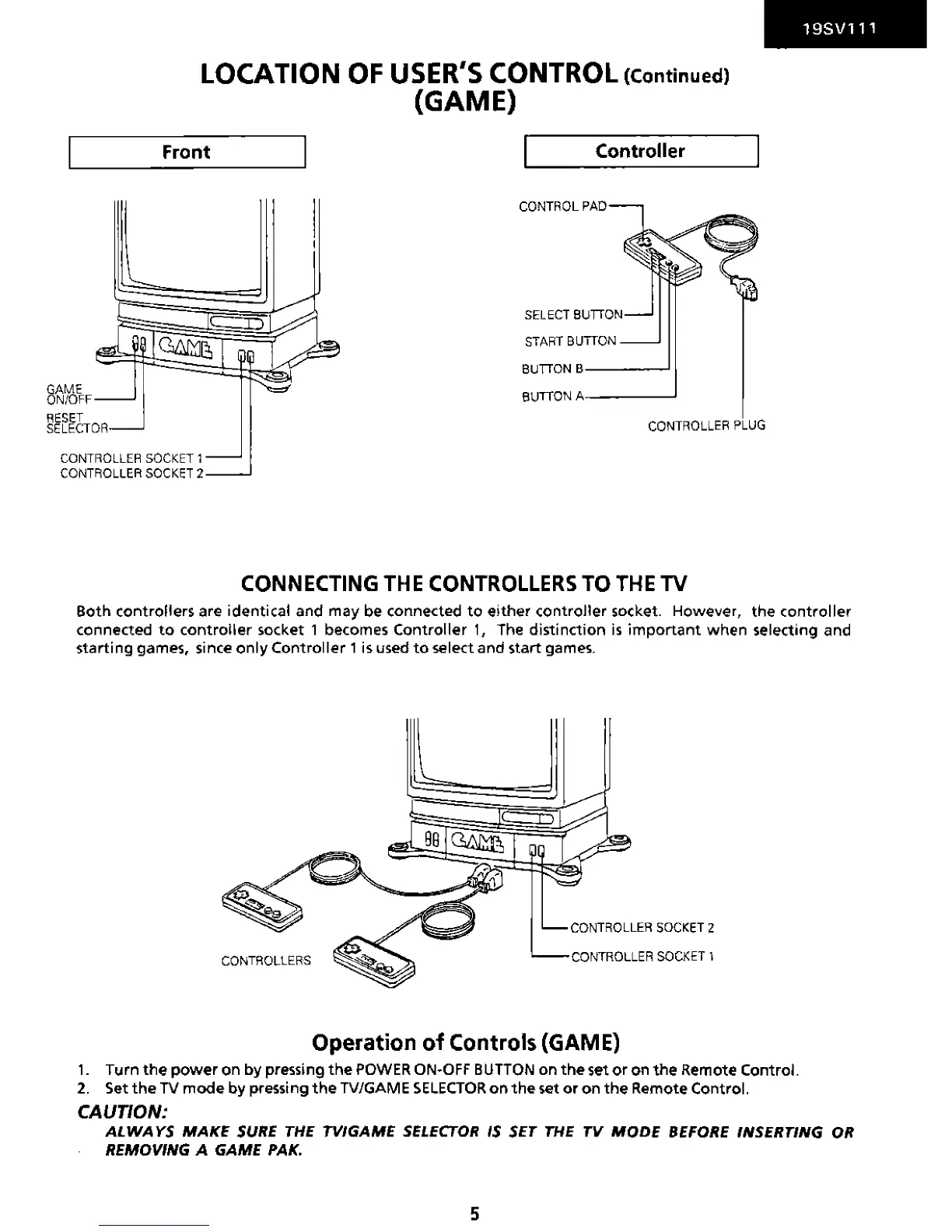
GAME
ON/OFF
LOCATION
OF
USER'S CONTROL (Continued)
(GAME)
Front I Controller
CONTROL
PAD
START
BUTTON
BUTTON
B----'
BUTTON
A------'
CONTROLLER
PLUG
CONTROLLER
SOCKET
1
CONTROLLER
SOCKET
2
CONNECTING
THE
CONTROLLERS
TO
THE
TV
19SV111
Both
controllers
are
identical
and
may be connected
to
either
controller
socket. However,
the
controller
connected
to
controller
socket 1 becomes
Controller
1,
The
distinction
is
important
when
selecting and
starting
games, since
only
Controller
1 is used
to
select and start games.
CONTROLLER
SOCKET
2
CONTROLLERS
CONTROLLER
SOCKET
1
Operation
of
Controls (GAME)
1.
Turn
the
power
on
by
pressing
the
POWER
0 N·O F F BUTTON
on
the
set
or
on
the
Remote Control.
2.
Set
the
TV
mode
by
pressing
the
TV/GAME
SELECTOR
on
the
set
or
on
the
Remote Control.
CAUTION:
ALWAYS
MAKE
SURE
THE TVIGAME
SELECTOR
IS
SET
THE
TV
MODE
BEFORE INSERTING OR
REMOVING A GAME PAK.
5

Related product manuals