10
25R-M100
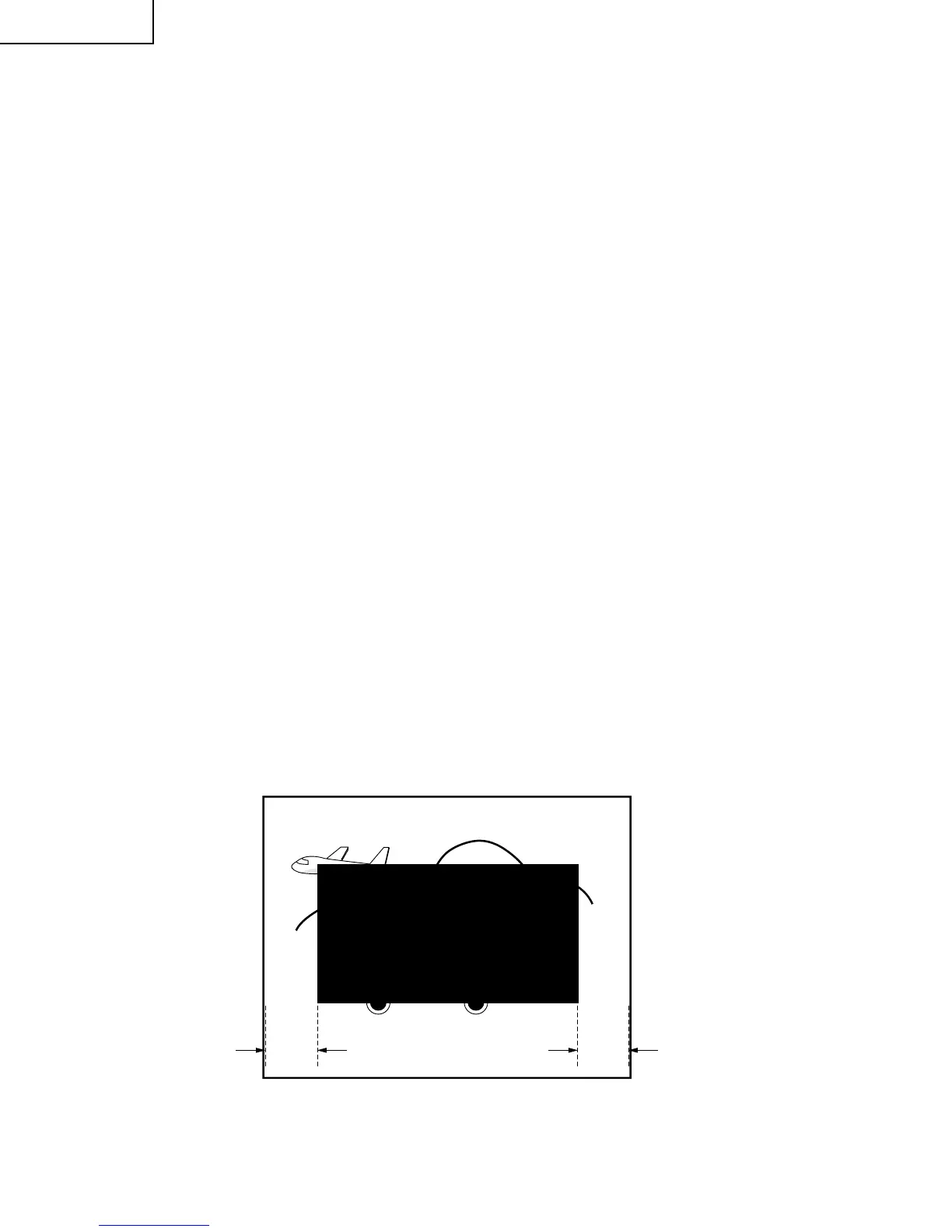
Figure C.
A B
Vertical-Size, V-Linearity and
V-S Correction Adjustments
1. Receive a good local channel.
2. Enter the service mode DEF category and select the
adjustment "D02" for Vertical Size, "D05" for V-
Linearity and "D06" for V-S Correction Adjustment.
3. Set in order "D05" for V-Linearity, "D06" for V-S
Correction and set the data to get the best linearity.
4. Then adjust "D02" data until it become a proper
vertical size.
Horizontal Position Adjustment
1. Receive a good local channel.
2. Enter the service mode DEF category and select the
adjustment "D01".
3. Adjust "D01" data value to center the picture.
Vertical-Phase Adjustment
1. Receive a good local channel.
2. Enter the service mode DEF category and select the
adjustment "D03".
3. Adjust "D03" bus data to get the most acceptable
vertical position.
Note: The step range is 20 (32)+12 (3 steps)/
-20 (5 steps).
(Push once move 4 steps.)
Caption Position Adjustment (Horizontal)
1. Receive a good local channel.
2. Enter the service mode DEF category and select the
adjustment "D04".
3. A black text box will appear on the screen. (see Figure
C. below)
4. Adjust "D04" data value to balance the text box
position in the center. (A=B).



 To Next Page