2T-C45AE1X
6 – 1
CHAPTER 6. TROUBLESHOOTING
[1] TROUBLESHOOTING
[1]TROUBLESHOOTINGTABLE
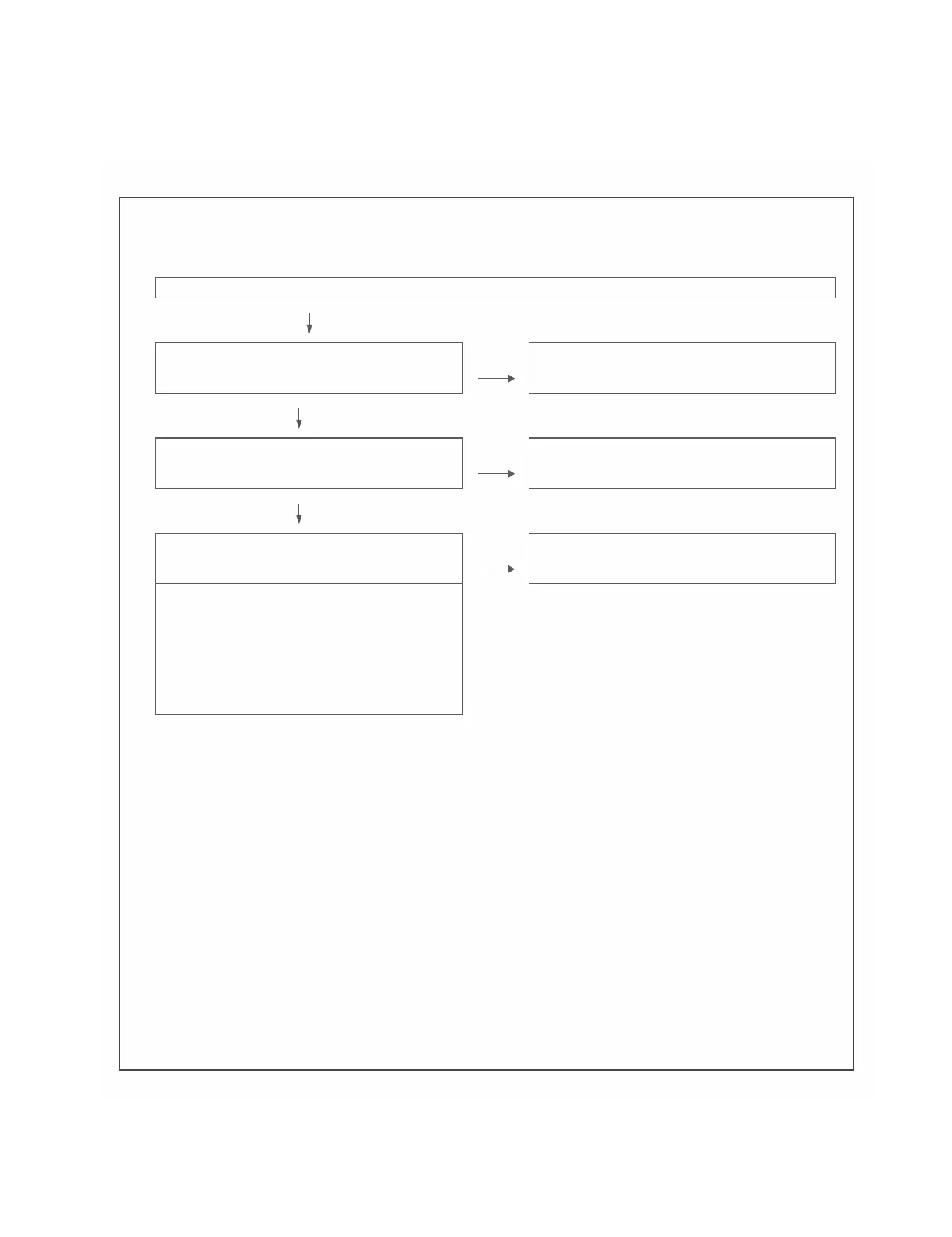
Nopower(frontLEDfailuretolightup)ornostartup(frontLEDfailuretoturnfromredtogreen)
Arethewireharnessesandothercablesproperlyconnectedin
theset?
NO Reconnectthewireharnessesandothercablesproperlyinthe
set.
YES
Isthere thePSONandPNLPOWsignalinputatpins
(14)and (16
)ofP9601?
NO Checkthe
PSON signallinePN L POWsignalline.
YES
AretheDC/DCconverteroutputsandtheoutputvoltagesalong
thecontrollinesasspecified?
NO ChecktheDC/DCconvertersandthecontrollines.Replace
defectivepartsasrequired.
1) D1.5V(IC9601)
2) BU3.3V(IC9602)
3) BU1.1S(IC9603)
4) D3.3V(IC9604)
5) D5.1V(IC9605)
6)
PNL+12V(AO6405)
7) BU+5V(D9602)







 To Next Page