26
CH
MENU
E
TV/VIDEO
R
E
V
EA
L
HOLD
E
N
D
M
MENUSOUND
S
U
B
T
IT
L
E
SUBPAGE
T
E
X
T
R
O
T
A
T
E
W
ID
E
T
CH
OK
E
TV/VIDEO
R
E
V
EA
L
HOLD
E
N
D
MENUSOUND
S
U
B
T
IT
L
E
SUBPAGE
T
E
X
T
R
O
T
A
T
E
B
R
IG
H
T
T
M
T
|
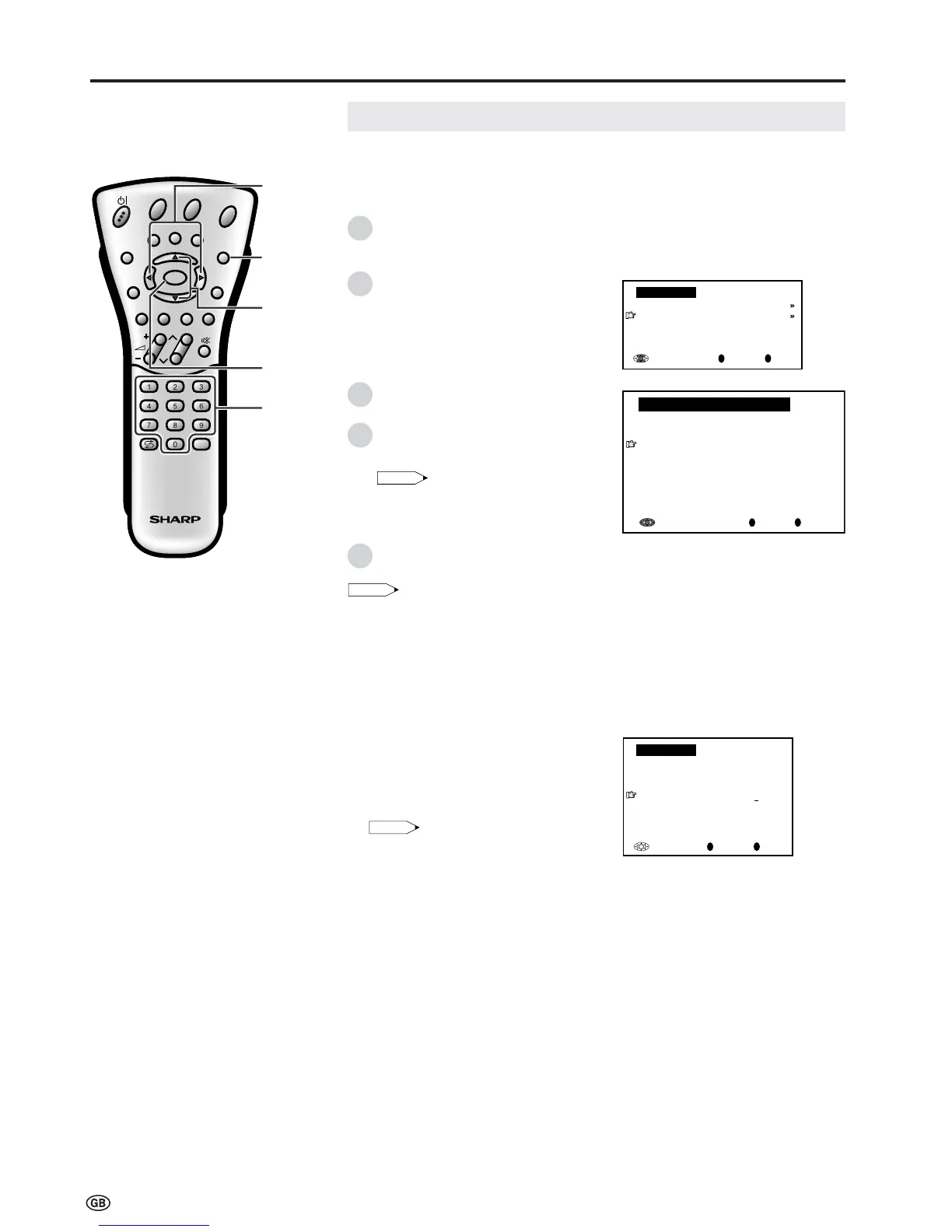
When the PIN input screen
appears, input your PIN with
Channel Select. The normal
screen appears when the PIN is
correctly entered.
Note:
• If the PIN has been input incorrectly,
“Wrong PIN!” is displayed.
OK
Back
M
End
E
Child lock
Please enter your PIN:
Child lock
[
????
]
Child Lock (Continued)
[3] Setting Child Lock (Continued)
To set a Child Lock for individual
programmes without time limit
OK
Back
M
End
E
Child lock
For all programmes
For individual progr. only
Change PIN
[
1234
]
Cancel PIN
Useful Features (Continued)
0
OK
Back
M
End
E
0
0
0
0
0
0
0
0
0
0
0
For individual progr. only
8 E 9 16 E54
1 S 6 9 E1 17 E56
2 S 8 1 E11 18 E57
3 S1 11 E36 19
4 S11 12 E37 2
5 E 3 13 E38 21
6 E 5 14 E5 22
7 E 6 15 E53 23
</>
END
OK
]/[
Note:
• When a Child Lock is activated, the “Programmes” and “First installation” items are not
displayed in the TV menu and cannot be selected.
[4] Temporarily cancelling the Child Lock setting
You can view a programme for which a Child Lock has been set by temporarily
cancelling the Child Lock setting. Perform the procedure below to input your
PIN and cancel the Child Lock if you are prompted to do so.
Channel
Select
Perform steps 1 to 3 in
[2] Changing/Cancelling a PIN
to display the “Child lock” screen.
Press ]/[ to select “For individual
progr. only”, and then press OK to
display the “For individual progr. only”
screen.
Press ]/[ and/or </> to select the
desired programme.
Press OK to lock the programme. The
locked programme is displayed in red.
Note:
• To unlock the programme, select the
programme and press
OK.
• The Child Lock remains effective until it is
cancelled.
Press END to exit.
1
2
3
4
5














 To Next Page