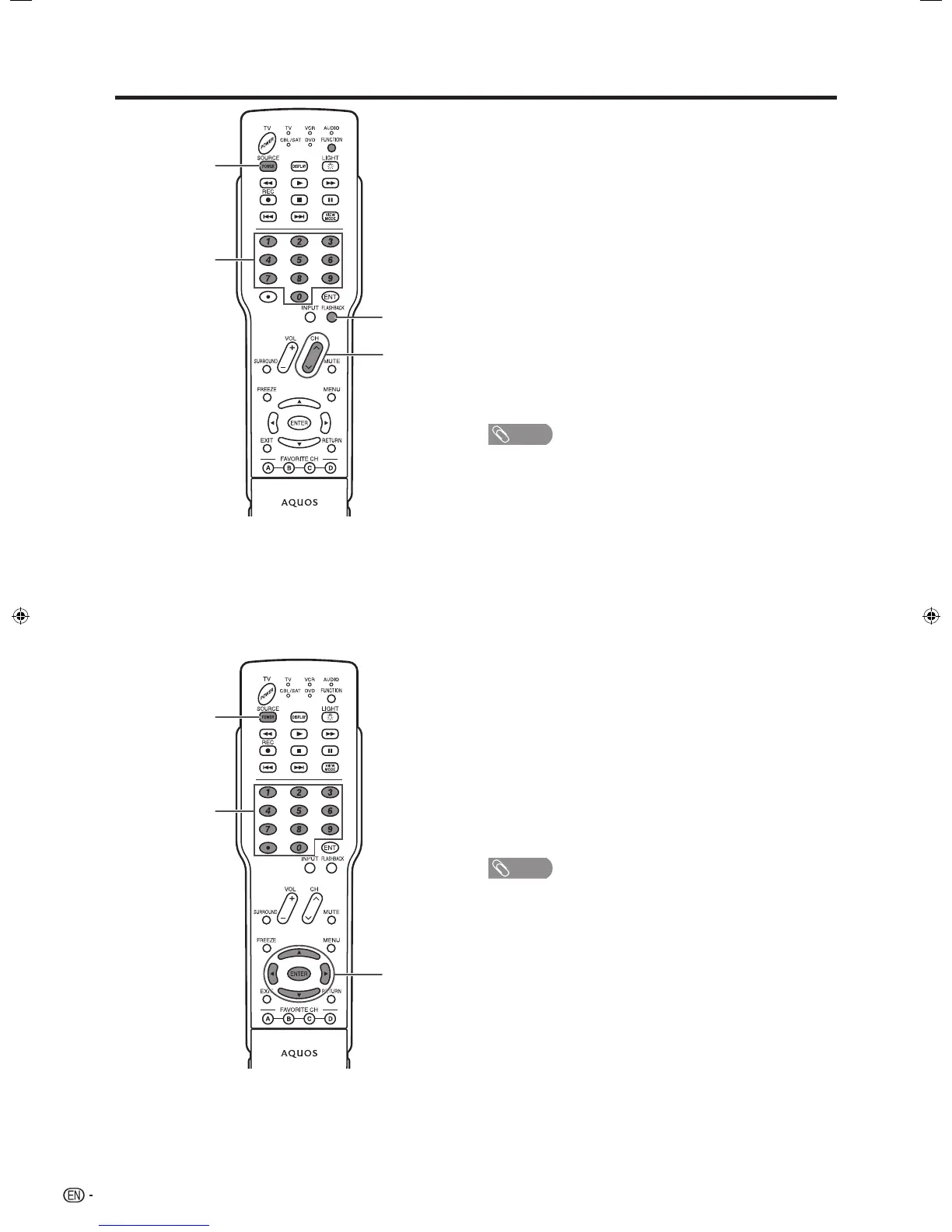
Cable control buttons
When the
FUNCTION is set to CBL/SAT, the cable
converter connected to the TV can be operated using
1 to 4.
1 SOURCE POWER
Turns the cable converter power on and off.
2 0–9
Press a button (or buttons) that corresponds to the
channel that you wish to watch.
3 FLASHBACK *
Press to switch between the current channel and the
channel you were watching immediately before.
4 CH
r
/
s
Press
CH
r
or CH
s
to tune in a higher or lower
channel.
* Some manufacturers do not preset
FLASHBACK.
• CABLE and SAT cannot be selected at the same time.
SAT control buttons
1 SOURCE POWER
Turns the cable converter power on and off.
2 0–9, • (DOT)
Press a button (or buttons) that corresponds to the
channel that you wish to watch.
3 ENTER,
a
/
b
/
c
/
d
ENTER: Press to activate the selected function.
a
/
b
/
c
/
d
: Press the button to select items on the
SAT GUIDE screen or SAT MENU screen.
• CABLE and SAT cannot be selected at the same time.
Other viewing options
D40U_en_i.indd 46 2006/01/23 11:34:15










 To Next Page