AC power supply/Alimentation secteur/Fuente
de
alimentaci6n de CA
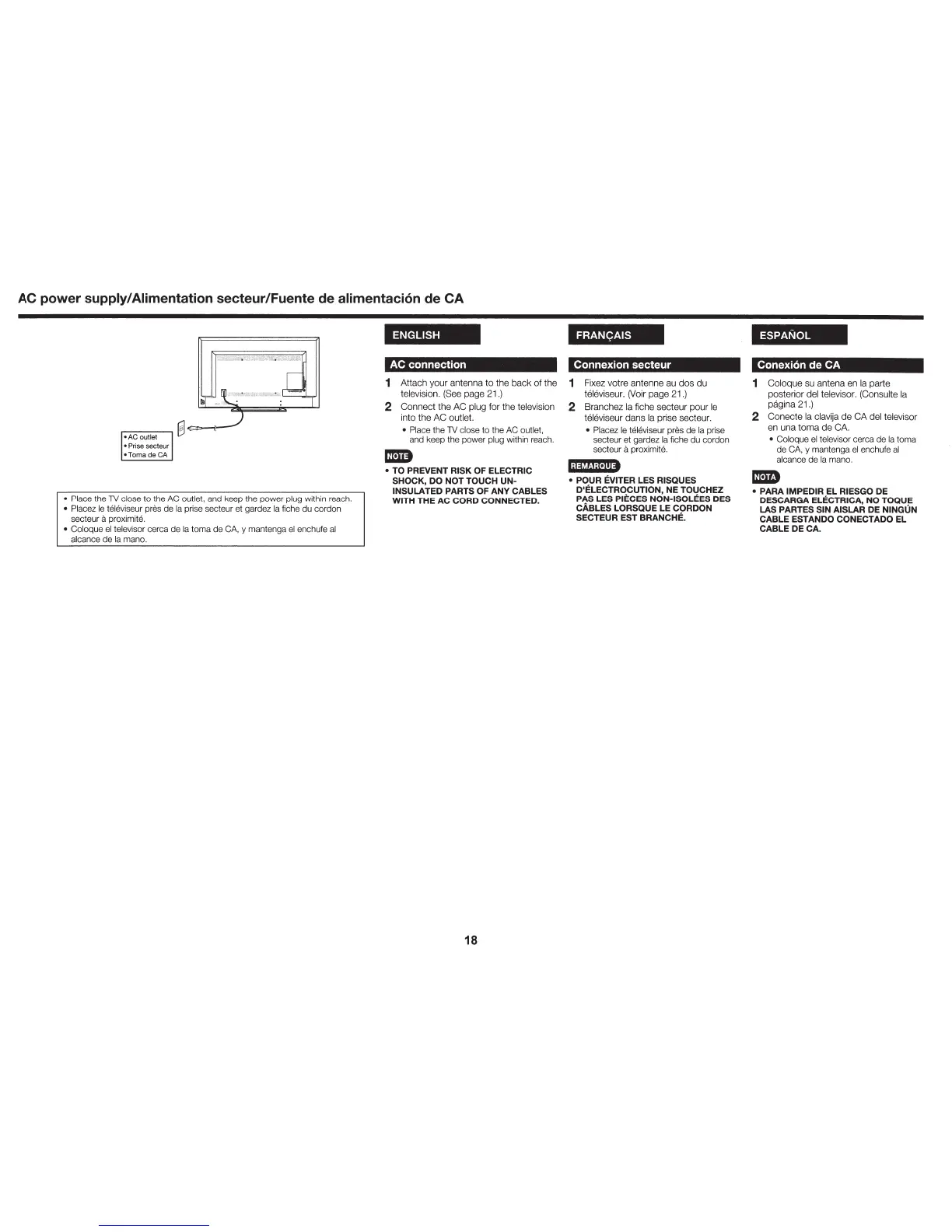
• Place the TV close to the AC outlet, and keep the power plug within reach.
• Placez
le
televiseur pres de
Ia
prise secteur et gardez
Ia
fiche du cordon
secteur
a proximite.
• Coloque
el
televisor cerca de
Ia
toma de
CA,
y mantenga
el
enchufe
al
alcance de
Ia
mana.
ENGLISH
AC connection
1
Attach
your
antenna
to
the
back
of
the
television. (See
page
21.)
2
Connect
the
AC
plug for the television
into the
AC
outlet.
• Place the
TV
close to the
AC
outlet,
and keep the power plug within reach.
mm
• TO PREVENT RISK OF ELECTRIC
SHOCK, DO NOT TOUCH
UN-
INSULATED PARTS OF ANY CABLES
WITH THE AC CORD CONNECTED.
18
FRANyAIS
Connexion secteur
1 Fixez votre antenne au
dos
du
televiseur. (Voir
page
21.)
2 Branchez
Ia
fiche secteur
pour
le
televiseur
dans
Ia prise secteur.
• Placez
le
televiseur pres de
Ia
prise
secteur et gardez
Ia
fiche du cordon
secteur
a proximite.
l;@t.!;i·l'l+
• POUR EVITER LES RISQUES
D'ELECTROCUTION, NE TOUCHEZ
PAS LES PIECES NON-ISOLEES DES
CABLES LORSQUE
LE
CORDON
SECTEUR EST BRANCHE.
ESPANOL
Conexion
de
CA
1
Coloque
su antena en
Ia
parte
posterior del televisor. (Consulte
Ia
pagina 21.)
2
Conecte
Ia
clavija
de
CA
del televisor
en
una
toma
de
CA.
• Coloque
el
televisor cerca de
Ia
toma
de CA, y mantenga
el
enchufe
al
alcance de
Ia
mano.
l!iD
• PARA IMPEDIR EL RIESGO DE
DESCARGA ELECTRICA, NO TOQUE
LAS
PARTES SIN AISLAR DE NINGUN
CABLE ESTANDO CONECTADO
EL
CABLE DE CA.





 To Next Page