EasyManua.ls Logo

Sharp Aquos LC-90LE657U - User Manual

Sharp Aquos LC-90LE657U
3 pages
Print Icon
To Next Page IconTo Next Page
Loading...
AQUOS UV2A DISPLAY
Breathtaking HD images,
greater brightness and contrast
SMART TV
With Dual-Core Processor
and built-in Wi-Fi
120Hz REFRESH RATE
AquoMotion 240
ACTIVE 3D
Two 3D glasses included in box
SLIM DESIGN
POWERFUL 35W AUDIO
High fidelity with clear voice
 SERIES LED SMART TV
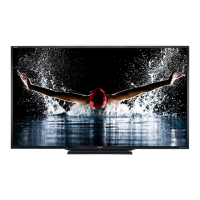
90" CLASS (DIAGONAL) LED TV
LC-90LE657U
Unlimited content, control, and instant
connectivity. AQUOS® TVs with SmartCentral™
give you more of what you crave. From the best
streaming apps, to the easiest way to channel
surf and connect your devices, it’s that easy.
Delivers crystal-clear images
even during fast-motion
scenes.
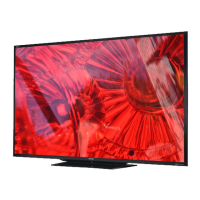
At 90 inches, it’s the largest available LED TV on the planet. Big, bold and brainy - the
LC-90LE657U is an LED Smart TV that delivers legendary AQUOS picture quality
and unlimited content choices, seamless control, and instant connectivity through
SmartCentral™. The AQUOS 1080p LED Display dazzles with advanced pixel structure
for the most breathtaking HD images, an 8 million: 1 dynamic contrast ratio, and a 120Hz
refresh rate with AquoMotion 240 for stunning picture clarity, even during fast-motion
scenes. A Smart TV with Dual-Core processor and built-in Wi-Fi, the LC-90LE657U
lets you quickly access apps, streaming movies, music, games, and websites you love.
SmartCentral
SMART TV
V-03 05/08/2013
AQUOS® UV2A Display with an
advanced pixel structure for the most
breathtaking HD images and
4 million: 1 contrast ratio

Questions and Answers

  • C
    christina20Aug 19, 2025
    How to troubleshoot no power on my Sharp LCD TV?
    • D
      Dawn CooleyAug 19, 2025
      If your Sharp LCD TV has no power, first ensure that you have pressed the POWER button on the remote. Check to make sure the AC cord is properly connected. Finally, verify that the main power switch on the TV is turned on.
  • A
    Antonio JonesAug 21, 2025
    Why is my Sharp Aquos LC-90LE657U remote control not working?
    • S
      staceysimmonsAug 21, 2025
      If your Sharp LCD TV remote control isn't working, ensure the equipment to be operated is set correctly by pressing TV to set the remote control unit to the setting for operating the TV. Check that the batteries are inserted with the correct polarity (+/-). Replace the batteries if they are worn out. Strong or fluorescent lighting may interfere with the remote; also check if a fluorescent light is near the remote sensor. Finally, make sure "RC Control Lock" is not selected in "Operation Lock Out".
  • L
    Lisa HamiltonAug 26, 2025
    What to do if my Sharp LCD TV power is suddenly turned off?
    • P
      Patrick RobertsAug 26, 2025
      If your Sharp LCD TV suddenly turns off, check if the sleep timer is set. Review the power control settings. If the unit's internal temperature has increased, remove any objects blocking the vents or clean them to improve ventilation.
  • D
    David BarberAug 27, 2025
    Why is there no picture on my Sharp LCD TV?
    • A
      Adam PayneAug 28, 2025
      If your Sharp LCD TV has no picture, check that the connection to other components is correct. Ensure the correct input is selected. Verify that "On" is not selected in "Audio Only". If connecting a laptop PC, confirm that the PC's display output mode is set to external monitor and check the resolution setting. Also, ensure a compatible signal is being input.
  • C
    Christopher GreenAug 29, 2025
    What to do if my Sharp Aquos LC-90LE657U cannot be operated?
    • A
      Annette Gardner MDAug 30, 2025
      If your Sharp LCD TV unit cannot be operated, external influences such as lightning or static electricity may cause improper operation. Turn off the power of the TV or unplug the AC cord, wait 1 or 2 minutes, and then replug it in to restore operation.
  • P
    Phillip PerezSep 1, 2025
    Why are some internet functions not available from the TV on my Sharp Aquos LC-90LE657U?
    • E
      evillanuevaSep 1, 2025
      The TV has only limited functions compared with regular PC browsers.
  • P
    pottsrebeccaSep 5, 2025
    What to do if 3D images appear 2D with Sharp LCD TV glasses?
    • J
      Jason DavisSep 5, 2025
      If 3D images appear 2D while wearing the 3D glasses with your Sharp LCD TV, the glasses may be set to 2D mode. To switch to 3D mode, press the power button while viewing 2D images. The LED light will blink green, and the 2D images should switch to 3D.
  • M
    Michael StewartSep 7, 2025
    Why is the picture quality of HD programs poor on my Sharp LCD TV?
    • R
      Robert WhiteSep 7, 2025
      To enjoy HD images from external equipment on your Sharp LCD TV, set up an HDMI connection or component connection. If the program content is not of HD quality, HD images cannot be displayed. The HD cable/satellite set-top box may need to be configured to output HD images via cable/satellite. The cable/satellite broadcast may not support a signal resolution of 1080p.
  • S
    scottdylanSep 9, 2025
    Why is the picture cut off or with sidebar screen on my Sharp Aquos LC-90LE657U?
    • S
      Scott PollardSep 9, 2025
      If the picture on your Sharp LCD TV is cut off or has a sidebar screen, first check if the image position is correct. Then, ensure that screen mode adjustments, such as picture size, are made correctly.
  • B
    Brad OlsonSep 12, 2025
    Why does my Sharp LCD TV have strange color or color misalignment?
    • J
      Jason MaxwellSep 12, 2025
      If the color on your Sharp LCD TV looks strange, light, or misaligned, try adjusting the picture tone. Also, consider whether the room is too bright, as a bright room can make the picture appear dark.

Sharp Aquos LC-90LE657U Specifications

General IconGeneral
BrandSharp
ModelAquos LC-90LE657U
CategoryLCD TV
LanguageEnglish

Related product manuals