44
Useful adjustment settings
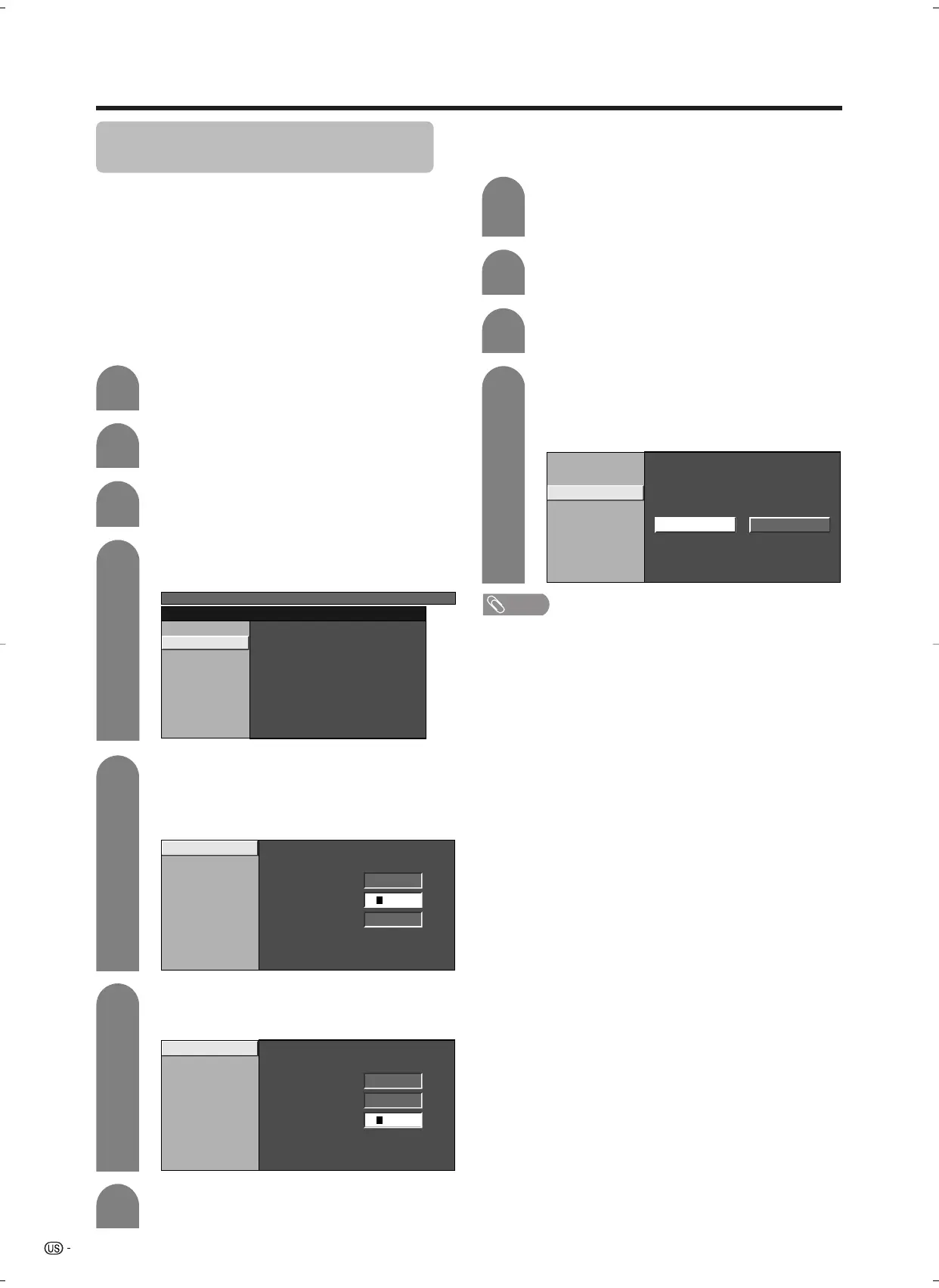
Secret number setting for parental
control (AV input mode only)
Allows you to use a secret number to protect certain
settings from being accidentally changed.
IMPORTANT:
Three conditions must be met to enable V-Chip (see
pages 44 to 49):
1 Secret No. is registered.
2 V-Chip settings have been made.
3 “Status” is set to “On”.
Press MENU and MENU screen displays.
1
2
Press c/d to select “Setup”.
Press a/b to select “Parental CTRL”, and
then press ENTER.
3
Press a/b to select “Secret No.”, and then
press ENTER.
4
MENU
[
Setup
...
Parental CTRL
]
Secret No.
Select “New Secret No.”, and then press
ENTER.
Input the new 4-digit secret number by using
0 – 9.
5
New Secret No.
New Secret No.
––––
Input Secret No.
––––
Reconfirm
––––
Input the same 4-digit number on the
“Reconfirm” screen as in step 5 to confirm.
6
New Secret No.
New Secret No.
****
Input Secret No.
––––
Reconfirm
––––
Setting parental control status
Used to enable or disable the parental control function.
Press a/b to select “Status”, and then press
ENTER.
Press c/d to select “On” or “Off”, and then
press ENTER.
• Select “On” to enable and “Off” to disable
Parental CTRL.
V-Chip
Secret No.
Status
On Off
Repeat steps 1 to 3 in Setting a secret
number.
• Secret number setting menu displays.
1
2
Input the 4-digit secret number by using 0 –
9.
3
4
Press RETURN to start configuring V-Chip
settings. (See pages 47 and 48 for details.)
7
Setting a secret number
NOTE
• You can skip step 1 and 2 above while in Parental CTRL
screen.
LC-26/32GA5U(E)-40-49 05.2.28, 1:20 PM44











 To Next Page