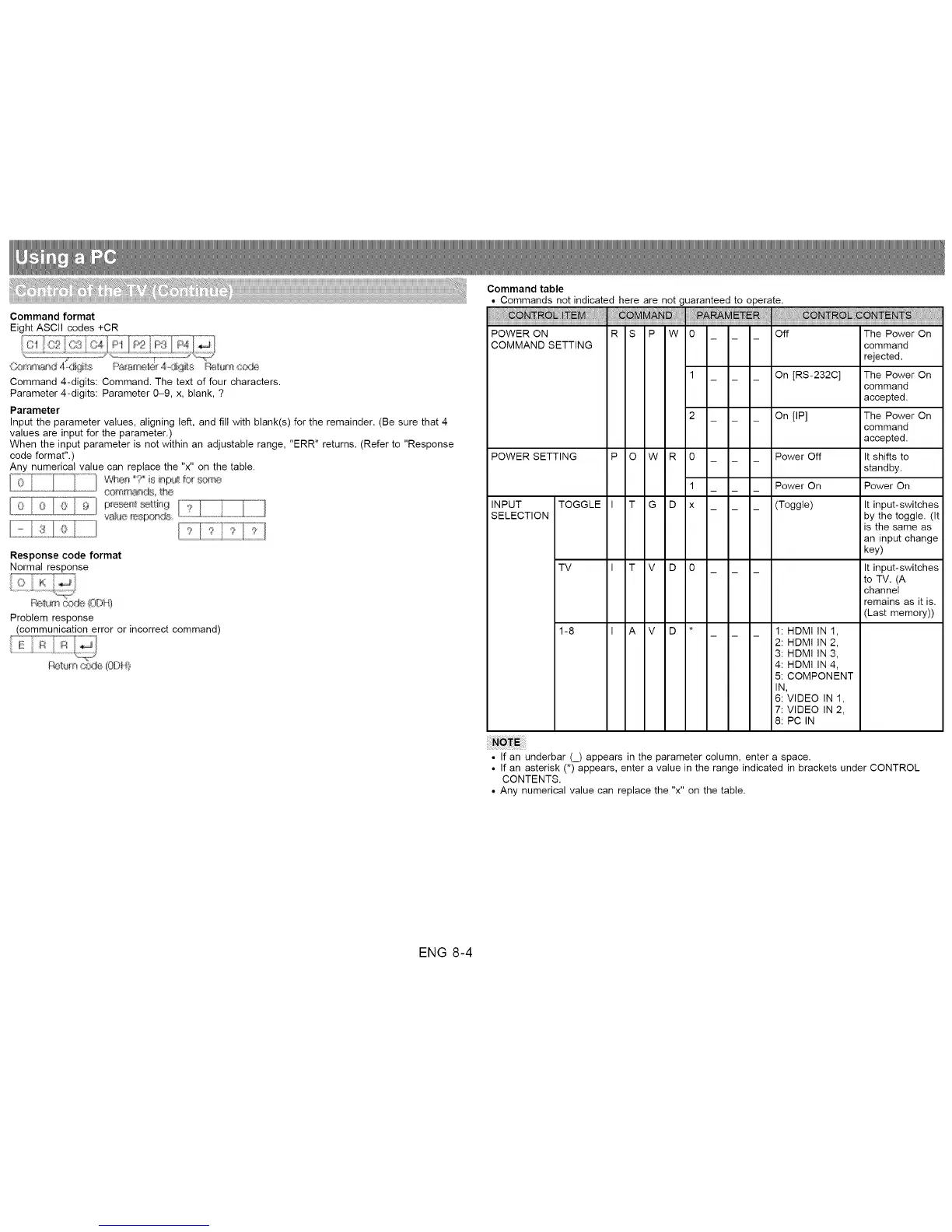
Command format
Eight ASCII codes +CR
Command 4-digits: Command. The text of four characters.
Parameter 4-digits: Parameter 0-9, x, blank, ?
Parameter
Input the parameter values, aligning left, and fill with blank(s) for the remainder. (Be sure that 4
values are input for the parameter.)
When the input parameter is not within an adjustable range, "ERR" returns. (Refer to "Response
code format".)
Any numerical value can replace the "x" on the table.
comm_qds he
iiliCii;iJ
Response code format
Normal response
Problem response
(communication error or incorrect command)
Command table
• Commands not indicated here are not guaranteed to operate.
POWER ON R S P W 0 Off
COMMAND SETTING
POWER SETTING P O W R
INPUT TOGGLE I T G D
SELECTION
TV I T V D
1-8 I A V D
0
1
x
On [RS-232C]
On [IP]
Power Off
Power On
(Toggle)
1: HDMI IN !,
2: HDMI IN 2,
3: HDMI IN 3,
4: HDMI IN 4,
5: COMPONENT
IN,
6: VIDEO IN 1,
7: VIDEO IN 2,
8: PC IN
The Power On
command
rejected.
The Power On
command
accepted.
The Power On
command
accepted.
It shifts to
standby.
Power On
It input-switches
by the toggle. (It
is the same as
an input change
key)
It input-switches
to TV. (A
channel
remains as it is.
(Last memory))
• If an underbar (_) appears in the parameter column, enter a space.
• If an asterisk (*) appears, enter a value in the range indicated in brackets under CONTROL
CONTENTS.
• Any numerical value can replace the "x" on the table.
ENG 8-4












 To Next Page