- 3 -
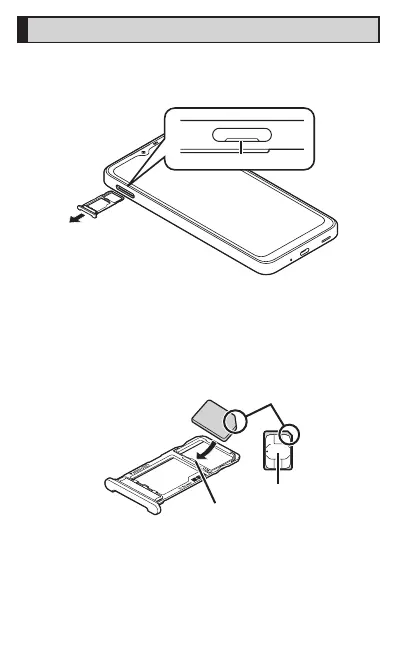
Attaching the SIM card
Before attaching the SIM card attach it with the display side turned up.
A
Pull out the SIM card/microSD memory card tray with
your finger on the groove.
Groove
B
Fit the SIM card to the SIM card/microSD memory
card tray with the IC (metal) side turned down while
pressing the card against the projection of the tray
Check the direction of the SIM card and fit it securely.
Not to let the SIM card lift up from the card tray.
If the SIM card does not fit the card tray, may cause a fault.
IC (metal)
Projection













 To Next Page