Dynamic book remote control
2
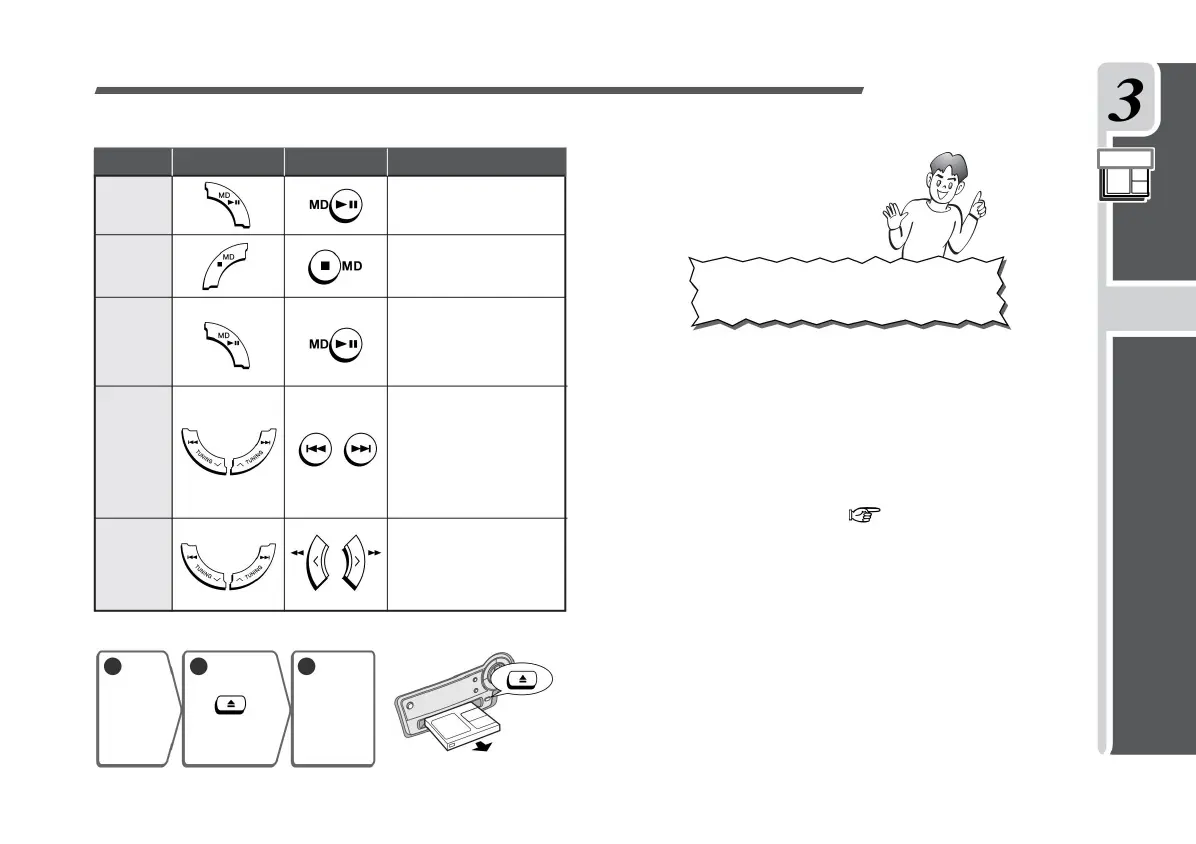
Stop
Information •
Recording in monaural recording or 2x / 4x long-time recording (stereo)
Press and hold during playback.
When you release your finger
from the button, it will regenerate
from that position.
Forcibly pushing the MD while the power is off may cause a malfunction. • When
moving the product, be sure to remove the MD, turn off the power, and then
unplug the power cord.
reproduction
Press during playback.
Press it again to play from
the stopped position. Press
during playback or stop.
After selecting the song
number you want to listen to
while stopped, when you
start playing, the song will
be played from that song.
MD
Various ways
of listening
Precautions
• Be sure to turn on the power when inserting the MD.
1
Cue
the song
• • • • • • •
Stop
MD.
Press.
Preparation
Operation
Consideration
Various operations of MD
How to take out MD
Press while stopped.
pause
Press during playback.
Recording sound
• The MD becomes warm during use, but this is not a malfunction. • MD makes it
difficult for the sound to skip due to vibration, but the sound may be interrupted for
continuous vibration.
When listening to a group-recorded MD, see the
explanation on page 49.
Group
recording / playback
beginning
You can also play the songs that have been played. (P.36)
Convenient
3
If you move the MD with it inserted, the MD may get stuck in the product and
cause a malfunction.
edit
Take
out the MD.
Listen listen
Fast forward
and fast rewind
twenty three
1-BIT MD / CD SYSTEM SD-FX10
Listen to MD
Machine Translated by Google


 To Next Page