MAINTENANCE INSTRUCTIONS
Unplug this vacuum cleaner from the electrical outlet before servicing. •
HOW TO CHANGE THE PAPER BAG
r When operating the vacuum cleaner, always use genuine Sharp TWIN PLY TM Micro -_
Filtration paper bags.
1
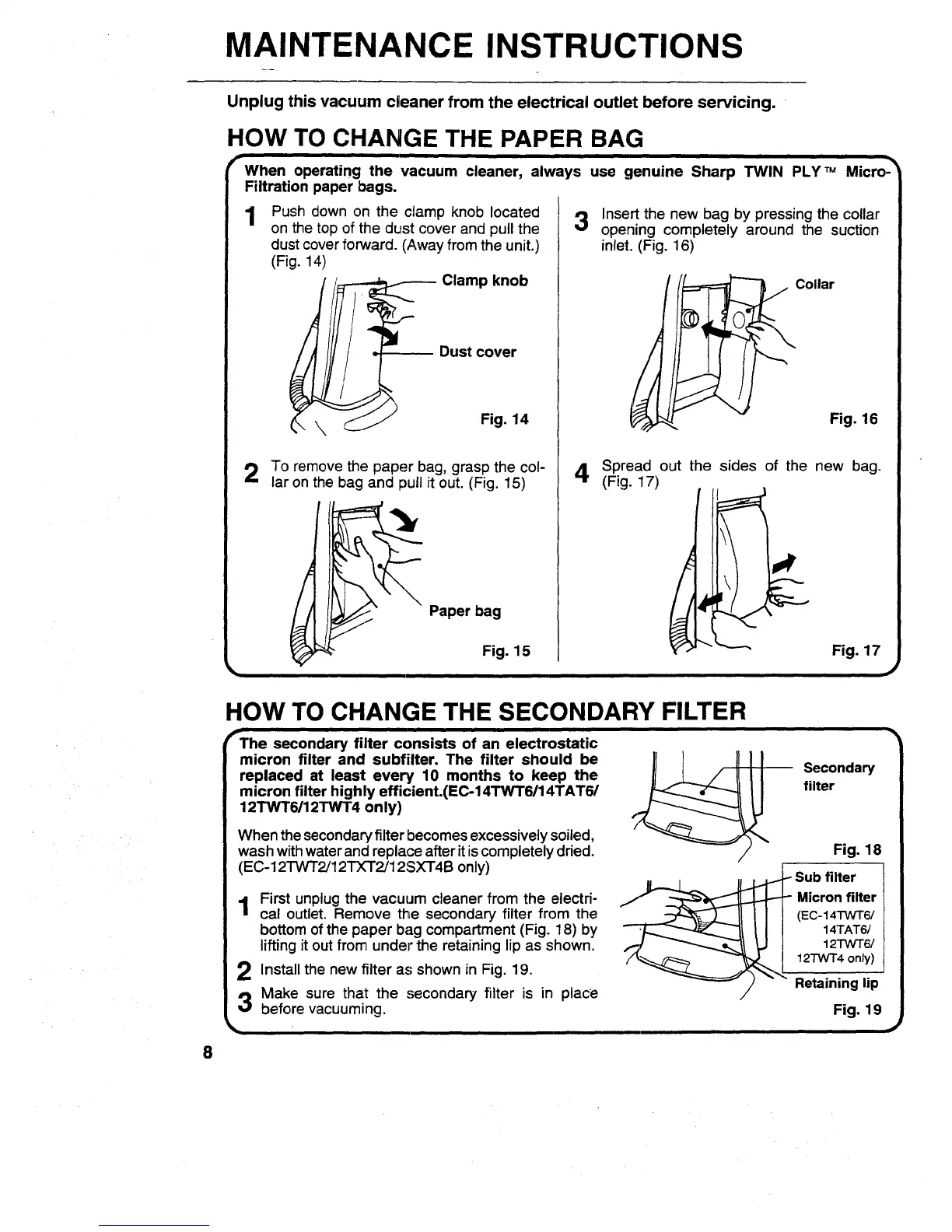
Push down on the clamp knob located
on the top of the dust cover and pull the
dust cover forward. (Away from the unit.)
(Fig. 14)
_---- Clamp knob
Dust cover
Fig. 14
2 To remove the paper bag, grasp the col-
lar on the bag and pull it out. (Fig. 15)
Paper bag
Fig. 15
3
Insert the new bag by pressing the collar
opening completely around the suction
inlet..(Fig. 16)
Collar
Fig. 16
4
Spread out the sides of the new bag.
(Fig. 17)
__1. L,,_._, Fig. 17
,J
HOW TO CHANGE THE SECONDARY FILTER
i
fThe secondary filter consists of an electrostatic
micron filter and subfilter. The filter should be
replaced at least every 10 months to keep the
micron filter highly efficient.(EC-14TWT6/14TAT6/
12TWT6/12TWT4 only)
When the secondaryfilter becomes excessively soiled,
wash with water and replace after it iscompletely dried.
(EC-12TWT2/12TXT2/12SXT4B only)
1 First unplug the vacuum cleaner from the electri-
cal outlet. Remove the secondary filter from the
bottom of the paper bag compartment (Fig. 18) by
lifting it out from under the retaining lip as shown.
2 Install the new filter as shown in Fig. 19.
3 Make sure that the secondary filter is in place
before vacuuming.
Secondary
filter
Fig. 18
Sub filter
Micron filter
(EC-14TWT6/
14TAT6/
12TWT6/
12TWT4 only)
Retaining lip
Fig. 19


 To Next Page