EasyManua.ls Logo

Sharp EL-6360 - Page 9

Sharp EL-6360
56 pages
Print Icon
To Next Page IconTo Next Page
To Previous Page IconTo Previous Page
Loading...
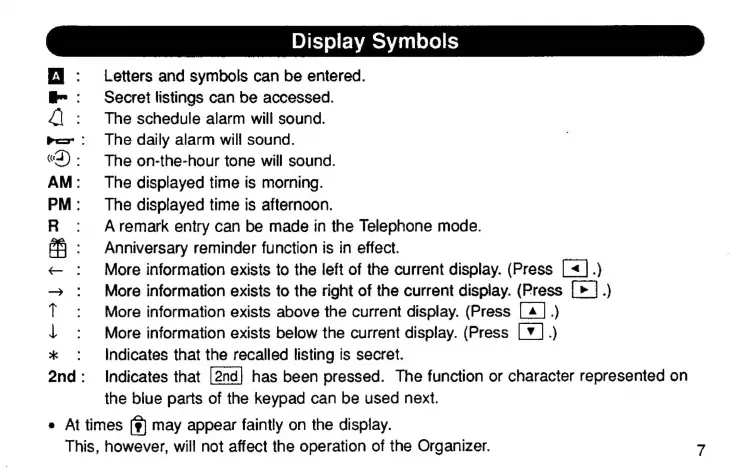
Display
Symbols
EJ
:
Letters
and
symbols
can
be
entered.
В":
Secret
listings
сап
be
accessed.
4|
:
Тһе
schedule
alarm
will
sound.
ве“:
The
daily
alarm
will
sound.
«3):
Тһе
on-the-hour
tone
will
sound.
AM:
The
displayed
time
is
morning.
PM:
The
displayed
time
is
afternoon.
A
remark
entry
can
be
made
in
the
Telephone
mode.
Anniversary
reminder
function
is
in
effect.
More
information
exists
to
the
left
of
the
current
display.
(Press
|
«1.)
More
information
exists
to
the
right
of
the
current
display.
(Press
|.)
More
information
exists
above
the
current
display.
(Press
[4
|.)
More
information
exists
below
the
current
display.
(Press
(7
|.)
:
Indicates
that
the
recalled
listing
is
secret.
2nd:
Indicates
that
has
been
pressed.
The
function
or
character
represented
on
the
blue
parts
of
the
keypad
can
be
used
next.
е
At
times
(г)
may
appear
faintly
on
the
display.
This,
however,
will
not
affect
the
operation
of
the
Organizer.
7
ж
єз
TRI

Related product manuals