EasyManua.ls Logo

Sharp EL-6660 - Page 12

Sharp EL-6660
50 pages
Print Icon
To Next Page IconTo Next Page
To Previous Page IconTo Previous Page
Loading...
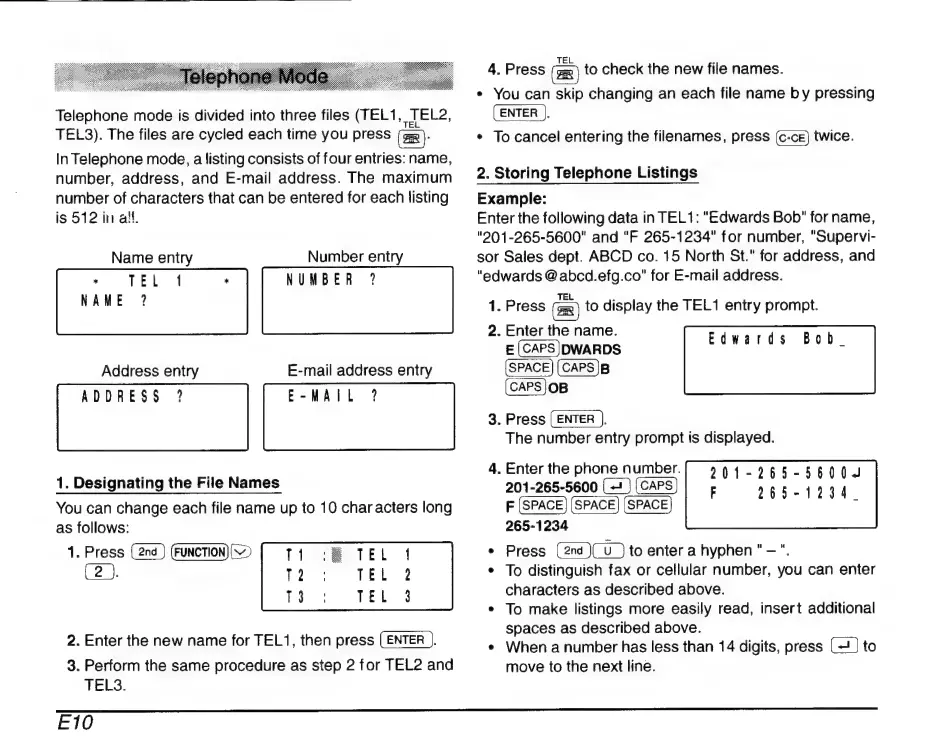
Telephone
mode
is
divided
into
three
files
(TEL1
JEL2,
TEL3).
The
files
are
cycled
each
time
you
press
(gm
)-
In
Telephone
mode,
a
listing
consists
of
four
entries:
name,
number,
address,
and
E-mail
address.
The
maximum
number
of
characters
that
can
be
entered
for
each
listing
is
512
in
al.
Name
entry
Number
entry
es
|
PEL
4
*
NUMBER
?
NAME
?
Address
entry
E-mail
address
entry
ADDRESS
?
E-MAIL
?
1.
Designating
the
File
Names
You
can
change
each
file
name
up
to
10
characters
long
as
follows:
1.
Press
(FUNCTION
(>
[
T1
E
TEL
(2
).
12
TEL
T3
à
TE
2.
Enter
the
new
name
for
TEL1,
then
press
(ENTER
).
3.
Perform
the
same
procedure
as
step
2
for
TEL2
and
TELS.
4,
Press
to
check
the
new
file
names.
*
You
can
skip
changing
an
each
file
name
b
y
pressing
(ENTER
),
*
To
cancel
entering
the
filenames,
press
twice.
2.
Storing
Telephone
Listings
Example:
Enter
the
following
data
in
TEL1:
"Edwards
Bob"
for
name,
"201-265-5600"
and
"F
265-1234"
for
number,
"Supervi-
sor
Sales
dept.
ABCD
co.
15
North
St."
for
address,
and
"edwards
@
abcd.efg.co"
for
E-mail
address.
1.
Press
to
display
the
TEL1
entry
prompt.
Bob.
2.
Enter
the
name.
E
(CAPS)DWARDS
(cAPS)B
(CAPS
JOB
3.
Press
(ENTER
).
The
number
entry
prompt
is
displayed.
Edwards
4.
Enter
the
phone
number.
201-265-5600
F
265-1234
e
Press
to
enter
a
hyphen
"
-
".
*
To
distinguish
fax
or
cellular
number,
you
can
enter
characters
as
described
above.
*
To
make
listings
more
easily
read,
insert
additional
spaces
as
described
above.
e
When
a
number
has
less
than
14
digits,
press
to
move
to
the
next
line.
E10

Related product manuals