EasyManua.ls Logo

Sharp EL-6660 - Page 23

Sharp EL-6660
50 pages
Print Icon
To Next Page IconTo Next Page
To Previous Page IconTo Previous Page
Loading...
You
can
store
anniversaries,
such
as
birthdays,
so
that
you
can
recall
these
important
dates
easily.
Once
a
date
is
stored
as an
anniversary,
the
date
will
be
an
anniversary
for
every
year
from
1901
to
2099.
The
maximum
number
of
characters
for
each
label
is
512.
Anniversaries
are
marked
with
a
tag
()
in
the
center
right
of
the
date
in
the
monthly
calendar.
1.
Entering
Anniversaries
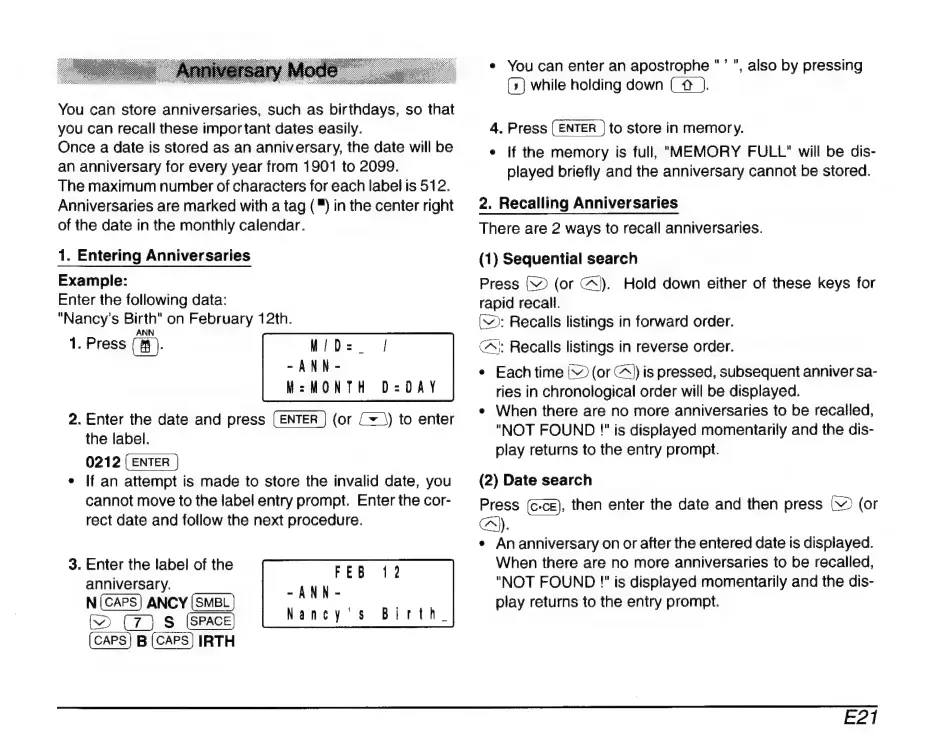
Example:
Enter
the
following
data:
"Nancy’s
Birth"
on
February
12th.
ANN
1.
Press
(8$.
MID:
-ANN-
M=MONTH
D=DAY
2.
Enter
the
date
and
press
(or
{+
\)
to
enter
the
label.
0212
*
If
an
attempt
is
made
to
store
the
invalid
date,
you
cannot
move
to
the
label
entry
prompt.
Enter
the
cor-
rect
date
and
follow
the
next
procedure.
3.
Enter
the
label
of
the
anniversary.
-ANN
EPA
N
(CAPS)
ANCY
(SMEL)
Nancy’s
Birth.
D
S
(cAPS)
B
(CAPS)
IRTH
*
You
can
enter
an
apostrophe
"
'
",
also
by
pressing
(>)
while
holding
down
(
4
).
4.
Press
to
store
in
memory.
¢
If
the
memory
is
full,
MEMORY
FULL"
will
be
dis-
played
briefly
and
the
anniversary
cannot
be
stored.
2.
Recalling
Anniversaries
There
are
2
ways
to
recall
anniversaries.
(1)
Sequential
search
Press
V
(or
X).
Hold
down
either
of
these
keys
for
rapid
recall.
(W:
Recalls
listings
in
forward
order.
C^;
Recalls
listings
in
reverse
order.
*
Each
time
|
(or
A)
is
pressed,
subsequent
anniver
sa-
ries
in
chronological
order
will
be
displayed.
*
When
there
are
no
more
anniversaries
to
be
recalled,
"NOT
FOUND
!"
is
displayed
momentarily
and
the
dis-
play
returns
to
the
entry
prompt.
(2)
Date
search
Press
(c-ce),
then
enter
the
date
and
then
press
NV
(or
C.
+
An
anniversary
on
or
after
the
entered
date
is
displayed.
When
there
are
no
more
anniversaries
to
be
recalled,
"NOT
FOUND
""
is
displayed
momentarily
and
the
dis-
play
returns
to
the
entry
prompt.
E21

Related product manuals