EasyManua.ls Logo

Sharp EL-6660 - Page 4

Sharp EL-6660
50 pages
Print Icon
To Next Page IconTo Next Page
To Previous Page IconTo Previous Page
Loading...
Auto
Power
Off
Function
When
none
of
the
keys
have
been
pressed
for
approxi-
mately
7
minutes,
the
Organizer
automatically
turns
the
power
off
to
save
the
batteries.
(The
actual
time
may
vary
depending
upon
the
condition
of
use.)
Press
to
resume
operation.
Backlight
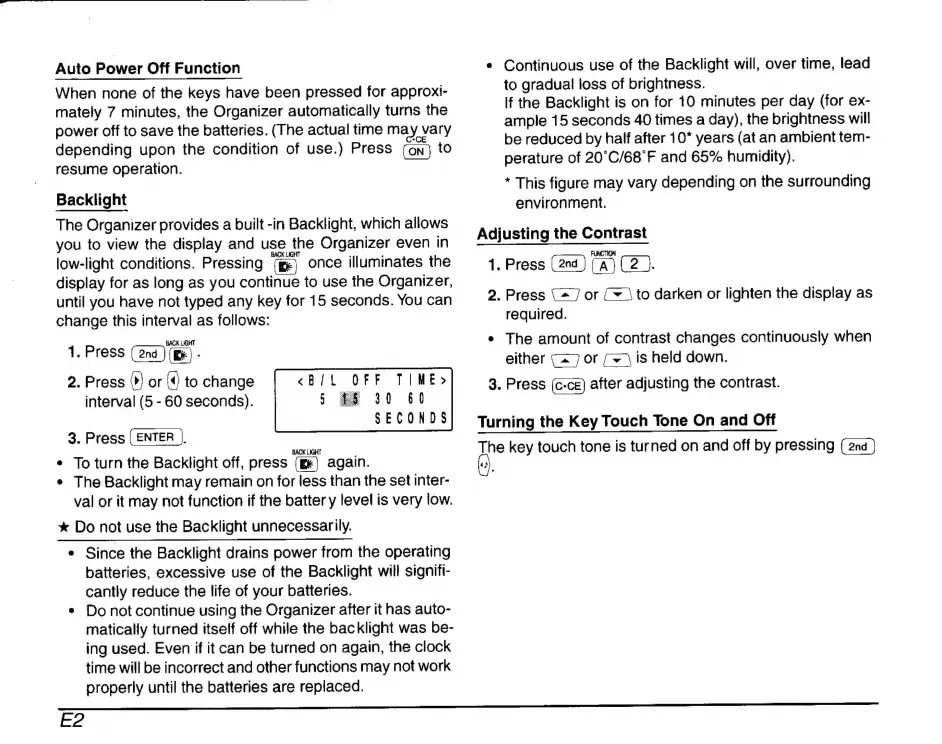
The
Organizer
provides
a
built
-in
Backlight,
which
allows
you
to
view
the
display
and
use
the
Organizer
even
in
low-light
conditions.
Pressing
(ge)
once
illuminates
the
display
for
as
long
as
you
continue
to
use
the
Organizer,
until
you
have
not
typed
any
key
for
15
seconds.
You
can
change
this
interval
as
follows:
1.
Press
(ond)
(E)
-
2.
Press
©)
or
(4
to
change
TIME»
interval
(5
-
60
seconds).
13
60
SECONDS
3.
Press
(ENTER
|).
e
To
turn
the
Backlight
off,
press
again.
*
The
Backlight
may
remain
on
for
less
than
the
set
inter-
val
or
it
may
not
function
if
the
batter
y
level
is
very
low.
*
Do
not
use
the
Backlight
unnecessarily.
DET
e
Since
the
Backlight
drains
power
from
the
operating
batteries,
excessive
use
of
the
Backlight
will
signifi-
cantly
reduce
the
life
of
your
batteries.
*
Do
not
continue
using
the
Organizer
after
it
has
auto-
matically
turned
itself
off
while
the
backlight
was
be-
ing
used.
Even
if
it
can
be
turned
on
again,
the
clock
time
will
be
incorrect
and
other
functions
may
not
work
properly
until
the
batteries
are
replaced.
«
Continuous
use
of
the
Backlight
will,
over
time,
lead
to
gradual
loss
of
brightness.
If
the
Backlight
is
on
for
10
minutes
per
day
(for
ex-
ample
15
seconds
40
times
a
day),
the
brightness
will
be
reduced
by
half
after
10*
years
(at
an
ambient
tem-
perature
of
20'C/68'F
and
65%
humidity).
*
This
figure
may
vary
depending
on
the
surrounding
environment.
Adjusting
the
Contrast
1.
Press
(2
).
2.
Press
{27
or
{+
to
darken
or
lighten
the
display
as
required.
e
The
amount
of
contrast
changes
continuously
when
either
(27
or
(+)
is
held
down.
3.
Press
after
adjusting
the
contrast.
Turning
the
Key
Touch
Tone
On
and
Off
The
key
touch
tone
is
turned
on
and
off
by
pressing
A
E2

Related product manuals