EasyManua.ls Logo

Sharp EL-6660 - Page 43

Sharp EL-6660
50 pages
Print Icon
To Next Page IconTo Next Page
To Previous Page IconTo Previous Page
Loading...
CCE
6.
Press
to
turn
the
power
on.
If
nothing
appears
on
the
display,
press
the
RESET
switch
and
press
and
hold
for
two
or
three
seconds.
7.
Set
the
clock
to
the
correct
time.
3.
Memory
Backup
Battery
Replacement
(1)
Battery
replacement
frequency
*
Replace
the
battery
every
5
years.
When
you
replace
the
batter
y,
write
down
the
date
on
the
label
of
the
Organizer,
so
that
you
know
when
to
replace
the
battery
the
next
time.
For
example,
if
you
replace
the
battery
in
January,
2003,
write:
MEMORY
BACKUP
BATTERY
INSTALLATION
DATE
MONTH
.vgam
1
*
2003
(2)
Precautions
when
replacing
the
memory
backup
battery
*
Make
sure
the
operating
batteries
are
not
depleted.
If
the
operating
batteries
are
depleted,
first
replace
these
before
replacing
the
memor
y
backup
battery.
¢
|f
the
memory
backup
battery
is
replaced
when
the
op-
erating
batteries
are
depleted,
memory
contents
will
be
lost.
(3)
Replacing
the
battery
1.
Press
to
turn
the
power
off.
2.
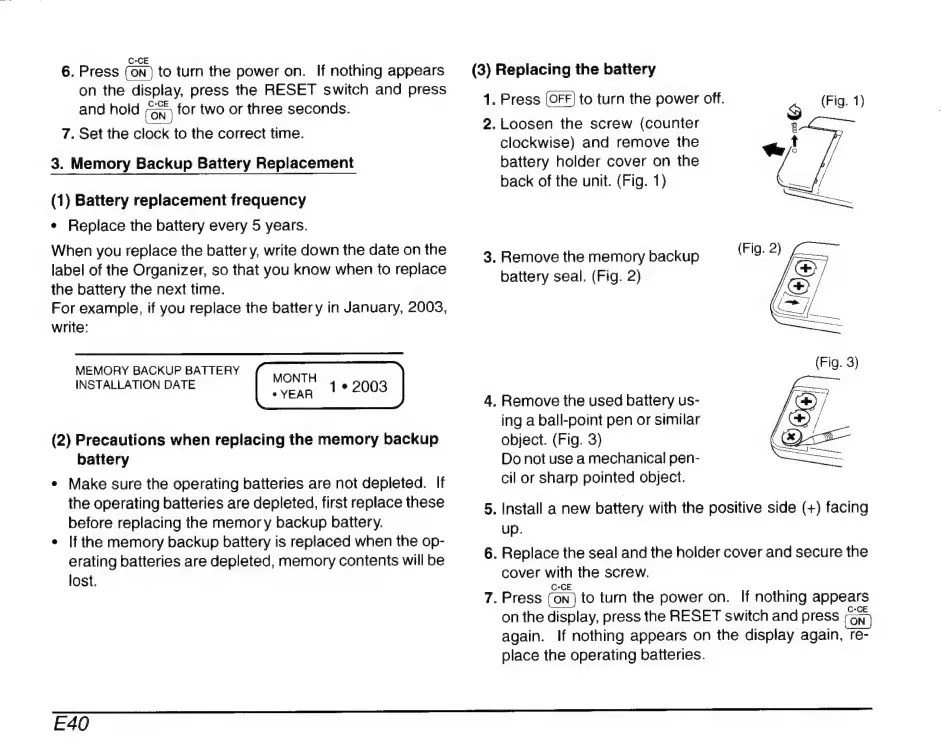
Loosen
the
screw
(counter
clockwise)
and
remove
the
battery
holder
cover
on
the
back
of
the
unit.
(Fig.
1)
3.
Remove
the
memory
backup
battery
seal.
(Fig.
2)
4.
Remove
the
used
battery
us-
ing
a
ball-point
pen
or
similar
object.
(Fig.
3)
Do
not
use
a
mechanical
pen-
cil
or
sharp
pointed
object.
5.
Install
a
new
battery
with
the
positive
side
(+)
facing
up.
6.
Replace
the
seal
and
the
holder
cover
and
secure
the
cover
with
the
screw.
7.
Press
to
turn
the
power
on.
If
nothing
appears
on
the
display,
press
the
RESET
switch
and
press
again.
If
nothing
appears
on
the
display
again,
re-
place
the
operating
batteries.
E40

Related product manuals