EasyManua.ls Logo

Sharp EL-6660 - Page 6

Sharp EL-6660
50 pages
Print Icon
To Next Page IconTo Next Page
To Previous Page IconTo Previous Page
Loading...
^
=:
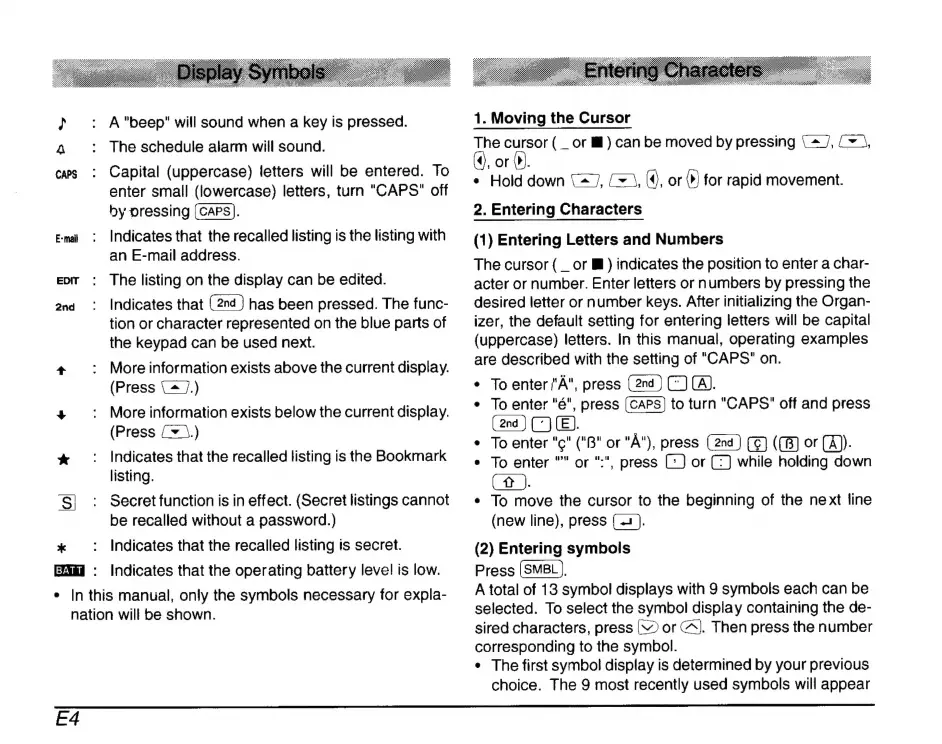
A"beep"
will
sound
when
a
key
is
pressed.
A
:
The
schedule
alarm
will
sound.
ces
:
Capital
(uppercase)
letters
will
be
entered.
To
enter
small
(lowercase)
letters,
turn
"CAPS"
off
by
pressing
(CAPS).
Emi
:
Indicates
that
the
recalled
listing
is
the
listing
with
an
E-mail
address.
eor
:
The
listing
on
the
display
can
be
edited.
2nd
:
Indicates
that
has
been
pressed.
The
func-
tion
or
character
represented
on the
blue
parts
of
the
keypad
can
be
used
next.
+
.
Moreinformation
exists
above
the
current
display.
(Press
(^
7.)
+
|:
More
information
exists
below
the
current
display.
(Press
[+
5.)
*
:
Indicates
that
the
recalled
listing
is
the
Bookmark
listing.
S|
:
Secretfunction
is
in
effect.
(Secret
listings
cannot
be
recalled
without
a
password.)
*
:
Indicates
that
the
recalled
listing
is
secret.
:
Indicates
that
the
operating
battery
level
is
low.
e
|n
this
manual,
only
the
symbols
necessary
for
expla-
nation
will
be
shown.
1.
Moving
the
Cursor
The
cursor
(
_
or
M)
can
be
moved
by
pressing
{2
J,
{+
\,
,
or
iP.
«
Hold
down
127,
m,
(4,
or
(>)
for
rapid
movement.
2.
Entering
Characters
(1)
Entering
Letters
and
Numbers
The
cursor
(
_or
B
)
indicates
the
position
to
enter
a
char-
acter
or
number.
Enter
letters
or
numbers
by
pressing
the
desired
letter
or
number
keys.
After
initializing
the
Organ-
izer,
the
default
setting
for
entering
letters
will
be
capital
(uppercase)
letters.
In
this
manual,
operating
examples
are
described
with
the
setting
of
"CAPS"
on.
e
To
enter
/'Á",
press
CJ
(A).
e
To
enter
"é",
press
to
turn
"CAPS"
off
and
press
OB.
*
To
enter
"c"
("B"
or
"A"),
press
(C8)
or
(A).
*
To
enter
""
or
":",
press
L)
or
CJ
while
holding
down
(t
).
*
To
move
the
cursor
to
the
beginning
of
the
next
line
(new
line),
press
(
2).
(2)
Entering
symbols
Press
(SMBL).
A
total
of
13
symbol
displays
with
9
symbols
each
can
be
selected.
To
select
the
symbol
display
containing
the
de-
sired
characters,
press
(
or
C^].
Then
press
the
number
corresponding
to
the
symbol.
°
The
first
symbol
display
is
determined
by
your
previous
choice.
The
9
most
recently
used
symbols
will
appear
Ed

Related product manuals