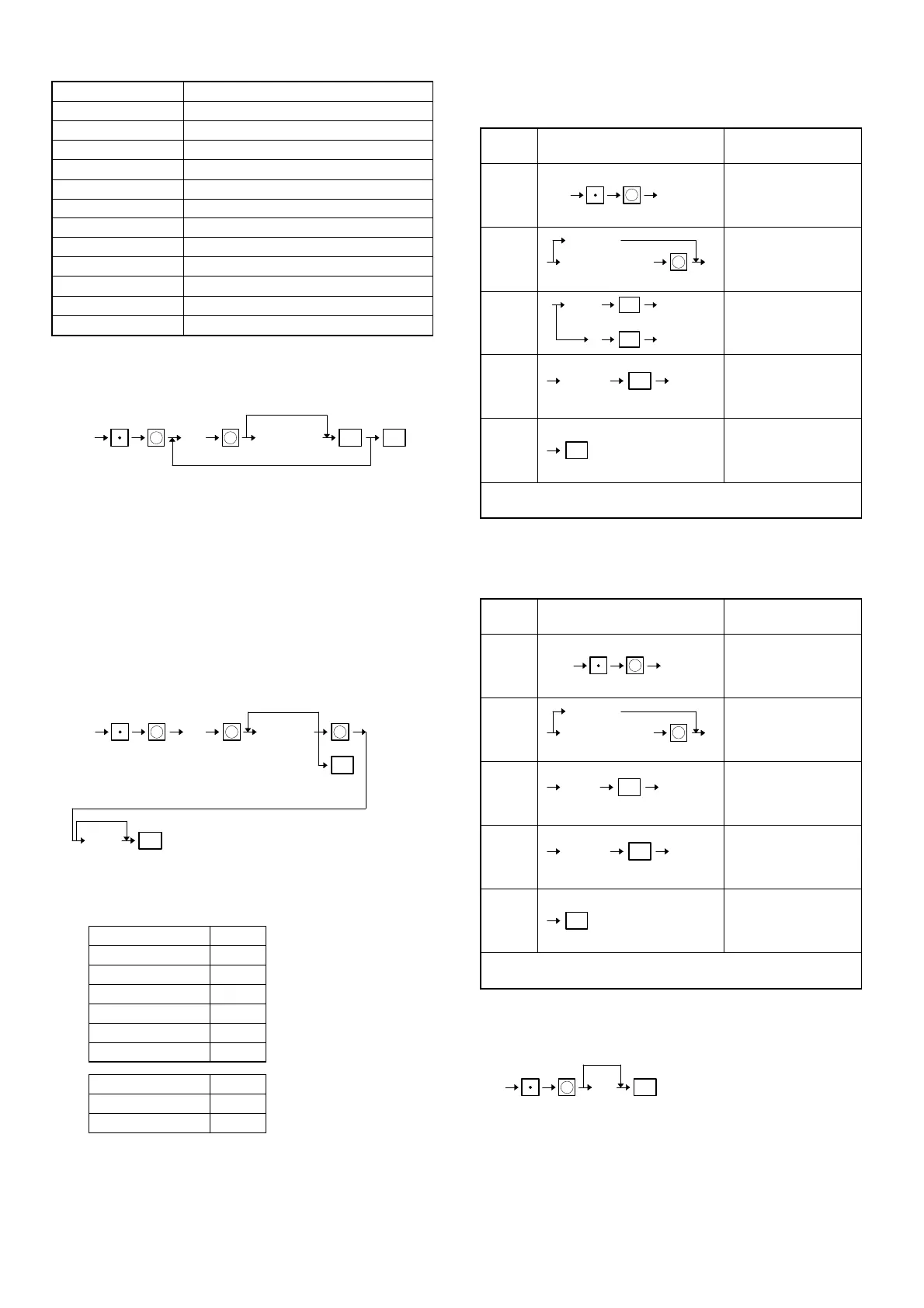
Guidance No. MRS
10 ENTER PLU#
11 DEPT & TYPE
12 BASE Q’TY
13 SIGN AND TAX
14 STOCK
15 MIN. STOCK
16 PINT PRICE
17 PINT Q’TY
18 ENTER EAN#
19 CUSTOM. CODE
20 NAME
21 ADDRESS
[JOB#2646]
PAYEE NAME FOR ENGLISH CHECK PROGRAMMING
X: Position code = 1 to 2
Characters can be entered by using character keys or numeric keys.
the key entery sequence for entering one character by numeric keys
is as follows:
XXX → 00 key XXX: Character code (3 digits)
Please refer to section 3
1 Block max. 21 characters
MRS =" "
" "
[JOB#2711]
TAX RATE PROGRAMMING
∗ DEPRESSION OF THE ST KEY AT FOLLOWING POINTS PER-
FORM A TAX TABLE DELETE OPERATION.
A: Tax programming A
Tax1 1
Tax2 2
Tax3 3
Tax4 4
Tax5 5
Tax6 6
y: Sign y
+ 0
–1
xxx.xxxx: Rate = 0.0000~100.0000%
LOWER TAX LIMITATION max. 999.99
(This is invalid in VAT system.)
MRS = 0
[JOB#2850]
Programming of customer code, name and address
Step
No.
Key sequence Display
1 CUSTOM. CODE
2NAME
3 ADDRESS
4 CUSTOM. CODE
5
The entry moves the next step by key and returns the previous
step by ( key)
[JOB#2851]
Programming of customer code, name and address for new customer
code which is programmed by the learning function.
Step
No.
Key sequence Display
1
Programmed name
is displayed
2
Programmed name
is displayed
3
Programmed
address is displayed
4
Name of next code
is displayed
5
The entry moves the next step by key and returns the previous
step by ( key)
[JOB#2869]
Programming of delete period for customer detail data
XX: Delete period = 0~99 months
When XX is "00", the customer detail data is notdeleted.
MRS = 12
2646
TL
X
Space
X
X
Character key
ST
Position code
2711
YXXX.XXXXA
Declaration of TAX TAX rate
TL
When lower tax
limit is 0.
XXXXX
TL
Lower tax limit
for add. tax.
X X X
0
✽
0
XXXXXXXXXXXXX
X
(Scanning)
Customer code
(Name)
ST
16 chara.
ST
4 (Delete)
XXXXXXXXXXXXX
X
(Scanning)
Customer code
2869
TL
XX
0 (Not available)
X
49



 To Next Page