EN - 14
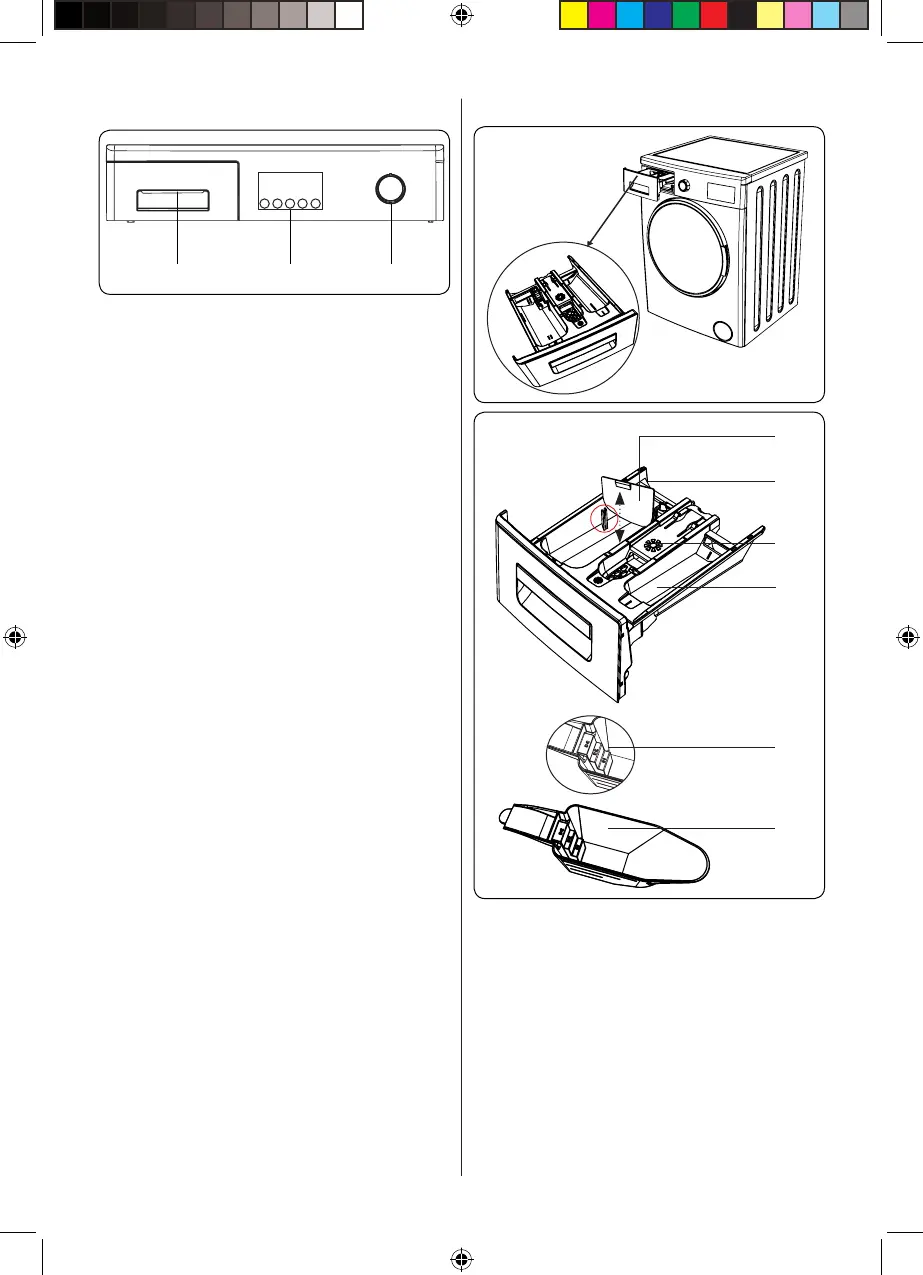
5. CONTROL PANEL OVERVIEW
1 2 3
1. Detergent drawer
2. Additional Function Buttons: Use
these buttons to select additional
functions for the laundry programme.
See Additional Functions for more
information.
3. Programme Dial: Use the programme
dial to select the washing / drying
programme for your laundry. Turn
the programme dial clockwise or
anticlockwise to select the required
programme. Make sure that the dial
is pointing exactly at the selected
programme.
4. Start/Pause button: Start or pause the
selected programme.
5.1. Detergent Drawer General View
1
2
3
4
5
6
1. Liquid Detergent Attachments (*)
2. Main Wash Detergent Compartment
3. Softener Compartment
4. Pre-Wash Detergent Compartment
5. Powder Detergent Levels
6. Powder Detergent Scoop (*)
(*) Specifications may vary depending on
the machine purchased.
52241755_D4_EN_new_reg.indd 14 24.05.2018 09:07:11


 To Next Page