EN - 16
4.1 Monochrome Control Unit
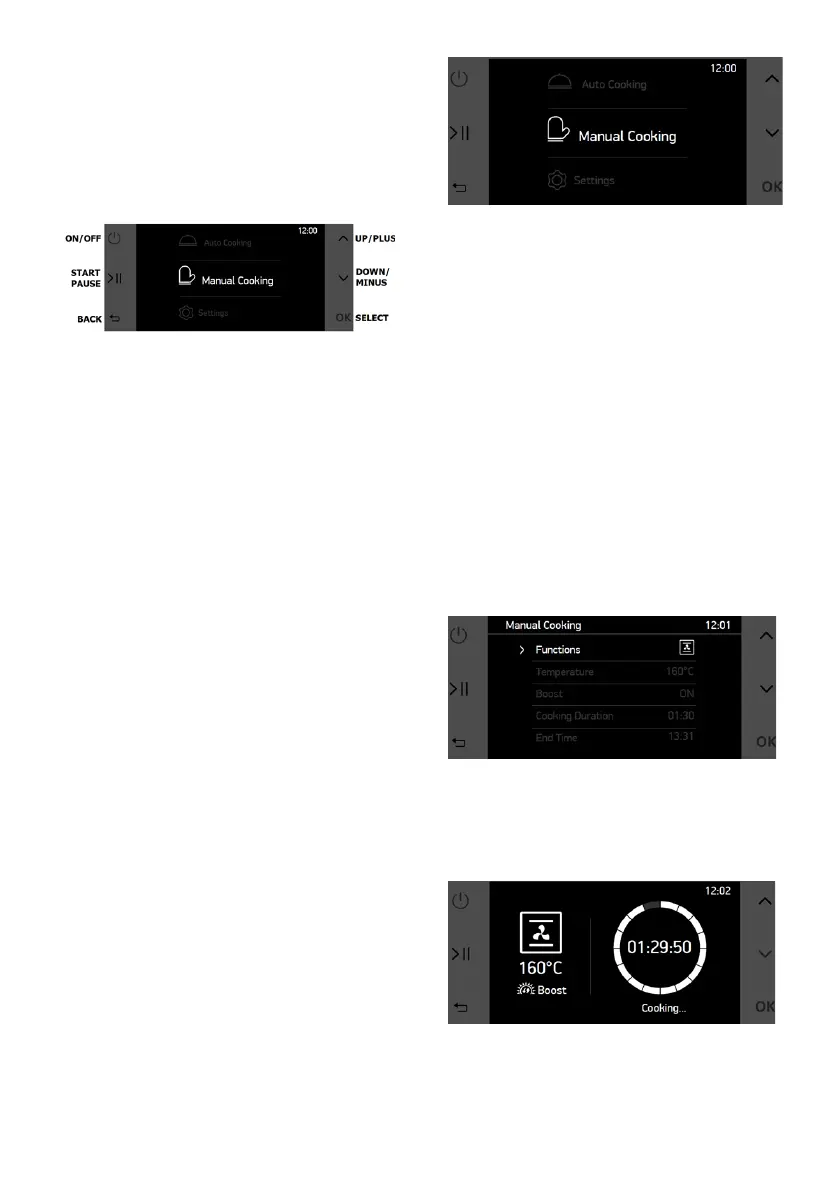
Monochrome control unit consist of
a 4.3” monochrome LCD screen and
6 different touch buttons. Function
of the touch buttons of monochrome
control unit’s are described at below.
Monochrome control unit is designed
on principles such as making amateur
users to be able to implement
professional recipes easily with auto
cooking functions, also allowing
housewives to implement their own
inspired recipes with combined
manual cooking functions.
Monochrome control unit’s menus
such as manual cooking, auto cooking
and settings are described as below.
Manual Cooking:
Every cooking setting can be set by
user in the manual cooking. 7 different
cooking functions, temperature,
boost function, cooking duration and
cooking end time can be selected.
With the exiability of manual cooking
any cooking can be performed by
users with respect their own taste.
To perform cooking in the manual
cooking menu, below listed steps
should be followed.
• Use UP & DOWN buttons to naviga-
te in main menu.
• Tap OK button to when “Manual Co-
oking” is selected.
In the manual cooking menu, cooking
functions, temperature, boost function,
cooking duration and cooking end
time can be set by end user. To
change any specication, navigate
with UP & DOWN buttons and select
the specication with OK button. After
tapping, selected specication blinks.
While blinking, UP & DOWN buttons
are used to change the value of the
specication. You can nalize the
selection by tapping OK button.
NOTE: If cooking duration is set as
00:00, cooking continues until user
stops manualy.
To start cooking tap the START/
PAUSE button and cooking screen will
appear as below.
On the cooking screen;
• START/PAUSE button can be used
to pause or restart the cooking,



 To Next Page