EN - 17
• Temperature can be changed by tap-
ping UP & DOWN buttons,
• While any cooking function is activa-
ted, BACK button is tapped to navi-
gate between oven function, tempe-
rature and cooking time. When any
specication is blinking, value of it can
be changed bytapping UP & DOWN
buttons.
• To stop cooking and go back to main
menu, tap START/PAUSE button,
then tap to BACK button.
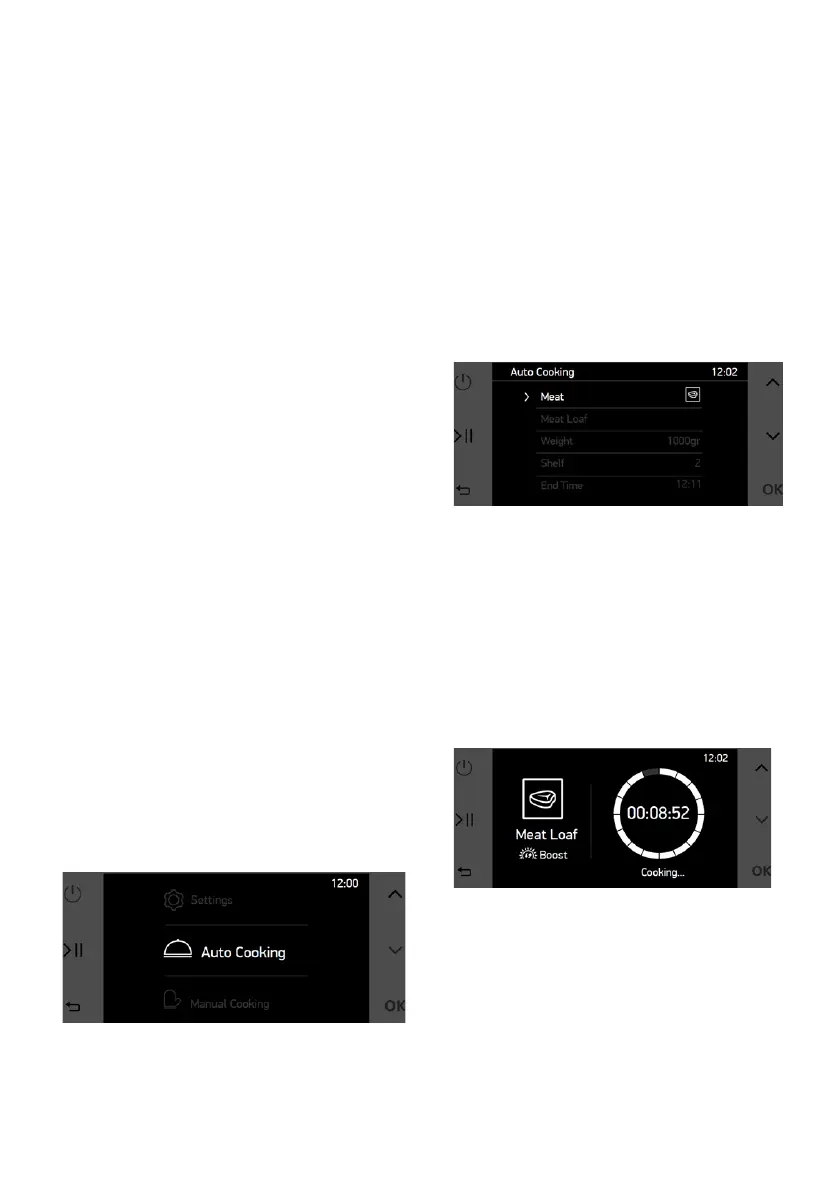
Auto Cooking:
Pre determined recepies which are
prepared by professional cooks are
can be used by end user with auto
cooking menu. In auto cooking menu,
only name of the meal is selected
by user, every cooking settings like
cooking function, duration, temperature
is set by monochrome control unit
automaticaly.
To perform cooking with auto cooking
menu, below mentioned steps should
be followed.
• Use UP & DOWN buttons to navigate
in main menu.
• Tap OK button to when “Auto Coo-
king” is selected.
In the auto cooking menu, category,
name and weigth of the recipe is
selected by end user. Also cooking
end time can be changed by end
user. To change any specication,
navigate with UP & DOWN buttons
and select the specication with OK
button. After tapping, selected
specication blinks. While blinking,
UP & DOWN buttons are used to
change the value of the specication.
You can nalize the selection by
tapping OK button.
NOTE: To achive best cooking
performance, tray should placed to
displayed shelf.
To start cooking tap the START/
PAUSE button and cooking screen
will appear as below.
On the cooking screen;
• START/PAUSE button can be used
to pause or restart the cooking,
• To stop cooking and go back to main
menu, tap START/PAUSE button,
then tap to BACK button.



 To Next Page