EasyManua.ls Logo

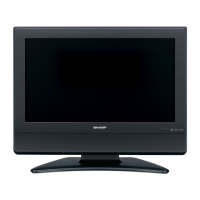
Sharp LC-26SA1E - User Manual

Sharp LC-26SA1E
28 pages
Print Icon
To Next Page IconTo Next Page
Loading...
LCD COLOUR TELEVISION
LCD-FARBFERNSEHGERÄT
TÉLÉVISION COULEUR À ÉCRAN
À CRISTAUX LIQUIDES (LCD)
TELEVISORE A COLORI LCD
LCD-KLEURENTELEVISIE
TELEVISIÓN EN COLOR LCD
OPERATION MANUAL
BEDIENUNGSANLEITUNG
MODE D’EMPLOI
MANUALE DI ISTRUZIONI
GEBRUIKSAANWIJZING
MANUAL DE MANEJO
LC-26SA1E LC-26SV1E LC-32SA1E LC-32SV1E
Printed in Hungary
Gedruckt in Ungarn
Imprimé en Hongrie
Stampato in Ungheria
Gedrukt in Hongarije
Impreso en Hungría
TINS-C612WJZZ
OPERATION MANUAL / BEDIENUNGSANLEITUNG / MODE D’EMPLOI / MANUALE DI ISTRUZIONI / GEBRUIKSAANWIJZING / MANUAL DE MANEJO
LC
-
26SA1E
LC
-
26SV1E
LC
-
32SA1E
LC
-
32SV1E
C612WJZZ
1
ENGLISH
FRANÇAIS
DEUTSCH
ITALIANO
NEDERLANDS
ESPAÑOL
06P08-HU-NG
PIN
Printed on environmentally friendly paper
Auf ökologischem Papier gedruckt
Imprimé sur papier écologique
Stampato su carta ecologica
Afgedrukt op ecologisch papier
Impreso en papel ecológico


Other manuals for Sharp LC-26SA1E

Questions and Answers

  • J
    James JonesAug 13, 2025
    How to turn on Sharp LC-26SA1E LCD TV if there is no power?
    • A
      Amber RogersAug 13, 2025
      If your Sharp LCD TV has no power, first ensure that you have pressed the power button on the remote. If the indicator light on the TV is red, pressing the power button should resolve this. Also, check the AC cord to ensure it is properly connected. Finally, check the power button on the TV itself.
  • C
    Christine GrayAug 17, 2025
    What to do if there is no sound on my Sharp LC-26SA1E LCD TV?
    • H
      hughesstaceyAug 17, 2025
      If there is no sound on your Sharp LCD TV, first verify that the volume isn't set too low. Also, ensure that headphones are not connected to the TV. Finally, check that you haven't accidentally pressed the mute button on the remote.
  • D
    David AndersenAug 20, 2025
    Why does my Sharp LCD TV power off suddenly?
    • M
      Martin SmithAug 21, 2025
      If your Sharp LCD TV suddenly turns off, it could be due to a few reasons. First, the unit’s internal temperature may have increased, so remove any obstructions blocking the vents or clean them. Also, check the power control settings and ensure the sleep timer isn't set. If it is set, press the SLEEP button on the remote until it is off.
  • J
    joshua69Aug 25, 2025
    Why Sharp LCD TV remote control unit does not operate?
    • R
      richard41Aug 25, 2025
      If the remote control for your Sharp LCD TV isn't working, start by checking the batteries. Ensure they are inserted with the correct polarity and replace them if they are worn out. Strong or fluorescent lighting may also interfere with the remote's operation. Check to see if a fluorescent light is illuminated to the remote control sensor.
  • C
    Cindy OlsonAug 27, 2025
    What to do if there is no picture on my Sharp LC-26SA1E LCD TV?
    • P
      pmullinsAug 28, 2025
      If there is no picture on your Sharp LCD TV, first ensure that all connections to other components are correct. Then, verify that the input signal type is correctly selected. Make sure the correct input source is selected. Check that a non-compatible signal isn't being input. Ensure picture adjustments are correct, that the antenna is connected properly, and that 'On' is not selected in 'Audio Only'.
  • M
    Mary PowellSep 1, 2025
    Why does my Sharp LC-26SA1E have strange colors?
    • L
      Lauren PerrySep 1, 2025
      If you are experiencing strange, light, or dark colors, or color misalignment on your Sharp LCD TV, try adjusting the picture tone. Also, consider the room's brightness, as a bright room can make the picture appear dark. Check the color system and HDMI setup settings as well.
  • P
    Paige NormanSep 4, 2025
    What to do if Sharp LCD TV unit cannot be operated?
    • A
      awilsonSep 4, 2025
      If your Sharp LCD TV cannot be operated, it may be due to external influences such as lightning or static electricity. To resolve this, turn the power off, or unplug the AC cord and re-plug it in after 1 or 2 minutes, then try operating the unit again.
  • G
    Garrett HumphreySep 8, 2025
    How to fix cut off picture on Sharp LCD TV?
    • S
      Shannon RaySep 8, 2025
      If the picture on your Sharp LCD TV is cut off, ensure that the image position is correct. Also, check the screen mode adjustments (4:3 Mode/WSS) to make sure the picture size is set correctly.

Sharp LC-26SA1E Specifications

General IconGeneral
BrandSharp
ModelLC-26SA1E
CategoryLCD TV
LanguageEnglish

Related product manuals