EasyManua.ls Logo

Sharp LC-39LE650E - Connectivity and Media Playback; Network Configuration and Setup; External Device Connection Guide

Sharp LC-39LE650E
148 pages
Print Icon
To Next Page IconTo Next Page
To Previous Page IconTo Previous Page
Loading...
28
LC-39/50LE650
LC-39/50LE651
LC-39/50LE652
2. Removing of major Parts 50”
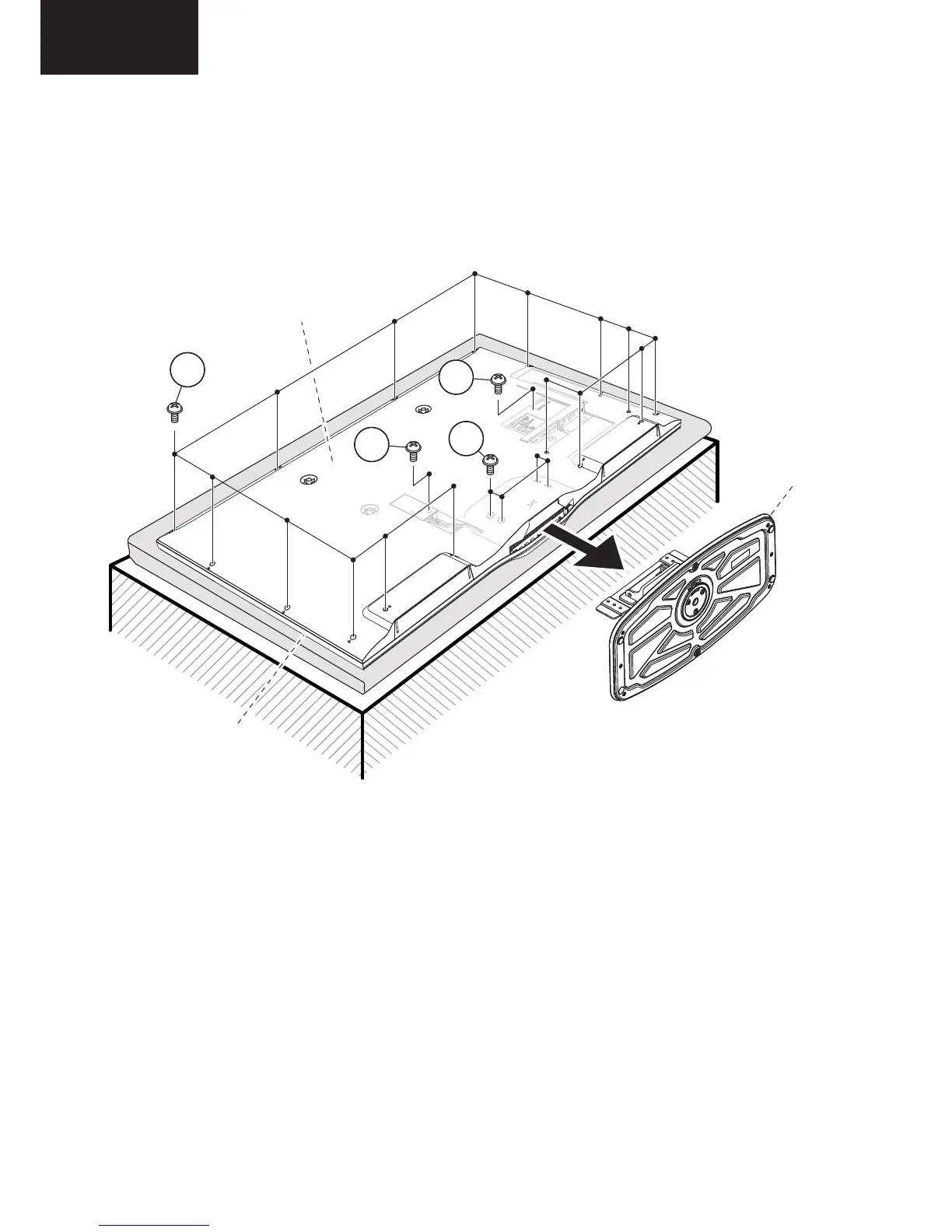
2.1. Remove the 4 lock screws and detach the Stand.
2.2. Remove the 14 lock screws , 1 lock screw , 1 lock screw and detach the AC cord cover and Rear Cabinet
LC-50LE650
LC32D44E-BK
Service Manual
CHAPTER 2. REMOVING OF MAJOR PARTS
[1] REMOVING OF MAJOR PARTS
1. Remove the 4 lock screws and detach the Stand.
2. Remove the 14 lock screws , 1 lock screw , 1 lock screw and detach the AC cord cover and the Rear Cabinet.
2
1
3
4
1 / 5
1 / 5
STAND
2
front
CABINET
rear
CABINET
1
3
4
STAND

Other manuals for Sharp LC-39LE650E

Related product manuals