32
Viewing the Built-in Operation Manual/XXXXXX/XXXXXX
ENGLISH
Viewing the Built-in Operation Manual
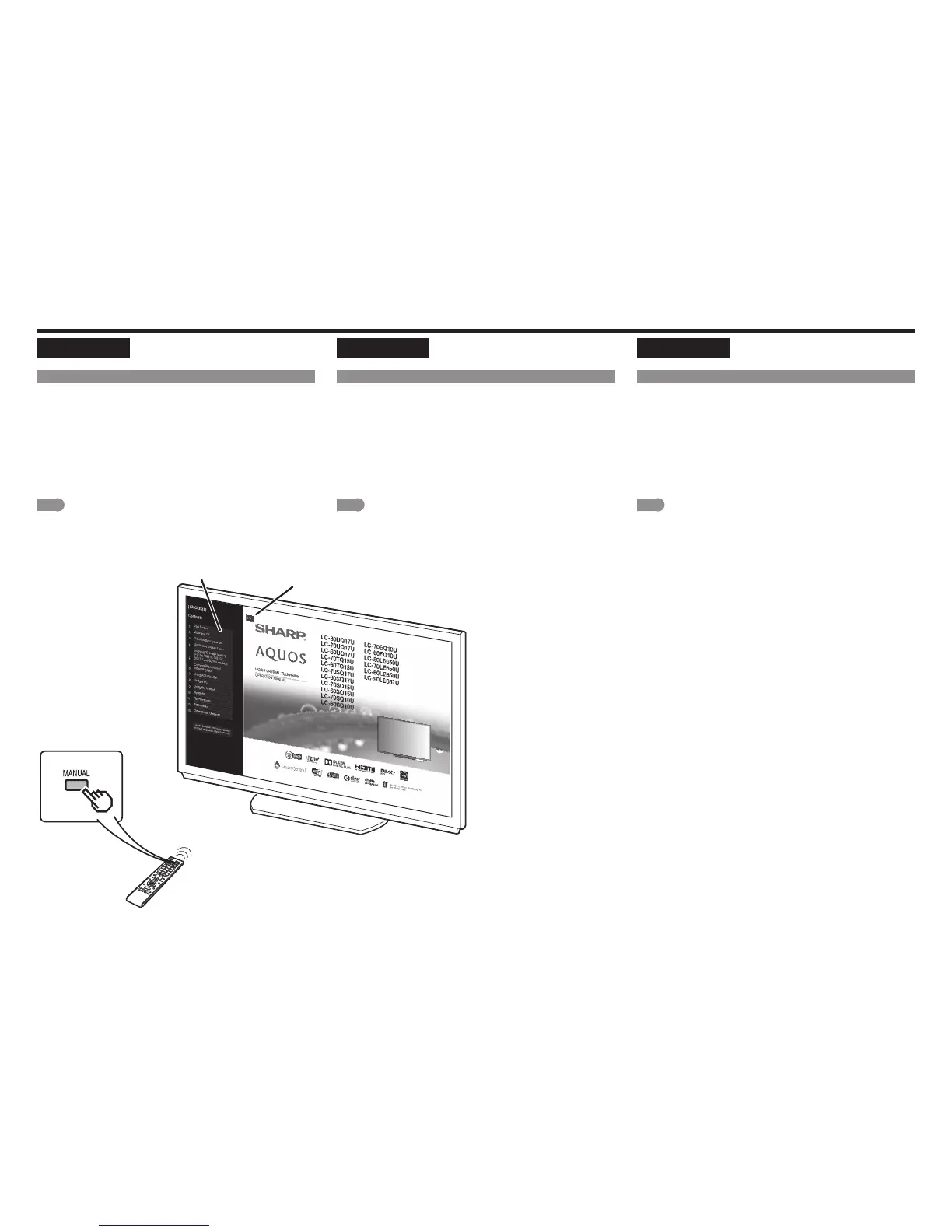
Press MANUAL on the remote control unit to display operation
information on the screen.
To search for an item from the table of contents, and to search
for a particular term and to find troubleshooting information, press
MANUAL while watching the TV and then select the applicable item
from the manual cover page that appears.
1
Press MANUAL while watching the TV.
This displays the e-manual screen.
2
When you select contents, its page will be displayed.
3
You can turn over the page one by one for these arrow marks.
NOTE
• To change the language of the manual, select "MENU" > "Easy Setup" >
"Language" to change the language.
• You can also display the e-manual by selecting "Information" > "Manual" from
the menu screen.
FRANÇAIS
Viewing the Built-in Operation Manual
Press MANUAL on the remote control unit to display operation
information on the screen.
To search for an item from the table of contents, and to search
for a particular term and to find troubleshooting information, press
MANUAL while watching the TV and then select the applicable item
from the manual cover page that appears.
1
Press MANUAL while watching the TV.
This displays the e-manual screen.
2
When you select contents, its page will be displayed.
3
You can turn over the page one by one for these arrow marks.
NOTE
• To change the language of the manual, select "MENU" > "Easy Setup" >
"Language" to change the language.
• You can also display the e-manual by selecting "Information" > "Manual" from
the menu screen.
ESPAÑOL
Viewing the Built-in Operation Manual
Press MANUAL on the remote control unit to display operation
information on the screen.
To search for an item from the table of contents, and to search
for a particular term and to find troubleshooting information, press
MANUAL while watching the TV and then select the applicable item
from the manual cover page that appears.
1
Press MANUAL while watching the TV.
This displays the e-manual screen.
2
When you select contents, its page will be displayed.
3
You can turn over the page one by one for these arrow marks.
NOTE
• To change the language of the manual, select "MENU" > "Easy Setup" >
"Language" to change the language.
• You can also display the e-manual by selecting "Information" > "Manual" from
the menu screen.







 To Next Page