■ Recording desired tracks from a compact disc
onto a MiniDisc (Track Editing)
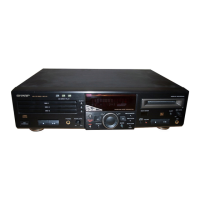
1 Press the CD ■ button.
2 Load a compact disc and a recordable MiniDisc.
3 Select the track to start recording by turning the jog dial.
● The selected track number appears.
4 Press the TRACK button.
● To record a single track, skip to step 6.
5 Select the last track to record by repeatedly pressing the
TRACK button.
6 Press the START button.
● Recording will start from the tracks selected in disc 1, disc 2
and disc 3, in that order. After recording, the CD and the MD
will stop automatically.
To cancel the track edit operation:
Press the CD ■ button before pressing the START button.
To stop recording:
Press the MD ■ button.
● It is not possible to pause recording.
(Continued)
■ APMS recording
1 Select tracks for APMS playback. (Page 15)
2 Load a recordable MiniDisc.
3 Press the START button.
● APMS playback will start, and recording will start automati-
cally.
● Programmed tracks will be recorded in order. After the unit
has finished recording the last track, recording will stop au-
tomatically.
To stop recording:
Press the MD ■ button.
■ To record without using One-Touch Editing
Without using one-touch recording, the following operation allows
you to record from the first track.
1 Press the CD ■ button.
2 Load a compact disc and a recordable MiniDisc.
3 Press the REC ● button.
● The unit will enter the recording stand-by mode.
4 Press the CD
0 6
button.
To stop recording:
Press the MD ■ button.
● After the track number has been written on the MiniDisc, the
recording will stop. However, CD playback will continue.
START
RECORD
TRACK
3
4
5
TOC DISC
REMAIN
1 2 3 4 5 6 7
8 9 10 11 12
TOC
TOTAL
3
TOC
TOTAL
3 4 5 6 7
Track number at which recording starts
Starting
track
Ending
track
Total playing time from the
third track to the seventh track
MD-R3
21


 To Next Page