EasyManua.ls Logo

Sharp MD-MT20H - User Manual

Sharp MD-MT20H
44 pages
Print Icon
To Next Page IconTo Next Page
Loading...
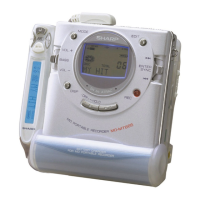
PORTABLE MINIDISC RECORDER
MD-MT20H
MODEL
OPERATION MANUAL
* MD-MT20H FOR UK(F/R) 99.3.11, 2:29 PM1

Questions and Answers

  • E
    Evelyn PetersonJul 29, 2025
    Why my Sharp Minidisc Recorder does not turn on?
    • C
      Curtis BrownJul 29, 2025
      The Sharp Minidisc Recorder might not be turning on because the AC adapter is disconnected. Ensure it is properly connected. Alternatively, the battery may be exhausted, requiring a replacement. The unit could also be in hold mode, which needs to be disabled. Condensation inside the unit or external factors like mechanical shock or static electricity can also prevent it from turning on; in such cases, wait for the condensation to evaporate or ensure a stable environment.
  • M
    Mary DoughertyAug 3, 2025
    What to do if recording and editing are impossible on Sharp Minidisc Recorder?
    • C
      cameronbeckAug 3, 2025
      If recording and editing are impossible on your Sharp Minidisc Recorder, first check if the MiniDisc is protected against accidental erasure and remove the protection if it is. Ensure the unit is properly connected to the other equipment. Also, verify that the AC adapter is connected. Disable the hold mode. Finally, confirm that the external equipment is outputting an optical signal.
  • C
    Carla MorrowAug 8, 2025
    How to fix no sound from earphones on Sharp Minidisc Recorder?
    • M
      Mark SalinasAug 8, 2025
      If you're not hearing any sound from the earphones connected to your Sharp Minidisc Recorder, start by increasing the volume. Check the connection of the remote control unit or earphones to ensure they are properly plugged in. Make sure you are using a MiniDisc containing music, not just data.
  • R
    Richard WilsonAug 13, 2025
    What to do if Sharp Minidisc Recorder operation buttons do not respond?
    • C
      Charles DiazAug 13, 2025
      If your Sharp Minidisc Recorder doesn't respond when you press the operation buttons, first check if the unit is in hold mode and disable it. If that's not the issue, the battery may be exhausted, so replace it. Also, make sure that the remote control unit plug or the earphone plug is inserted firmly.
  • W
    Willie RodriguezAug 18, 2025
    Why my Sharp Minidisc Recorder skips some sounds?
    • R
      Raven MedinaAug 18, 2025
      If your Sharp Minidisc Recorder is skipping sounds, the battery might be exhausted, so try replacing it. Also, check if the unit is being subjected to excessive vibration and place it on a stable surface.
  • J
    joshua61Aug 25, 2025
    What to do if MiniDisc cannot be ejected from Sharp Minidisc Recorder?
    • C
      Caleb StephensAug 25, 2025
      If the MiniDisc cannot be ejected from your Sharp Minidisc Recorder, ensure that the disc is not in writing mode. Also, check if the unit is in the recording or editing mode, and exit these modes.

Summary

Safety and User Guidance

UK User Information and Warnings

Service information, AC adaptor warnings, and compliance notes specific to UK users.

Operational Safety Cautions

Safety precautions for laser, fire, shock hazards, and hearing protection.

Usage and Storage Precautions

Guidelines for safe listening volume, considering others, and proper unit storage.

Power and Battery

Rechargeable Battery Handling

Detailed information on handling, charging, and care for the rechargeable battery.

Power Source Options

Instructions for using rechargeable, alkaline, and AC power sources.

Recording Procedures

Recording Basics and Disc Types

Understanding recording types (analogue/digital) and MiniDisc disc types.

Recording Methods

Guides for analogue, digital, and microphone recording procedures.

Playback Features

Basic Playback Operation

Step-by-step guide to inserting a MiniDisc and starting playback.

Playback Navigation and Modes

Playback precautions, track searching (APSS), and playback modes like random/repeat.

Time Information Display

How to check remaining disc time, total playing time, and track elapsed time.

Advanced Functions and Editing

Convenient Recording Features

Timed auto-mark, recording as single track, checking disc time.

Disc and Track Management

Erasing tracks, managing track numbers, and understanding the Table of Contents (TOC).

MiniDisc Editing Operations

Editing functions like move, divide, combine, and naming discs/tracks, plus name/stamp.

System Information and Support

External Connections

Instructions for connecting the unit to external audio systems like car stereos.

Unit Operations and Settings

Monitoring battery, hold function, sound settings, auto-play, and power save.

MiniDisc Handling and Care

Proper handling, storage, and cleaning of MiniDiscs.

Troubleshooting, Errors, and Maintenance

Common problems, limitations, error messages, and maintenance procedures.

Product Guarantee

Details regarding the terms and conditions of the product guarantee.

Sharp MD-MT20H Specifications

General IconGeneral
BrandSharp
ModelMD-MT20H
CategoryMinidisc Recorder
LanguageEnglish

Related product manuals