Need help?
Do you have a question about the Sharp MX-5141N and is the answer not in the manual?
Key safety precautions for using the fax function.
Explanation of warning and caution symbols used throughout the manual.
Critical guidelines for safe handling and use of the power cord.
Machine placement requirements for surface, moisture, and temperature.
General warnings and precautions for safe machine operation.
Details on laser specifications and necessary eye protection.
Cautions regarding hot parts and potential pinch points during operation.
Step-by-step instructions for powering the machine on and off correctly.
Important warnings related to power failures and turning off the machine.
Overview of Copy, Fax, Email, FTP/Desktop, HDD retrieve, and Job Status functions.
Guide to copying: function selection, original placement, scanning, preview, and start.
Steps for sending faxes: placing originals and selecting recipients.
Instructions for replacing toner cartridges when they are low or empty.
Step-by-step instructions to clear paper jams from the machine.
Important warnings regarding hot components during maintenance.
Details on fax line compatibility, transmission speed, and coding methods.
Specs for network printing, PDLs, OS compatibility, and protocols.
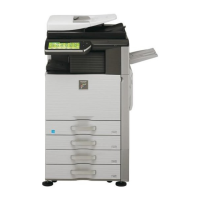
This document is a Quick Start Guide for the SHARP DIGITAL FULL COLOUR MULTIFUNCTIONAL SYSTEM, models MX-4140N, MX-4141N, MX-5140N, and MX-5141N. It provides essential information for users to quickly set up and operate the device, covering safety instructions, basic operations, and maintenance procedures.
The SHARP Multifunctional System is a versatile device designed for various office tasks, primarily focusing on digital full-color copying, scanning, and faxing. It integrates multiple functions into a single unit, streamlining document management and workflow.
Copy Function: The device excels at producing high-quality color copies from original documents. Users can place originals on the document glass or in the automatic document feeder (ADF) for scanning. The system allows for various copy settings, including the number of copies, color mode, 2-sided copying, and copy ratio. It also features a "Document Filing" function, which saves scanned originals and settings to the hard disk for later use or re-editing.
Fax Function: Equipped with a facsimile expansion kit (MX-FX11), the system can send and receive faxes over general phone lines (PSTN) or private branch exchanges (PBX). It supports various scanning line densities, including normal, small, fine, and high-definition, and connection speeds up to Super G3 (33.6 kbps). The device can transmit originals up to A3 size and store a significant number of entries in its touch dial memory, including group dialing for fax, scanner, and Internet fax.
Scan Function: The system operates as a color scanner, capable of scanning documents at various resolutions (from 100 x 100 dpi to 600 x 600 dpi for push scan, and up to 9,600 dpi for pull scan). It supports both Reversing Single Pass Feeder (RSPF) and Duplex Single Pass Feeder (DSPF) for efficient one-sided and two-sided scanning. Scanned files can be saved in multiple formats, including TIFF, PDF, PDF/A, encrypted PDF, and XPS, with various compression methods. The scanned data can be sent via E-mail, FTP/Desktop, or stored on the device's hard disk for later retrieval.
Network Printer Function: The device also functions as a network printer, supporting various page description languages like PCL6 emulation, Adobe® PostScript® 3™, and XPS. It is compatible with a wide range of operating systems, including Windows and Macintosh, and supports common network protocols like TCP/IP, IPX/SPX, IPP, and EtherTalk. The printer offers continuous print speeds comparable to its copy speeds and high-resolution output.
Wireless LAN Function (Optional): For enhanced connectivity, the system can be equipped with Wireless LAN capabilities, supporting IEEE 802.11n/g/b standards. This allows for flexible placement within an office environment without the need for direct network cabling. It supports various security protocols like WEP, WPA-PSK, WPA-EAP, WPA2-PSK, and WPA2-EAP.
Operation Panel: The machine features an intuitive operation panel with a touch screen and a [Home Screen] button. The touch panel allows users to navigate through various functions and settings by tapping icons. The [Home Screen] button provides quick access to the main menu. The touch panel supports various gestures, including tap, double tap (for enlarging/reducing images), press (for short-time key holding), flick (for scrolling preview images), drag (for rotating/deleting pages), pinch, and spread (for reducing/enlarging browser/preview display).
Power Management: The device has a main power switch located at the bottom left, behind the front cover, and a power button on the operation panel. To turn on, the main power switch is set to "I" and then the power button is pressed. To turn off, the power button is pressed, followed by setting the main power switch to "O". Restarting the machine, often required for settings to take effect, involves pressing the power button to turn off and then on again. For fax and Internet fax functions, the main power switch should always remain in the "I" position.
Document Feeders: The machine is equipped with an Automatic Document Feeder (ADF) for efficient scanning of multiple originals. Users can simply place documents in the ADF, ensuring they align with the edges and are inserted all the way. For single or thick documents, the document glass can be used, with instructions for aligning to the corner or placing thick books.
User's Manual and Guides: Beyond this Quick Start Guide, comprehensive documentation is available. The "User's Manual" can be downloaded from the machine to a computer, providing detailed information on printer and settings modes. A "Software Setup Guide" (CD-PDF) explains how to install necessary drivers for printer, network scanner, or fax functions. An "Operation Guide" is accessible directly from the machine's touch panel, offering quick overviews and troubleshooting tips for specific modes.
Administrator Functions: The system includes robust administrative features. An administrator can configure the machine to forward all transmitted and received data (scanned, faxed, or emailed) to a specified destination for archiving, ensuring data integrity and compliance. Access to these settings requires administrator-level privileges and a password. The device also supports user verification, which may be required for accessing certain functions or downloading manuals.
Toner Cartridge Replacement: The system provides clear indicators for toner levels. When toner is low, a "Prepare a new toner cartridge" message appears, prompting the user to have a replacement ready. When toner runs out, a "Replace the toner cartridge" message is displayed. The guide provides a step-by-step process for replacing toner cartridges, including opening the front cover, gently pulling out the old cartridge, shaking the new one 5-6 times, inserting it straight until it locks, and closing the cover. Users are advised to use only SHARP-recommended toner cartridges to ensure optimal quality and prevent damage.
Misfeed Removal: In the event of a paper misfeed, the machine displays a "A misfeed has occurred" message on the touch panel, halting printing and scanning. The guide instructs users to touch the "[Check how to remove misfeeds]" key on the touch panel, which will provide on-screen instructions for clearing the misfeed. It emphasizes caution, as the fusing unit and paper exit area can be hot, posing a risk of burns.
Supply Storage: Proper storage of supplies is crucial for maintaining machine performance. Toner cartridges should be stored horizontally, top side up, in a clean, dry location with a stable temperature, away from direct sunlight. Storing them on end can lead to uneven toner distribution. Paper should be stored in its wrapper, lying flat, to prevent curling and misfeeds.
Spare Parts and Consumables: SHARP guarantees the supply of spare parts for repair for at least 7 years following the termination of production. These parts cover components that may break down under normal use. Consumables, such as toner and staple cartridges, are also available for 7 years. Users are encouraged to use SHARP-specified products for all consumables to ensure optimal machine performance and longevity.
Safety Instructions: The guide includes important safety instructions for both general use and fax functions. These cover precautions related to electrical connections, handling power cords, avoiding installation in unstable or unsuitable environments (e.g., dusty, humid, excessively hot/cold, poor air circulation, direct sunlight), and proper handling of the machine to prevent injury or damage. It also warns against modifying the machine, placing liquids on it, or using flammable sprays for cleaning.
Environmental Considerations: The device is designed with environmental protection in mind, adhering to ENERGY STAR® guidelines for superior energy efficiency. Information on disposal for users in Europe and other countries is provided, emphasizing the importance of separate collection and recycling of used electrical and electronic equipment to prevent negative environmental and health impacts.
 General
| Print Technology | Laser |
|---|---|
| Functions | Print, Copy, Scan, Fax |
| Print Speed | 51 ppm |
| Print Resolution | 1200 x 1200 dpi |
| Copy Speed | 51 cpm |
| Copy Resolution | 600 x 600 dpi |
| Scan Resolution | 600 x 600 dpi |
| Fax Transmission Speed | 33.6 kbps |
| Original Size | A3 |
| Duplex Printing | Yes |
| Monthly Duty Cycle | 200, 000 pages |
| Warm-up Time | 20 seconds |
| Maximum Paper Size | A3 |
| Connectivity | Ethernet, USB 2.0 |
| Operating System Compatibility | Windows, Mac |
| Power Consumption | 1.84 kW (max) |


 To Next Page