33
CHANGING THE PORT
3
Click the [Next] button.
4
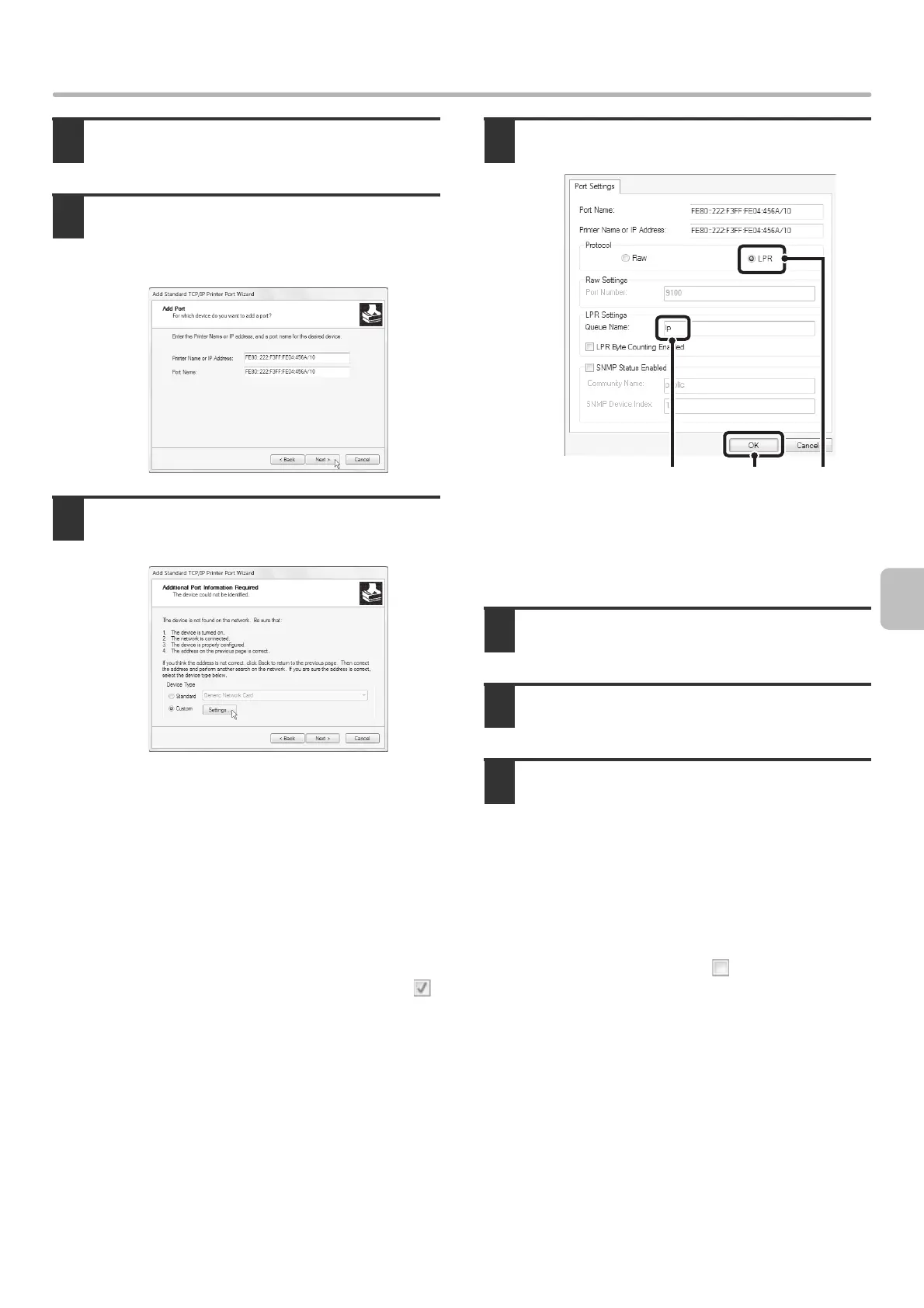
Enter the machine's IPv6 address in
[Printer Name or IP Address] and click
the [Next] button.
5
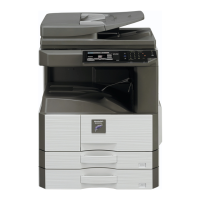
Select [Custom] and click the [Settings]
button.
6
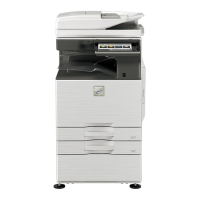
Configure the port settings.
(1) Select [LPR].
(2) Enter [lp].
(3) Click the [OK] button.
7
Click the [Next] button in the screen of
step 5.
8
Click the [Finish] button.
9
Click the [Close] button in the screen of
step 2.
When using a port created with "Standard TCP/IP Port"
When using a port created using "Standard TCP/IP Port", in the screen that appears after you click the [Configure Port]
button in the screen of step 3, make sure the [SNMP Status Enabled] checkbox is not selected ( ).
If the [SNMP Status Enabled] checkbox is selected ( ), it may not be possible to print correctly.


 To Next Page