38
COPIER
4
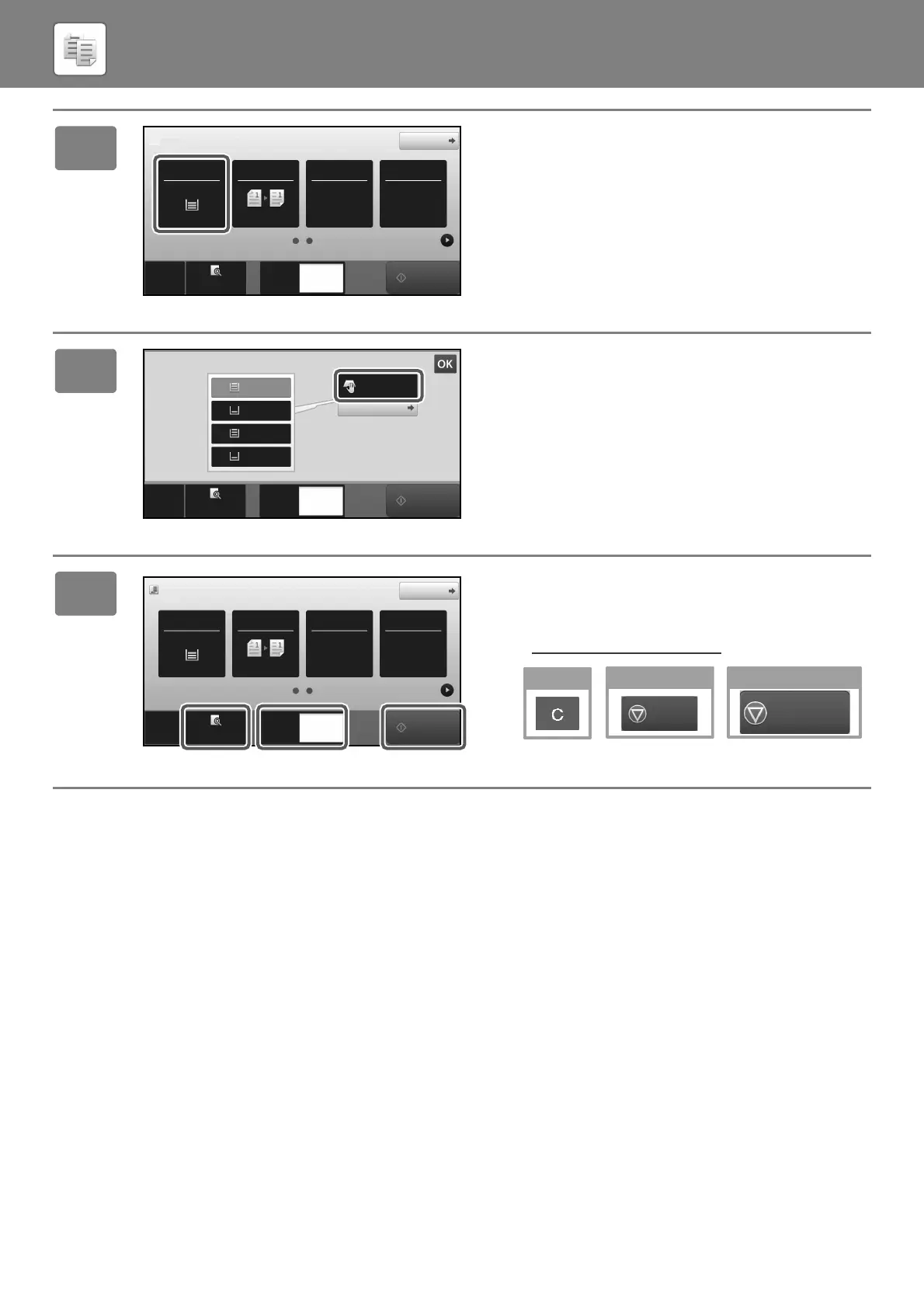
Tap the [Paper Select] Key.
5
Select the Bypass Tray.
6
Set the number of copies and then tap
the [Start] key.
• To check a preview of a document, tap the [Preview] key.
► PREVIEW SCREEN
(page 20)
Original
8½x11
Staple / PunchCopy Ratio2-Sided Copy
Paper
Select
8½x11
Tray 1 1 → 1
100%
CA
Preview
Start
Copies
Detail
Off
1
Preview
Copies
Paper
Select
Heavy 1
Type and Size
2
1
3
4
CA
8½x11
8½x11R
8½x11
8½x14
11x17
1
Start
Original
8½x11
Detail
Staple / PunchCopy Ratio2-Sided Copy
Paper
Select
8½x11
Tray 1 1 → 1
100%
CA
Preview
Copies
Off
1
Start
Cancel copying
Cancel Copy
Cancel scanning
Cancel
Scan
!mxm6070_us_sg.book 38 ページ 2018年3月5日 月曜日 午後4時52分



 To Next Page