INSERTING COVERS IN
COPIES
(COVERS/INSERTS)
Overview
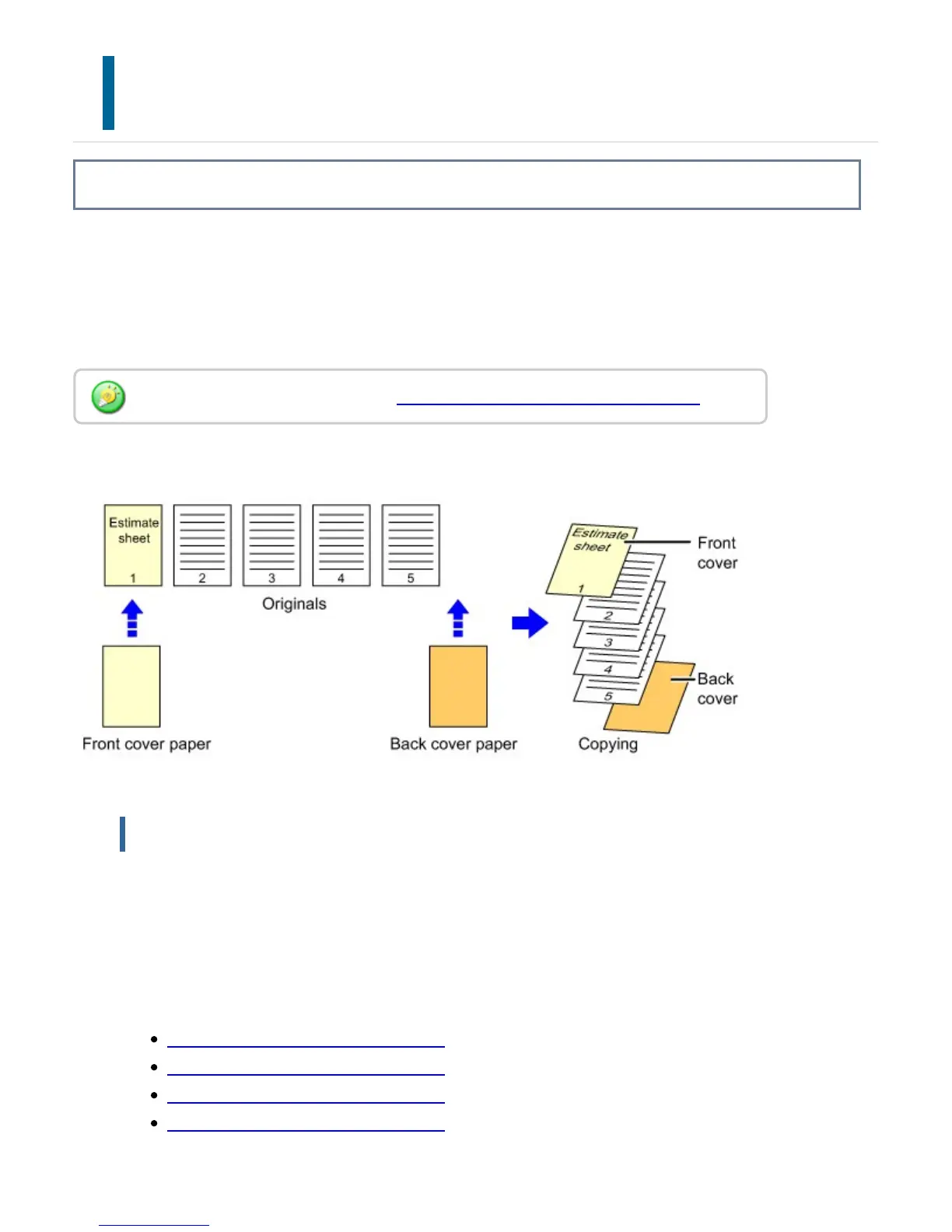
This function inserts a different type of paper into the pages corresponding to the front
and back covers of a copy job.
It is helpful when you want to change cover paper to make resources look better.
Configure insertion sheet settings if needed.
Copying on a front cover and inserting together with a back cover
Cover inserting examples
The following shows the copy results when front and back covers are inserted into six
1-sided original pages or three 2-sided original pages in the four copy modes below.
Copy modes
1-sided copying of 1-sided originals
2-sided copying of 1-sided originals
1-sided copying of 2-sided originals
2-sided copying of 2-sided originals
When inserting insertion sheets, see "INSERTING INSERTION SHEETS IN COPIES".
USER'S MANUAL | MX-M365N/MX-M465N/MX-M565N USER'S ... http://siica.sharpusa.com/portals/0/downloads/Manuals/MX-M365N-M...
351 of 1441 3/17/2016 7:14 AM


 To Next Page