SAVING SETTINGS AT THE TIME OF PRINTING
Overview
Settings configured on each of the tabs at the time of printing can be saved as user
settings. Saving frequently used settings or complex settings under an assigned name
makes it easy to select those settings the next time you need to use them.
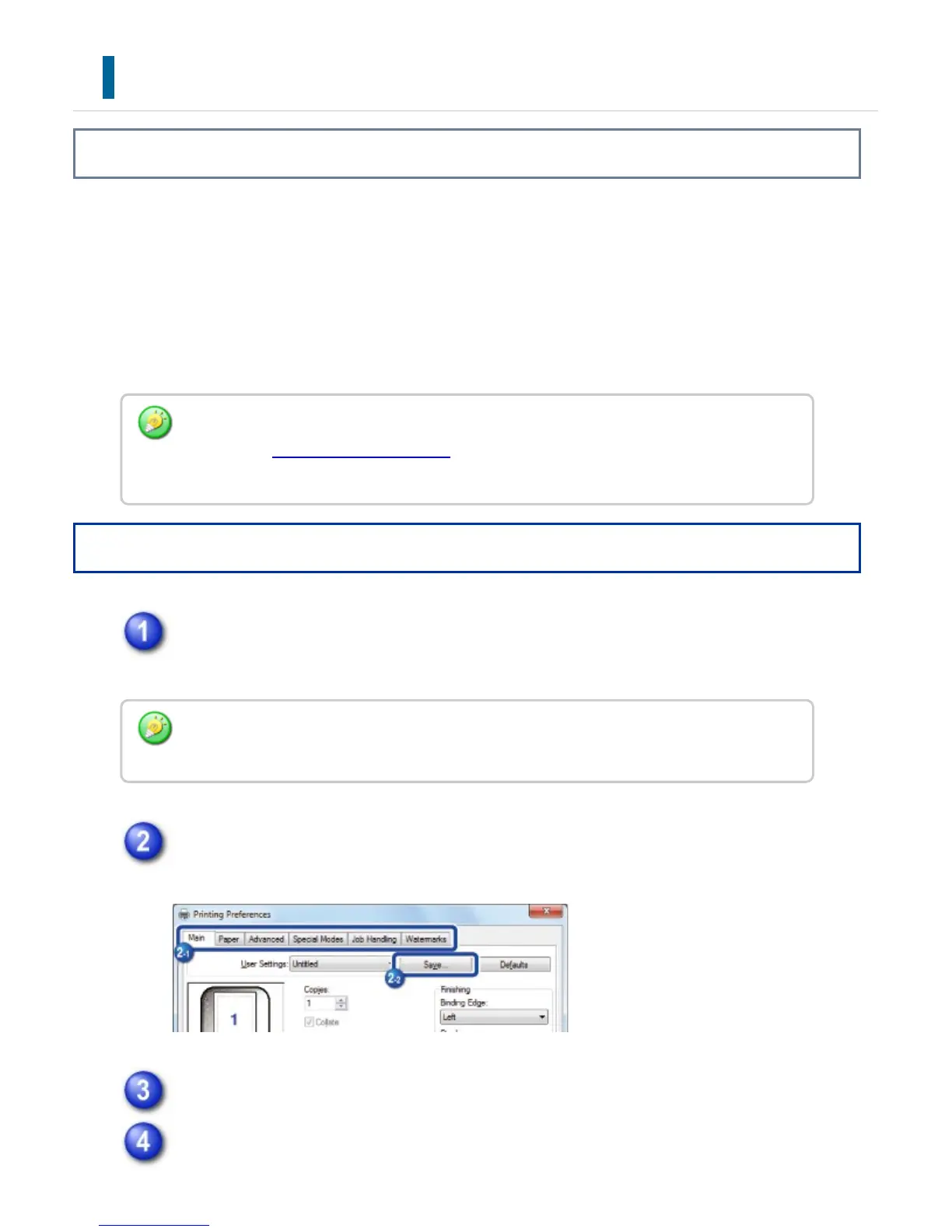
Settings can be saved from any tab of the printer driver properties window. Settings
configured on each tab are listed at the time of saving, allowing you to check the
settings as you save them.
Operation
Select the machine's printer driver from the print window of the application,
and click the [Detail] button.
Configure the print settings on each tab and click the [Save] button.
Check the displayed settings.
Enter a name for the settings using up to 20 characters and click the [OK]
Deleting saved settings:
In step 2 of "USING SAVED SETTINGS", select the user settings that you want to delete
and click the [Delete] button.
The button that is used to open the printer driver properties window (usually [Property] or
[Print Preferences]) may vary depending on the application.
USER'S MANUAL | MX-M365N/MX-M465N/MX-M565N USER'S ... http://siica.sharpusa.com/portals/0/downloads/Manuals/MX-M365N-M...
418 of 1441 3/17/2016 7:14 AM



 To Next Page